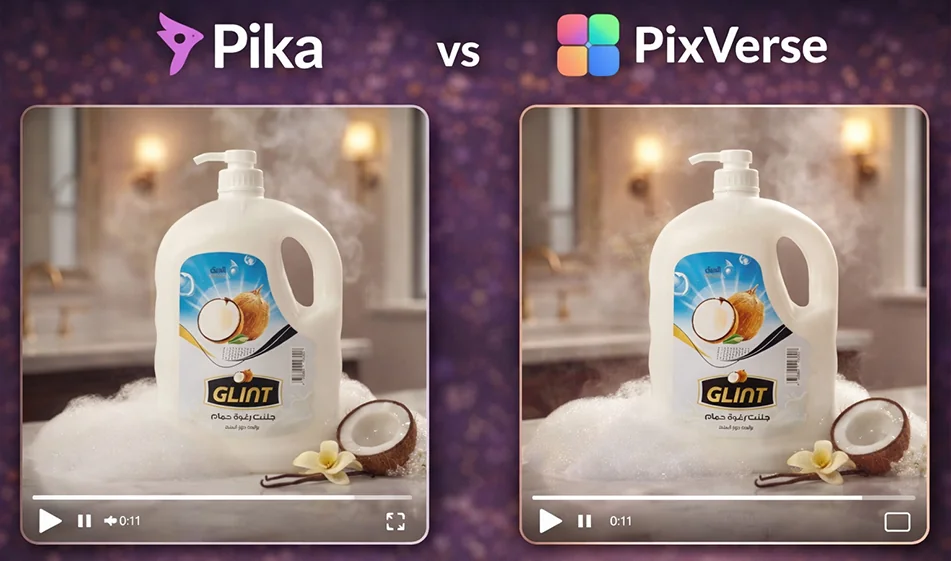
🎥 Compass Comparison: Pika vs. PixVerse

🎥 Compass Comparison: Pika vs. PixVerse

Comparison: Pika vs PixVerse

Topic:"Animating a product image into a trending video—who can make it look smoother?"

💡 Compass tip

If you have a product image and want to turn it into a trending video (8–12 seconds) with camera movement and advertising flash, the real question is not “Which tool is better?” but rather: Which tool gives smoother motion and preserves the shape of the product without distortion?
Here is a practical comparison between Pika and PixVerse with a quick test method.

1) Pika: Often stronger in "camera movements" and cinematic touch

When does it excel?

  • When you want smooth camera movement (slow zoom, slight rotation, sideways slide).
  • When you need an "advertisement feel" through lighting, reflections, and color grading.
  • Suitable for products: Perfumes, accessories, electronics, coffee... where shine and details are important.

Point of attention: If the spotlight is too intense, it may slightly alter the shape of the product, so make your request clear: "Preserve the shape of the product."

2) PixVerse: Fast and suitable for multiple trendy copies

When does it excel?

  • When you want to try out many ideas quickly: the same product with 5 different movements.
  • Suitable for ready-made trend scenarios and short clips for everyday use.
  • Useful if your goal is to "produce quantity" and test which version gets the most engagement.

Point of attention: Sometimes slight vibrations or slight changes in the edges may appear if the original image is weak or the background is complex.

A fair test that determines "who is smoother" in 10 minutes

Apply the same settings to both tools:

  1. The same product image (preferably with a clean background).
  2. Same duration: 8 seconds.
  3. Same size: 9:16.
  4. Exactly the same prompt.
  5. Produce 3 copies of each tool and then choose the best one.

Judging criteria (quick and clear)

  • Smoothness of camera movement (no jumps)
  • Stability of the product shape (no stretching or distortion)
  • Stability of the logo/label on the packaging
  • Quality of lighting and shadows
  • Smooth transition from the beginning to the end of the shot

🧩 Prompt ready to animate a product image (copy as is)

“Turn this product image into an 8-second 9:16 vertical ad video.
Keep the product shape and logo as is without distortion.
Very smooth camera movement: slow push-in with slight rotation around the product.
Soft studio lighting, realistic shadows, clean simple background, slight reflection, high detail.
No shaking, no change in packaging shape, no text inside the video.”

Ready-made trend (advertisement version)

If you want an eye-catching trend: Request "glow over the product":
"
Add a light glow over the product once in a smooth manner, without exaggeration."

🧭 Compass Summary

  • If your priority is smoother motion and a cinematic touch: Pika isprobably more suitable for you.
  • Ifyour priority is speed and producing many trendy copies for testing: PixVerse is very practical.

For more AI tools: bosala.ai

Top of Form

Bottom of Form

January 29, 2026 04:43 PM GMT
About Pika AI

🖼️ Tool Name:
Pika AI (Pika Labs)

🔖 Tool Category:
Video Generation; also fits under Generative AI & Media Creation and Text to Visual Media.

✏️ What does this tool offer?
Pika AI is an advanced AI platform that enables users to generate high-quality, creative video content from text, images, or existing video clips. Built for creators, marketers, animators, and storytellers, it brings cinematic ideas to life with detailed control over motion, camera angles, style, and animation — all through natural language.

What does the tool actually deliver based on user experience?
• Text-to-video, image-to-video, and video editing with AI
• Create short clips with motion, depth, and stylized effects
• Modify existing videos (change style, background, or animate stills)
• Control video length, resolution, and camera movement
• Popular for animation, concept trailers, and social media storytelling
• Used by filmmakers, content creators, and ad agencies

🤖 Does it include automation?
Yes — Pika AI automates:
• Scene generation and animation from prompts or assets
• Style transfer and motion simulation
• Editing and enhancement of uploaded videos
• Multi-shot scene creation with prompt scheduling

💰 Pricing Model:
Freemium (as of 2025)

🆓 Free Plan Details:
• Access to basic generation features
• Limited video exports per month
• Community model use and watermarking

💳 Paid Plan Details:
• Pro Plan (~$10–$30/month): HD exports, no watermark, priority access
• Business/Studio Plans: Longer videos, batch rendering, collaboration tools
• Enterprise: API access, white-labeling, and support

🧭 Access Method:
• Web-based platform
• Input prompt or media, customize settings, generate and download videos

🔗 Experience Link:

https://pika.art

About Pika 2.1

🖼️ Tool Name:
Pika 2.1 (by Pika Labs / Pika.art)

🔖 Tool Category:
AI-powered video generation platform; primarily under Video Generation and Animation Generation, with secondary relevance to Content Creation & Communication, Generative AI & Media Creation, and Productivity & Automation. 

✏️ What does this tool offer?
Pika 2.1 is the latest AI video model from Pika Labs, designed to generate cinematic, high-resolution video content from text or image prompts. Key features include:

  • 1080p resolution video output, with extended video length support for richer storytelling. 

  • Enhanced motion control and realism, including smoother animations, realistic physics behaviors, and natural character motion. 

  • Scene ingredients integration, allowing the direct inclusion of uploaded people, objects, or environments into AI-generated videos. 

  • Support for dynamic lighting, professional camera movements (e.g. crane shots, dolly, orbit), and coherent scene compositions. 

  • Text-to-video and image-to-video generation workflows, enabling creative flexibility. 

What does the tool actually deliver based on user experience?

  • Reviewers highlight Pika’s character consistency thanks to the “ingredients” feature and its high-quality outputs at 1080p. 

  • Users and creators report a substantial improvement in visual fidelity, realism, and prompt adherence. 

  • Artists, storytellers, educators, and marketers can produce “cinematic and polished content” efficiently—no complex tools required. 

🤖 Does it include automation?
Yes — Pika 2.1 features comprehensive automation, including:

  • AI-generated video creation from prompts, fully handling lighting, physics, camera movement, and rendering. 

  • Automated scene integration and composition with professional-quality results. 

  • Streamlined generation: users simply input text/image, and Pika produces ready-made videos with minimal manual editing. 

💰 Pricing Model:
Credit-based subscription model with tiered pricing:

  • Credits used per generation vary by model type—e.g., 35 credits for a 1080p image/text-to-video using Pika 2.1. 

  • Monthly plans range from Standard (~$28/month annually) providing 700 credits, to Pro (~$76/month annually) providing 2,300 credits. 

  • Other plans like Fancy offer even higher monthly credit allowances for intensive use. 

🆓 Free Plan Details:

  • Free tier provides limited monthly credits (e.g., ~80 credits), access to Pika 1.5 and Turbo models, watermark-free downloads, and commercial usage rights. 

💳 Paid Plan Details:

  • Standard ($28/month): 700 credits/month, full access to Pika 2.1.

  • Pro ($76/month): 2,300 credits/month, priority rendering and early access features.

  • Fancy: Highest tier with 6,000 credits/month for heavy usage. 

🧭 Access Method:

  • Browser-based platform (no local installation), accessible via Pika.art. Users input prompts directly. 

  • API integration available for developers through platforms like Pollo AI. 

🔗 Experience Link:

https://pika.art

About PixVerse

️ Tool Name: 🖼

PixVerse


Categories: 🔖

  • Marketing and Sales
  • Video, Editing, and Motion Graphics

️ What does this tool offer? ✏

PixVerse’s affiliate marketing program allows marketers to earn recurring income by promoting the platform and bringing in new users.

The program operates on a recurring commission system, where affiliates earn 30% of the subscription fees paid by each referred user, and this commission continues for up to 12 months per subscriber. The program also offers a 90-day tracking window (cookie) to record referrals, with no cap on potential earnings.

The program also allows for promotion to the “Super Affiliate” tier upon achieving monthly revenue exceeding $5,000 from referrals, at which point the commission rate increases to 35%, along with additional benefits such as official traffic support from PixVerse, co-marketing partnerships, a dedicated account manager, priority payments, early access to new features, and custom landing pages.

The process is simple and consists of three steps:

  1. Submit a short form and have your application approved (usually within 24 hours) with no minimum follower count or fees required.
  2. Receive a tracking link and a personalized dashboard to monitor performance.
  3. Promote the link across platforms such as YouTube, TikTok, blogs, email newsletters, and more.

The program provides a real-time dashboard displaying clicks, conversions, and earnings, with monthly payments upon reaching the minimum withdrawal threshold, and support for payment methods such as PayPal and bank transfer.

The program also includes a sub-affiliate rewards system offering an additional commission of up to 20% of the earnings generated by people referred by the marketer.

It also provides a library of marketing materials, including banners, thumbnails, demo videos, ready-to-use campaign copy, and marketing guides and strategies, as well as a dedicated Discord community and direct support from a specialized team.

The program emphasizes that joining is free and easy, and that approval is quick, while clarifying that earnings are not guaranteed and that terms, commission rates, and cookie durations are subject to change according to company policy.


What does it actually offer based on user experience? ⭐

  • Recurring commissions of up to 30% for 12 months per subscriber.
  • The possibility of increasing the commission to 35% upon reaching the Super Affiliate level.
  • A long tracking window (90 days) compared to many other affiliate programs.
  • A Sub-Affiliate system that provides an additional 20% in earnings.
  • A real-time dashboard to track performance (clicks, conversions, earnings).
  • Ready-to-use marketing materials (ads, videos, copy).
  • Community support via Discord and direct support from the team.
  • Monthly payment system with global payment options.

Does it include automation? 🤖

Yes, partially.

The program relies on an automatic referral tracking and conversion system, where clicks and conversions are recorded via a special tracking link, with commissions calculated automatically within the dashboard, in addition to automatically tracking sub-affiliate earnings and updating statistics in real time.


Pricing Model: 💰

  • Free (affiliate marketing program with no subscription fees)

🆓 Free Plan Details:

FeatureDetails
Sign-upCompletely free
RequirementsNo minimum number of followers or setup fees required
ApprovalUsually within 24 hours

Paid plan details: 💳

PlanPriceFeatures
Standard AffiliateFree30% commission for 12 months, 90-day cookie, dashboard, marketing materials, monthly payments.
Super AffiliatePerformance-based (upgrade at $5,000+ per month)35% commission, dedicated traffic support, co-marketing, dedicated account manager, priority payments, custom landing pages, early access to features.

How to access the tool: 🧭

MethodAvailable
WebYes
AppNot specified
APIYes (the PixVerse platform generally supports APIs)
ExtensionNot specified

Demo link or official website: 🔗

https://pixverse.ai/en/affiliate

About PixVerse R1

🖼️ Tool Name:

PixVerse R1

✏️ What does this tool offer in 2026?

  • Instant Interaction (No Render Bars): Unlike previous models (Sora/Runway) that take minutes to render, R1 generates video at 1080P resolution in real-time. What you type or change appears instantly.

  • Persistent Memory: Uses an autoregressive mechanism that maintains visual consistency over unlimited-length sequences, preventing the "logical breaks" seen in older AI videos.

  • Omni Multimodal Architecture: Processes text, image, video, and audio as a single unified stream, allowing for perfectly synchronized sound effects (like rain or footsteps) generated alongside the visuals.

  • IRE (Instant Response Engine): A neural engine that reduces computation steps to just 1–4, allowing for "Neural Reflexes" where the video reacts to user input as fast as a video game.

  • Interactive Cinema & Gaming: You can "play" the video like a game, changing the narrative or environment on the fly (e.g., "Make the scene night" or "Add a dragon to the sky").

  • Character Consistency: High-fidelity character tracking that allows you to maintain the same subject across different scenes and angles without distortion.

⭐️ What does it offer? (User Experience)

  • "Living Virtual World": Rated 4.9/5 for innovation. Users describe it as "the end of waiting," where filmmaking becomes an interactive, live co-creation process.

  • Ease of Use: Available via a simple web interface and mobile apps, requiring zero technical skill to "direct" a high-end cinematic scene.

💵 Pricing (January 2026 Status)

PixVerse uses a credit-based system, with R1 features typically reserved for higher-tier or "Real-Time" specific plans.

PlanPrice (Monthly)Key Features
Free Plan$0~150 daily credits; basic resolution; watermarks; limited R1 access.
Standard~$10.001,200 credits; HD resolution; no watermarks; 3 concurrent generations.
Pro / Creator~$30.006,000 credits; Full 1080P R1 access; 5 concurrent generations.
Business~$6,000.001M+ credits; API access for real-time app integration; enterprise security.

🎁 Free Version:

PixVerse offers an "Always Free" daily refill of credits (approx. 60–150 credits per day), allowing casual users to generate 5–10 short videos daily. You can experience the R1 demo for free at their discovery hub.

⚙️ Access or Source:

  • Official Website

  • Platforms: Web Dashboard, iOS/Android Apps, and API for developers.

🔗 Experience Link: 

https://realtime.pixverse.ai/