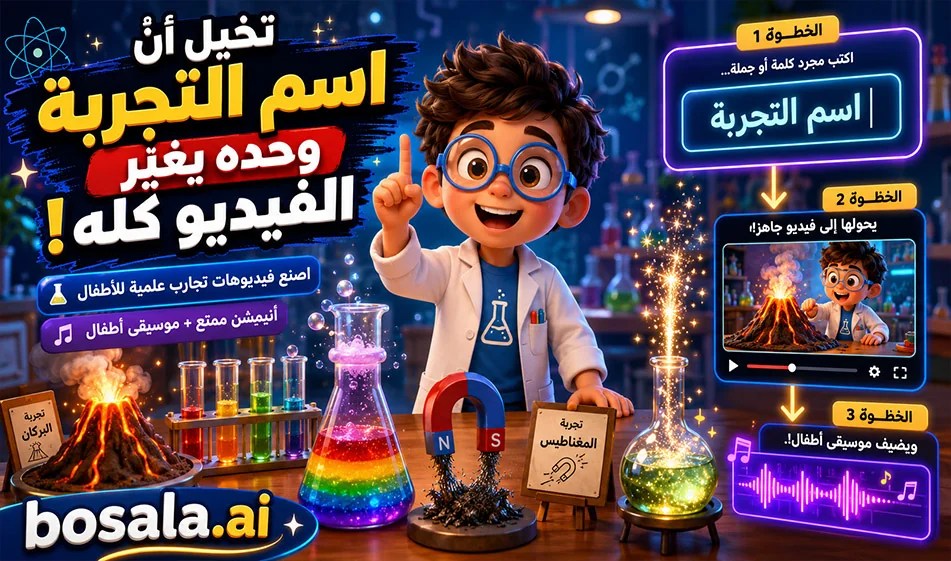
The Integration of GeminiGen and MakeSong in Creating Science Experiment Videos for Children

The Integration of GeminiGen and MakeSong in Creating Science Experiment Videos for Children

Integrating GeminiGen andMakeSong to Create Science Experiment Videos for Kids

With GeminiGen and MakeSong , you caneasily and repeatedly create educational animated videos for children. Enter the prompt into the video tool, change only the name of the science experiment, then generate and download the video. Next,go toMakeSong, write a simple description of the music, and you’ll get cheerful children’s music that fits the scene. Finally, combine the video and audio in an editing program like CapCut.

Overview
This method is ideal for creating a consistent educational series, since you don’t have to start from scratch every time. You have a single fixed prompt, a fixed character, and a fixed lab; you only change the name of the experiment. After the video, you add cheerful music from MakeSong to make the scene more appealing to children.

Links
Video: https://geminigen.ai/app/video-gen/veo

Additional video site: https://www.mindvideo.ai/invitation-landing?utm_source=invitation&invite_code=1BCHJ2HX

Music website: https://www.makesong.com/

How does it work?

Start inGeminiGen and paste the prompt as is. Then go to the first line and replace the text in parentheses with the name of the science experiment. Click "Generate" and download the resulting video.

Next, go toMakeSong and write a short description of the music you want, such as “fun, lighthearted, and curious children’s music.” Then generate the music and download it. Finally, import the video and music into an editing program.

Why is this method useful?

Because it saves time and makes the process easy to repeat. You can use the same template every time with different experiments, such as volcanoes, electricity, rainbows, or others. This makes it very suitable for educational content for children.

Example of a music description

You can write a description such as:

Cheerful children’s background music, playful, educational, bright, light percussion, soft xylophone, fun science mood, magical and curious atmosphere

Or in Arabic:

Cheerful and educational children’s music, light, joyful, full of curiosity and discovery, suitable for a short science experiment video

Prompt used

Experiment topic: [Write the name of the experiment here]

Create an 8-second children’s educational video in a high-quality 3D animated family-friendly style, inspired by premium cinematic kids’ animation.

The video takes place inside a bright, colorful school science lab.

Main character:
A cute recurring child scientist named Leo, around 9 years old, wearing a small white lab coat, round glasses, and colorful sneakers. Leo is expressive, smart, warm, playful, and highly engaging for children.

Core instruction:
Use the experiment topic written only at the top of this prompt. Understand it correctly, analyze the science concept, and automatically create the best child-friendly visual experiment for it. Choose the correct props, tools, reactions, movement, colors, and simple explanation based on the experiment topic.

Scene setup:
Inside a cheerful school science lab with colorful shelves, beakers, safe school science tools, and soft warm lighting. Leo stands beside a science table where the experiment is prepared. The environment should feel fun, educational, safe, and magical for kids.

Video structure:
0:00 - 0:02
Leo smiles, points to the experiment setup, and introduces it with excitement. The camera gently pushes in.

0:02 - 0:05
The main science action happens clearly and visually according to the experiment topic. Add bright child-friendly effects, simple motion, expressive reactions, glowing science elements, and strong visual clarity.

0:05 - 0:08
Leo explains the result in one very simple Arabic sentence and reacts with joy, curiosity, or amazement. End on a strong hero shot showing Leo and the final experiment result clearly.

Arabic dialogue:
Generate simple spoken Arabic dialogue automatically based on the experiment topic written at the top. The dialogue must be short, clear, educational, and suitable for children aged 6 to 11. Leo should explain the science idea in a very easy and exciting way.

Audio:
No music.
Use only suitable sound effects that match the experiment, such as bubbling, soft eruption, energy hum, water sounds, crackling, spinning, fizzing, air whoosh, light sparkle, or gentle lab ambience, depending on the experiment topic.

Important constraints:
No subtitles.
No captions.
No on-screen text.
No watermark.
No logo.
No dangerous real-life instructions.
Keep the same Leo character, same lab environment, same lighting, same 3D cartoon style, and same educational tone across the whole series.
Make the animation safe, playful, cinematic, colorful, and highly engaging for children.
Duration exactly 8 seconds.

Summary

This integration between GeminiGen andMakeSong is ideal for creating science experiment videos for children quickly and easily. You simply type in the name of the experiment, generate the video, add appropriate music, and then put everything together in the editor. The result is a fun, consistent, and easily replicable educational series.

June 09, 2026 12:11 PM GMT
About Google Veo

️ 🖼Tool name: Veo 3.1

🔖 Tool Category: AI text and image to video tool / online video creator

️ ✏What does this tool do?

  • Convert text or images into short 8-second videos with up to 1080p resolution.

  • Add built-in audio including sound effects, environmental sounds, and lip sync.

  • Support vertical video formats (9:16) suitable for phones and social media.

  • Advanced options like "Frames to Video" and "Ingredients to Video" to create smooth and impactful videos.

  • Automatically generate videos using AI from images or text.

  • Easy-to-use interface via the Gemini or Flow app.

What do you actually offer based on user experience?

  • Produce high-quality short videos quickly.

  • Content suitable for social media and presentations.

  • Support vertical video formats (9:16) suitable for phones and social media.

  • Automatically generate videos using artificial intelligence from images or text.

  • Easy-to-use interface via the Gemini or Flow app.

🤖 Does it include automation?

  • Yes, it does:

    • Automatically generate videos from images or text with effects and transitions.

    • Automatically generate explanatory texts when needed.

    • Convert static images into dynamic videos without much manual intervention.

💰 Pricing model:

  • Free plan:

    • Create short videos for free with some restrictions.

    • Upload videos without a watermark for some templates.

  • Paid plans:

    • Basic Plan: $12/month, includes removal of restrictions and uploading high-quality videos.

    • Professional plan: $24/month, higher speed, additional templates, and priority processing.

🧭 How to access the tool:

  • Visit Veo's website via browser.

  • Upload images or enter text.

  • Edit templates and text if necessary.

  • Click "Generate" to create the video.

  • Upload the video after processing.

🔗 Link to the trial or official website:

About Veo 3.1 AI

️ Tool name: 🖼
Veo 3.1 AI

Tool category: 🔖
• Text and images to video
• Video, montage, and motion
• Video ideas and scripts
• Motion graphics, titles, and subtitles
• Automation and smart agents
• Voice cloning
• Music and sound effects generation

️ What does this tool offer? ✏
Veo 3.1 AI allows you to create realistic videos from images or text using artificial intelligence, analyzing the movement of objects and scenes to generate logical and natural videos, without the need for prior video editing skills.

What does it actually offer based on user experience? ⭐
It enables users to quickly produce high-quality videos, with precise control over the number of videos, video length, 1080p quality, unlimited uploads, no ads or watermarks, and content and privacy protection.

Does it include automation? 🤖
Yes, the tool is fully automated, generating videos directly from images or text, with motion prediction and visual logic for viewers without human intervention.

Pricing model: 💰
🆓 Free plan details:
There is no free plan; all plans are paid with different credits and features.

Paid plan details: 💳
Starter: $15/month when paying annually, 400 credits per month, up to 40 videos, 2 parallel tasks, 1080p quality, unlimited downloads, priority support, no watermarks or ads.
Standard: $36/month when paying annually, 1,200 credits per month, up to 120 videos, 4 parallel tasks, fast queue priority, all features of the previous plan.
Premium: $60/month when paying annually, 2400 credits per month, up to 240 videos, 8 parallel tasks, ultra-fast priority, all features of the previous plan.

How to access the tool: 🧭
Veo 3.1 AI can be accessed via a browser after creating an account, with the option to choose the plan that suits your personal or professional use.

Trial link or official website: 🔗
https://veo-3-1.io

About AIMakeSong

🖼️ Tool Name:

AIMakeSong

✏️ Overview & Key AI Features (2026 Edition):

  • Comprehensive Song Creation: Converts text themes or custom lyrics into full songs with vocals. It handles everything: songwriting, composition, arrangement, and final production.

  • Specialized AI Rap Generator: One of its standout features in 2026, offering advanced flow, rhythm, and vocal inflections tailored specifically for Hip-Hop and Rap.

  • Pro-Level Editing Tools:

    • Vocal Remover: Extract vocals or instrumentals from any uploaded track.

    • Extend & Replace: Lengthen existing AI tracks or replace specific sections to refine the structure.

    • Audio to MIDI: Convert your generated or uploaded audio files into MIDI format for further editing in professional DAWs.

  • Lossless Exports: Subscribers can download high-fidelity WAV and MP3 files, along with time-synced lyrics (LRC/SRT) for video subtitling or karaoke.

  • Copyright & Commercial Security: All music generated through paid tiers comes with a full commercial license and is verified to be 100% royalty-free, making it safe for platforms like Spotify and YouTube.

  • Personalization: Features like VibeSeed allow you to capture the mood/style of one song and apply it to future creations, ensuring consistent branding for content creators.

⭐️ User Experience (2026):

  • "Studio Power in Your Pocket": Rated 4.8/5 for its speed and vocal quality. Users particularly love that it can turn "scribbled notebook lyrics" into polished songs in about 30–60 seconds.

  • Accessibility: Praised for its intuitive interface that allows users of all experience levels to "break through writer's block" and hear their ideas realized instantly.

💵 Pricing & Plans (February 2026 Status):

PlanPrice (Approx.)Key Features
Free Plan$0Daily free credits (e.g., 5 generations); 1-day storage; Personal use only (no commercial rights).
Basic~$7.30 / mo800 songs/year; High-quality lossless downloads; Commercial usage rights.
Advanced~$11.93 / mo7,200 songs/year; Priority generation queue; Private generations; 1-year storage.
Flagship / Ultra~$31.60 / mo40,000 songs/year; Max 8-min songs; Stem exports; Unlimited permanent storage.

🎁 How to Get Started:

Visit AIMakeSong.com. You can start by simply typing a topic into the "Text to Music"field or pasting your own lyrics. Choose a style (Trap, Pop, Rock, etc.) and hit "Generate." In seconds, you'll have a preview that you can extend or refine.

⚙️ Access or Source:

  • Official Website

  • Category: AI Music Generation, Creative Tech, Audio Engineering.

  • Primary Use Case: Creating original songs, background music for videos, and professional rap production.

🔗 Experience Link: 

https://www.aimakesong.com