Paper Animator
Description
🖼️ Tool Name:
Paper Animator
🔖 Tool Category:
Falls primarily under Animation Generation, with strong relevance to Video Editing, Image Editing, Content Creation & Communication, Visual Media to Text, and Productivity & Automation—since it transforms static visuals into dynamic paper-style animations quickly and efficiently.
✏️ What does this tool offer?
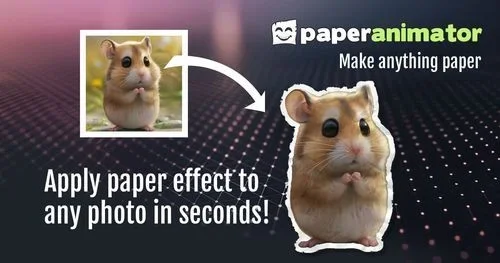
Paper Animator is a browser-based AI-powered tool that transforms static images (and sometimes text) into dynamic “paper-style” animations. It provides:
Paper cut-out and fold-out animation effects with customizable edge thickness, intensity, detail, shadows, and movement.
Magazine-style text generation: turn typed text into funky, randomized letter cut-outs.
Text match cut transitions: sophisticated match-cut animations from images with minimal effort.
Background removal and green-screen export capabilities, plus transparent PNG export for use in other editing tools.
✏️ How it works & who it benefits:
Completely browser-based—no installation or plugins required.
Drag-and-drop interface with pan, zoom, and effect adjustment controls—ideal for quick creativity.
Export options include HD video (MP4), green-screen-enabled animations, and transparent PNGs.
Tailored for content creators, social media marketers, educators, and creators needing engaging visuals—especially for TikTok, Instagram Reels, YouTube Shorts, advertising, or educational content.
⭐ What does the tool actually deliver based on user experience?
Rapid transformation of images into polished animations—often in just seconds.
High customization—users can dial in animation style details while still keeping the process intuitive.
Excellent for storytellers and creators who want a handcrafted aesthetic (“paper feel”) without complicated workflows.
🤖 Does it include automation?
Yes — Paper Animator employs AI-powered automation for:
Background detection and removal, enabling focus on the main subject.
Intelligent generation of paper cut effects, fold-outs, and match-cut transitions—all automated.
Auto text-to-graphic styling for magazine-style typography, randomized per generation.
💰 Pricing Model:
Freemium. Basic features are available for free, with downloadable results requiring sign-up and credits.
🆓 Free Plan Details:
Core creation features (image upload, preview animation) are free.
Downloading results (MP4 or PNG) may require sign-up—and potentially use of starter credits
💳 Paid Plan Details:
After free credits, exporting to formats like MP4 consumes credits: e.g., 1 credit per MP4 video, 0.5 credit per PNG.
Specific pricing tiers not widely documented—but usage-based credit system implied.
🧭 Access Method:
Fully web-based (via browser), with no installation required.
Free to use, but downloading outputs may require creating an account.
🔗 Experience Link:
https://paperanimator.com