Video summarization and excerpts / Video ideas and script / Video, montage and motion / Text and images to video / Social templates and montage automation / Smart automation and agents
Description
️ 🖼Tool name:
Crayo
🔖 Tool Category
️ ✏What does this tool offer?
Crayo is an AI tool that specializes in editing and creating short videos, with a primary focus on turning regular or long-form content into viral videos on platforms like TikTok, Instagram Reels, and YouTube Shorts. The tool relies on artificial intelligence to perform cutting, arranging, and adding visual and audio elements, significantly reducing the time and effort needed to produce an engaging video without the need for advanced expertise in traditional editing software.
⭐ What does it actually offer based on user experience?
In practice, Crayo is a very practical tool for producing fast-paced, social media-friendly content. Users note that it saves a lot of time in cutting long videos into short, ready-to-publish clips. What makes it stand out is the variety of video styles supported, such as Reddit stories, fake text conversations, split-screen videos, game videos, and Veo-3-style content. However, the tool is less flexible than professional editing software when you need very precise edits or complex cinematic output.
🤖 Does it include automation?
Yes, it includes high automation that includes:
- Automatically clipping videos and selecting the right moments
- Automated creation of catchy titles and subtitles
- Automatically optimize and balance audio quality
- Adding an AI voiceover
- Create complete videos from a simple idea or script
- Export the video in dimensions suitable for social media platforms
💰 Pricing model:
Crayo has a fully paid monthly subscription model and does not offer a perpetual free plan. The tool is geared towards continuous use rather than a fleeting experience.
🆓 F ree plan details:
- There is no permanent free plan
- A limited trial or short trial registration may be available to test the platform before signing up (not always guaranteed)
💳 Paid plan details:
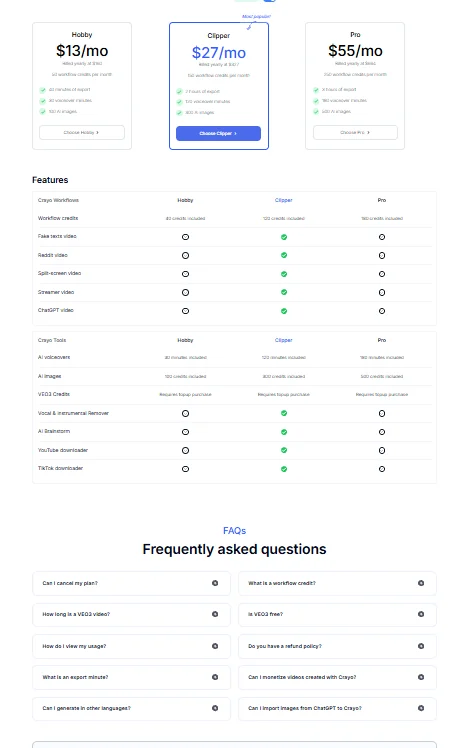
- Hobby plan:
- Price: $13 per month
- Suitable for individuals and beginners
- Workflow credits are limited
- Basic features for making short videos
- Clipper plan:
- Price: $27 per month
- Geared toward regular content creators
- More Workflow credits
- Support for most video types (Reddit, Split Screen, Streamer, Gaming)
- Wider use of AI tools (voiceover, AI-generated images)
- Pro plan:
- Price: $55/month
- Geared towards professionals and small teams
- Highest number of Workflow credits
- Full support for all tools and video types
- Higher usage limits, export capabilities, and broader commercial use
🧭 How to access the tool:
Directly through a web browser, without the need to download any programs, and works on various operating systems.
🔗 Link to the demo or official website:
https://crayo.ai
Pricing Details
Crayo relies on a fully paid monthly subscription model with no permanent free plan, making it a tool geared more for ongoing use than a quick trial. The platform does not have a fixed free plan, and may sometimes offer a limited trial or a short trial registration to test the tool before subscribing, but this is not always guaranteed. Paid plans start with the Hobby plan at $13 per month, which is suitable for individuals and beginners, and offers limited Workflow credits with basic features for creating short videos. The Clipper plan at $27 per month, geared towards regular content creators, offers more Workflow credits, support for most video types such as Reddit, Split Screen, Streamer, and Gaming, as well as wider use of AI tools such as voiceover and image generation. The Pro plan, at $55 per month, is best suited for professionals and small teams, offering the highest usage limits, full support for all tools and video types, wider export capabilities, and more flexible commercial use.