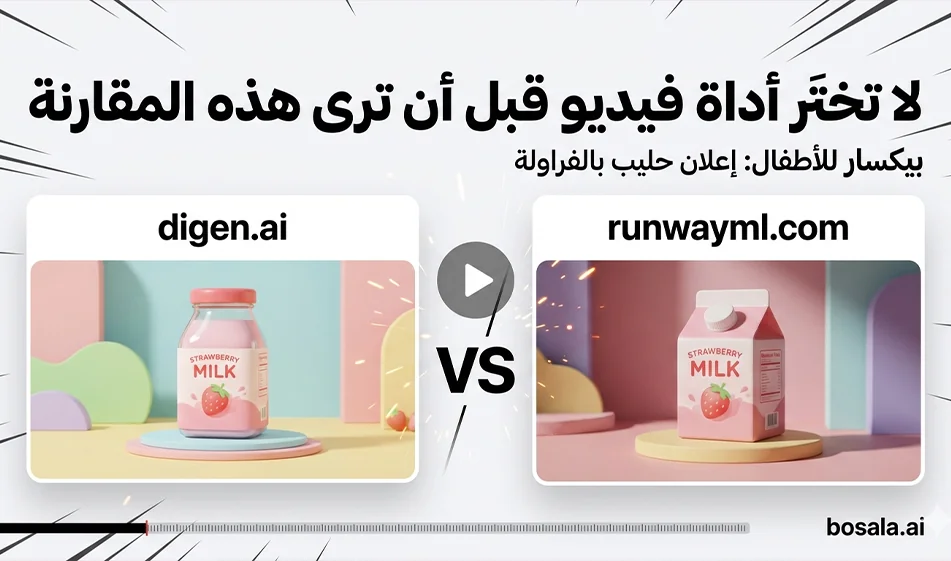
A Head-to-Head Comparison: digen.ai vs. Runway for Creating Short Ad Videos from the Same Prompt
If you produce short videos for Reels and Shorts and want a tool that quickly delivers a ready-to-go ad,a fair comparison between digen.ai and Runway isn’t about talk—it’s about experience: same prompt, same duration, same specifications, then evaluating the result.
The goal of the comparison
Which one provides greater stability in character and product rendering
Which one provides smoother motion without shaking
Which one maintains lighting without flickering
Which one produces a strong final shot suitable for an ad within 8 seconds
The practical differences between the two tools, simplified
digen.ai
Ideal when you want quick production and multiple versions to experiment with, especially for short clips ready for publication. You’ll typically find it best suited for everyday content creators who want fast results with minimal complexity.
Runway
Suitable when you want greater control and consistency in movement, camera work, and scene composition, especially if you’re building a consistent visual identity and looking for a smoother, more refined result.
Summary:digen.ai’s “
”for speed and volume
Runway for consistency, control, and smoothness
Testing Al-Adel Compass in 10 Minutes
Standard Settings
Aspect ratio 9:16
Duration: 8 seconds
No text in the video
Same prompt as is
Test Method
Generate only two versions on digen.ai
Generate only two versions on Runway
Choose the best from each tool
Compare the two results based on these criteria
The five evaluation criteria
Consistency of the child’s features and lack of facial distortion
Smoothness of movement without shaking or trembling
Stable lighting without flickering
Quality of materials, shine, and texture, especially glass and liquids
Clarity of the concept within the first two seconds and a strong Hero Shot
The tool that scores 3 points or more is the best fit for you for this type of ad
How to get started for free and compare without wasting your credit
digen.ai
typically offers limited free usage for testing, then unlocks more features through a subscription or in-app paid packages. The best way to take advantage of the free version is to test your idea on short clips and just two versions, then choose the best one.
Runway
usually offers a limited free trial based on credits or the number of generates, then switches to paid monthly plans or a pay-as-you-go credit system. To minimize costs, keep your clips short and limit the number of attempts.
A tip from Busala to reduce spending on these two tools
Always start with just eight seconds
Generate no more than two versions per prompt
Don’t change the entire prompt if the result fails
Change only one line, such as reducing camera movement or making the movement slower
Pricing in general and how to choose the right plan
digen.ai
You’ll often find a limited free option followed by paid options like a monthly subscription or generation packages. If you post daily and need a large number of clips, this type of plan is practical.
Runway
often relies on monthly plans or a generation credit that is consumed based on video duration, quality, and the number of attempts. If you run weekly campaigns and want greater consistency and more time to experiment, its plans may be more suitable, especially when using more advanced controls.
Compass’s rule of thumb for choosing a plan
Don’t subscribe until the tool passes the Compass Fairness Test
Use the free version first to pick a winner
Then pay only when you’re sure the output fits your style and saves you time
A ready-to-use practical application with strawberry milk prompts
Use these prompts as-is on both tools with the same settings
Duration: 8 seconds
Aspect ratio: 9:16
No text in the video
Strawberry Milk Prompt1
Create an 8-second vertical 9:16 kids’ commercial in a Pixar-inspired 3D animated style, set in a cheerful Egyptian neighborhood in the morning. A cute Egyptian child with big expressive eyes runs through a colorful sunlit street carrying a bottle of strawberry milk. Around the child, playful strawberries bounce and spin in the air like magical friends. The scene transforms into a bright fantasy splash of pink strawberry milk with glossy swirls, sparkles, and soft creamy motion. The bottle lands heroically in the center, fresh, shiny, delicious, and kid-friendly. Add warm Egyptian details in the background such as pastel-colored balconies, colorful shutters, potted plants, and a joyful, family-friendly atmosphere. Make it energetic, adorable, cinematic, highly detailed, with soft lighting, vibrant colors, playful camera movement, and premium kids’ ad quality. No text on screen.
Create an 8-second vertical 9:16 animated kids advertisement in a high-end Pixar-inspired 3D style. The scene begins inside a cozy Egyptian kitchen with warm sunlight, tiled walls, and a happy, playful atmosphere. A cute little girl opens the fridge and finds a glowing bottle of strawberry milk. As she picks it up, the room magically fills with floating strawberries, pink milk ribbons, sparkles, and cheerful animated hearts. Transition into a dreamy pink world where the bottle spins in creamy strawberry waves and lands in a clean hero shot. Egyptian home details should feel authentic and warm. Make the animation joyful, soft, colorful, magical, and premium, with smooth motion, realistic glossy textures, and charming child-friendly expressions. No text on screen.
Compass Summary
Choose the tool by result, not by name
Try the same prompt on digen.ai and Runway
Evaluate stability, smoothness, lighting, and the Hero Shotending
Start with the free version to determine the winner
Then switch to the paid version only when the results are consistent and support your weekly production
For more AI tools, visit bosala.ai