I spend countless hours editing a single podcast episode!
· 1 min read
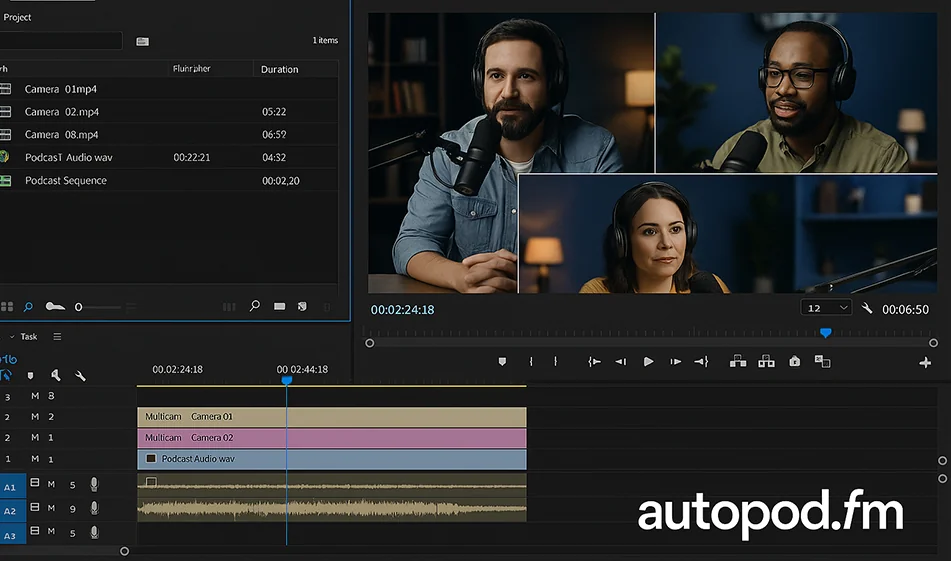
The solution is Autopod.fm.
✨ You upload your podcast recording, and the tool automatically handles all the camera cuts and video formatting.
🎬 Works as a plugin within Adobe Premiere Pro to dramatically speed up your workflow.
👨 💻 Ideal for podcasters, educational channels, and any talk show content that needs fast, professional editing.
⏱️ The most important feature: Reduces hours of editing to just a few minutes.
💰 The tool is free to try, and paid plans start at $19 per month.
From a raw recording... to a professional podcast video ready for publishing 📌.
Try Autopod.fm now.
And for more tools: 🌐 bosala.ai
#Podcast #PodcastMontage #AI #Autopod #Content Creation #AItools #PodcastEditing #ContentCreation #VideoEditing #AIForCreators #Visual Production #PodcastMakers
About AutoPod
- Multi-camera editor for up to 10 cameras and microphones
- Detects active speakers and applies preset layouts or wide shots
- Social clip creator with 16:9, 4:5 and 9:16 exports
- Auto-reframes clips and adds watermarks and end pages
- Batch exports clips
- Jump cut editor removes silences by decibel threshold
- Works as an extension for Adobe Premiere Pro
Related Tips
- A video prompt that gives you the feel of GTA with an Arabic twist
- 2 million free tokens to create videos! on Seedance
- How to Create a Series of Educational Videos Using ChatGPT, PixVerse, and Nabat?
- An Explanation of GeminiGen AI for Creating Videos and Images for Children
- A brief overview of Vidu and how to create entertaining animated videos