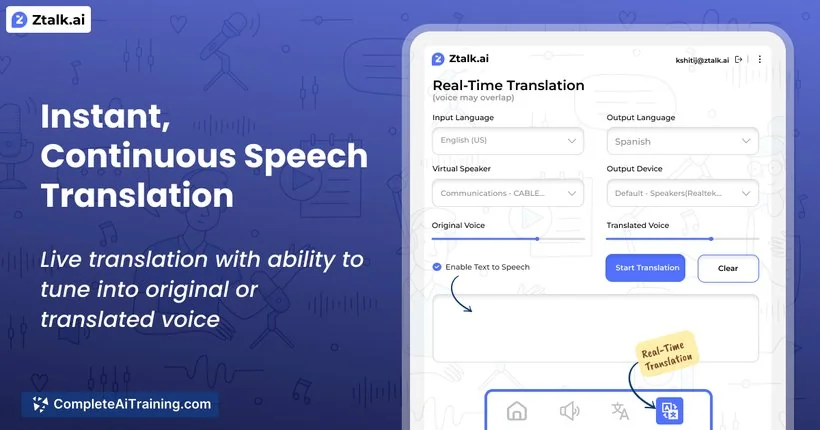
Description
️ 🖼Tool Name:
Ztalk.ai
🔖 Categories:
- Audio, Speech, and Music
- Chatbots/Voice
- Text-to-Speech / Speech-to-Text
- Automation and Smart Agents
- Integrations and APIs
️ ✏What does this tool offer?
Ztalk.ai is an AI-powered tool that provides real-time voice translation during meetings and video calls,converting speech from one language to another directly during the call to break down language barriers without requiring a change in communication platform.
The tool works with various video conferencing platforms, such as Zoom, Google Meet, and others. To get started, install the software, set up the default audio driver, select the input and output languages, and connect Ztalk.ai to your meeting app. Users can then speak naturally, and their speech is converted and translated in real time.
The tool supports more than 30 languages and, according to the provided information, offers a response time of less than 100 milliseconds, along with background noise cancellation and audio isolation.
It also allows users to view text transcripts in the original language, use custom AI prompts during calls, and access tools to control audio mixing.
Ztalk.ai supports a wide range of video conferencing platforms and uses encryption technologies to protect audio data during transmission and storage. The platform states that conversation data is not stored and that processing occurs in real time, noting compliance with SOC 2, GDPR, and HIPAA standards.
According to the information provided, the platform relies on technologies from OpenAI, Meta AI, NVIDIA, and AWS to provide translation and processing capabilities as well as cloud infrastructure.
⭐ What does it actually offer based on user experience?
- Real-time translation of voice conversations during video calls.
- Converts speech from one language to another in real time during the call.
- Compatibility with various video conferencing platforms without the need to switch communication platforms.
- Support for more than 30 languages.
- Provides a response time of less than 100 milliseconds, according to the platform.
- Reduces background noise and isolates the audio.
- Display text transcripts in the original language.
- Use custom AI prompts during calls.
- Control audio mixing.
- Process conversations in real time without storing conversation data, according to the platform.
- Provide security and protection options for voice data during transmission and storage.
🤖 Does it include automation?
Yes. Ztalk.ai relies on automated processing for voice translation during calls.
After selecting the input and output languages and connecting the tool to the meeting platform, Ztalk.ai automatically transcribes and translates speech during the conversation, eliminating the need for manual transcription.
The Pro plan also includes custom AI prompts, while the Enterprise plan offers custom integration capabilities for organizations.
💰 Pricing Model:
Freemium — Ztalk.ai offers a free Basic plan, along with a paid Pro plan and a custom-priced Enterprise plan.
🆓 Free Plan Details:
| Item | Details |
|---|---|
| Plan Name | Basic |
| Price | $0 per month |
| Translation | 40 minutes per month |
| Languages | Support for two languages |
| Noise cancellation | Basic |
| Technical Support | Community Support |
| Goal | Tailored to the Service Experience |
💳 Paid Plan Details:
| Plan | Price | Features and Differences |
|---|---|---|
| Pro | $499 per month | 20 hours of translation per month,support for all available languages, advanced noise cancellation, priority technical support, custom AI prompts, and support for Captions. |
| Enterprise | Custom Pricing | All Pro features, plus custom deployment options, advanced security features, dedicated 24/7 technical support, service level agreements (SLAs), and the ability to create custom integrations. |
🧭 How to access the tool:
| Access Method | Details |
|---|---|
| Desktop Application | The software is installed and integrated with the meeting platform. |
| Video conferencing platforms | Works with platforms such as Zoom, Google Meet, and others. |
| Default Audio Driver | Used to connect Ztalk.ai to the meeting app and route audio. |
| Real-time processing | Audio is translated during the call in real time. |
🔗 Trial link or official website: