Description
️ 🖼Tool Name:
VistaCreate
🔖 Categories:
- Photo Design and Editing
- Social Media Templates and Automated Editing
- Removing and Replacing Elements and Backgrounds
- Motion Graphics, Titles, and Subtitles
- Brand Guidelines
- Brand Assurance Templates
️ ✏What does this tool offer?
VistaCreate is a graphic design tool that helps users easily create professional designs using a vast library of ready-made templates and built-in AI tools. The platform lets you turn your ideas into complete visual content by selecting a suitable template, then customizing it by adding visual elements, editing text, and refining the design before publishing or printing it.
VistaCreate offers over 200,000 professional design templates that are constantly updated to help you create daily content suitable for social media, websites, and print. It also features a massive creative library with over 170 million images, videos, and vector graphics that can be used to create a variety of designs.
The platform includes a suite of AI tools that help speed up the design process, such as:
- Generating images using AI.
- Writing and optimizing text within a design.
- Removing unwanted elements.
- Removing backgrounds.
- Creating designs ready for commercial use.
VistaCreate also offers advanced tools for brands, such as Brand Kit and Styles,where users can save brand colors, fonts, and logos for easy access while creating projects, as well as extract color schemes from templates and apply them to designs.
The tool supports the creation of animated content and videos by:
- Adding animated text effects.
- Using transitions.
- Adding animated elements.
- Editing videos and sharing them on social media.
It also offers additional features such as:
- A background removal tool for creating product images with clean backgrounds.
- Sticker Maker to turn photos into stickers.
- Automatically resize your designs with the One-click Resizer.
- Schedule and publish content on social media.
- Send select print designs to VistaPrint for printing and delivery.
- Collaborate with your team by inviting up to 10 people to work on projects.
⭐ What does it actually offer based on user experience?
- Quickly create professional designs using ready-made templates.
- Provide an extensive library of images, videos, and design elements.
- Make it easy to create daily content for social media, the web, and print.
- Enhance the design experience with built-in AI tools.
- Allows you to customize designs to match your brand identity.
- Create videos and animations without needing advanced expertise.
- Easily remove backgrounds and unwanted elements.
- Reuse and resize designs for different platforms.
- Collaborate with team members on the same projects.
🤖 Does it include automation?
Yes, VistaCreate includes a range of automation features that help speed up the design and publishing process, including:
- Automatically resize designs to fit different platforms using the One-click Resizer.
- Scheduling the publication of designs on social media.
- Using AI tools to generate and refine images and text.
- Automatically applying brand identity via Brand Kit.
- Speeding up image editing by removing backgrounds and unwanted elements.
💰 Pricing Model:
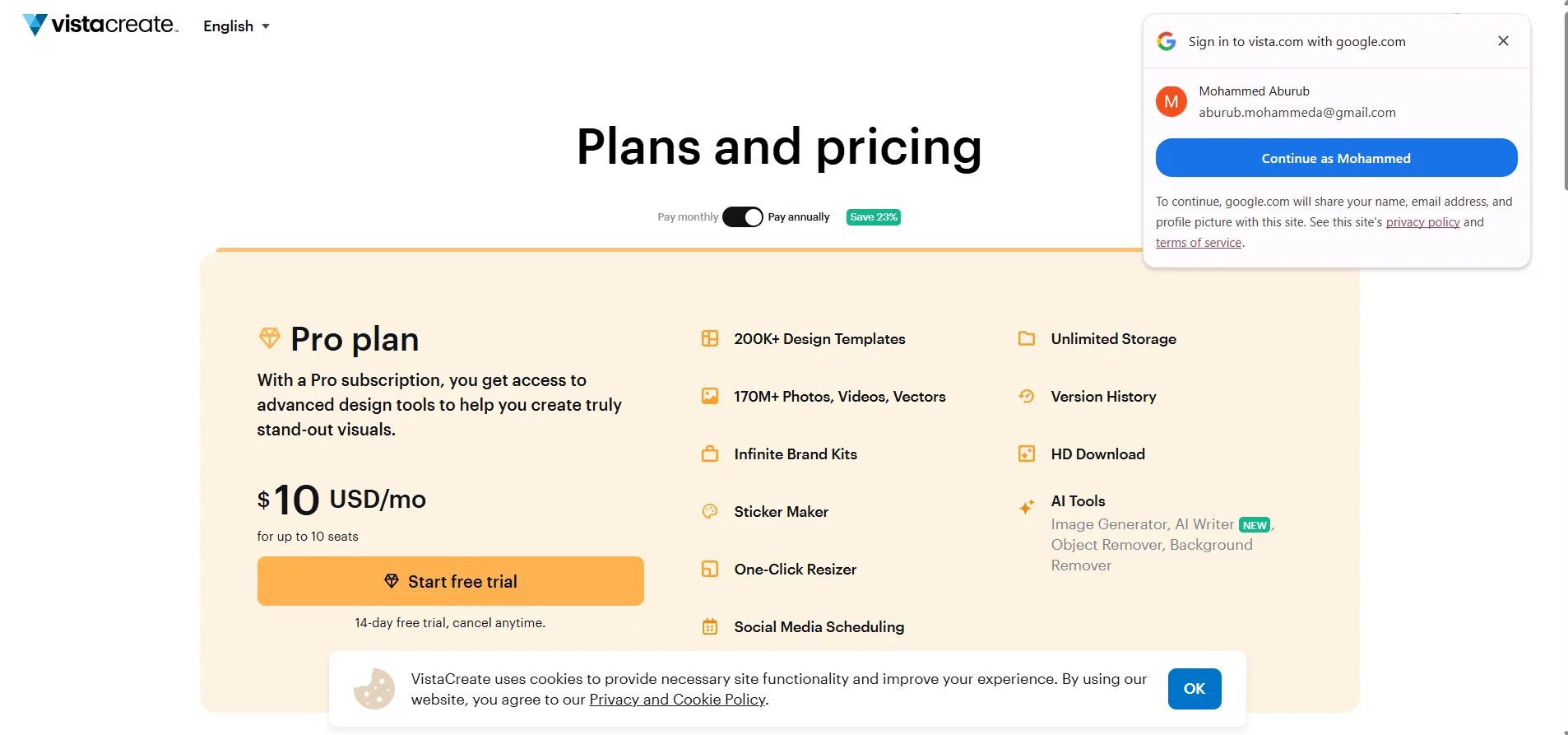
VistaCreate uses a Freemiummodel ,offering a free Starter plan and a paid Pro plan with monthly or annual subscriptions.
There is a 23% discount when paying annually.
🆓 Free Plan Details:
| Plan | Price | Features |
|---|---|---|
| Starter | $0 USD/mo | One seat |
| 100K design templates | ||
| 1M images, videos, and vector graphics | ||
| One Brand Kit that includes colors, logos, and fonts | ||
| 10 GB of project storage space |
💳 Paid plan details:
| Plan | Price | Features |
|---|---|---|
| Pro | $10 USD/mo | Up to 10 seats |
| 14-day free trial | ||
| Cancel anytime | ||
| Over 200,000 design templates | ||
| Over 170 million images, videos, and vector graphics | ||
| Infinite Brand Kits | ||
| Sticker Maker | ||
| One-Click Resizer | ||
| Social Media Scheduling | ||
| Unlimited storage | ||
| Version history | ||
| Download HD | ||
| Image Generator | ||
| AI Writer | ||
| Object Remover | ||
| Background Remover |
🧭 How to access the tool:
| Method | Details |
|---|---|
| Web | Available on the official website |
| App | Available via the platform's apps |
| API | Not mentioned in the provided information |
| Add | Not mentioned in the provided information |
🔗 Demo link or official website:
https://create.vista.com/plans/
