ChatGPT for YouTube
Description
🖼️ Tool Name:
ChatGPT for YouTube
🔖 Tool Category:
AI-powered video summarization and content assistant; it falls under the category of Video Editing and Content Creation & Communication.
✏️ What does this tool offer?
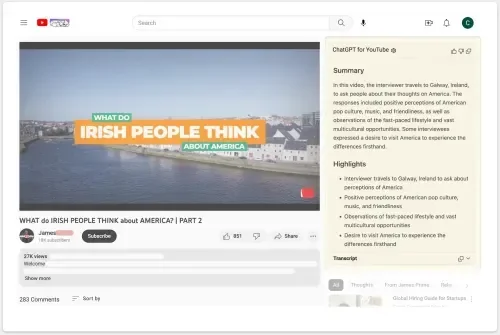
ChatGPT for YouTube is a browser extension that allows users to summarize YouTube videos using AI. By clicking a button next to any video, users can instantly get a concise summary, transcript analysis, or explanation — saving time and boosting productivity, especially for long-form content.
⭐ What does the tool actually deliver based on user experience?
• Instantly summarizes YouTube videos using ChatGPT
• Extracts key points and topics from video transcripts
• Supports multiple summary formats (bullet points, paragraph, TL;DR)
• Great for educational videos, tutorials, lectures, and podcasts
• Saves time for students, researchers, and content consumers
• Simple interface embedded directly into YouTube
🤖 Does it include automation?
Yes —
• Automatically pulls and processes video transcripts
• Uses LLMs to generate accurate summaries and insights
• May provide clickable timestamps or Q&A-style summaries
• No need to manually watch or scrub through long videos
💰 Pricing Model:
Freemium
🆓 Free Plan Details:
• Basic video summaries
• Daily limit on number of summaries
• Accessible via browser extension (Chrome, Firefox)
💳 Paid Plan Details:
• Premium features may include:
Unlimited video summaries
Advanced formatting options
Export summaries (PDF, Markdown)
Save and organize summaries in folders
Priority processing and faster load times
🧭 Access Method:
• Browser Extension (Chrome, Firefox)
• Integrated directly on YouTube interface after installation
🔗 Experience Link:
https://chrome.google.com/webstore/detail/chatgpt-for-youtube