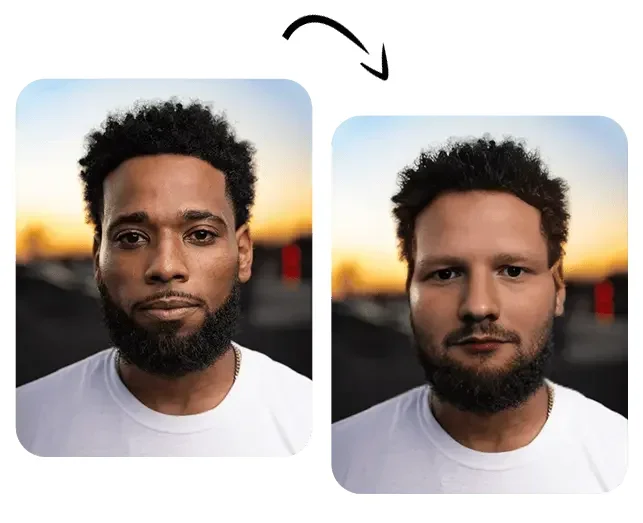
Description

️ 🖼Tool Name:
Swapface

🔖 Categories:
Video, Editing, and Motion
Edit/Enhance/Upsample
Social Media Templates and Editing Automation
Automation and Smart Agents

️ ✏What does this tool offer?
Swapface is an AI-powered tool for real-time face swapping (Face Swap) in real time, allowing users to transform into any character in seconds, with all processing performed locally on the user’s device without the need to upload data to external servers.

The tool enables the creation of live streams using face-swapping technology, helping content creators produce interactive content quickly and easily. It also supports face swapping in high-definition (HD) images and the creation of videos and GIFs with one-click character replacement, while maintaining the quality and realism of the results.

Swapface relies on advanced artificial intelligence technologies to produce natural and realistic faces, with a design focused on ease of use—simply launch the program and select the desired face, and the system will automatically perform the swap.

The platform places a strong emphasis on privacy, as all data processing occurs locally on the user’s device without sending files to the internet, giving the user full control over their data. It also features relatively low system requirements, as it can run on mid-range graphics cards, though it delivers better performance when used with recommended hardware.

The tool is available for Windows andMac (Apple Silicon) via an app downloaded to the device, and the company provides usage policies, a privacy policy, terms of service, and a refund policy.

What does it actually offer based on user experience?

  • Real-time face swapping during live streams.
  • Face swapping in high-resolution photos.
  • Create videos and GIFs with face swaps.
  • Easily replace characters within videos.
  • Process all data locally without uploading it to the cloud.
  • Produce realistic, high-quality results.
  • Easy to use with a simple interface.
  • Supports Windows and Mac (Apple Silicon).
  • Provides tutorials and usage examples on YouTube.

🤖 Does it include automation?
Yes, Swapface relies heavily on automation, automatically performing the following:

  • Detect and replace faces in real time.
  • Automatically process images and videos.
  • Applying face swaps with a single click.
  • Performing all processing operations locally without complex manual intervention.

💰 Pricing model:
Paid subscription + Pay-as-you-go

🆓 Free Plan Details:

FeatureDetails
PriceCurrently free to download and use the basic app (according to the official website)

💳 Paid plan details:

PlanPriceFeatures
Pay as you go$19 (100 Credits) or $49 (500 Credits)Purchase credits based on usage.
Pro$39 per month / $99 per quarter / $299 per yearA subscription for professional users.
Advance$69 per month / $199 per quarter / $499 per yearHigher capabilities and usage than the Pro plan.
Enterprise$249 per month / $499 per quarter / $999 per yearDesigned for enterprises and large-scale use.

🧭 How to access the tool:

MethodDetails
WebYes (official website for download and information)
AppYes, for Windows and Mac (Apple Silicon)
APINot specified
Add-onsNot specified

🔗 Trial link or official website:
https://www.swapface.org/

Pricing Details

The tool requires specific system specifications to run; Windows 10 Anniversary Update or later is recommended. The minimum requirements include an Intel Core i5 11400 or AMD Ryzen 5 3600 processor with 16 GB of RAM and an NVIDIA GeForce 2070 or Radeon RX 5700 graphics card. The recommended specifications include an Intel Core i7 or AMD Ryzen 7 processor with 32 GB of RAM and an NVIDIA GeForce 5070 Ti graphics card to ensure the best possible performance. The tool is available for direct download on Windows and Mac, and it leverages advanced AI technologies to generate realistic results. The platform is operated by DeepFuture Limited and provides its usage and privacy policies, terms of service, refund policy, and company information.