الوصف
🖼️ اسم الأداة:
Quiki.io
🔖 التصنيفات:
- إدارة المحتوى والنشر
- إدارة الأصول الرقمية
- الملاحظات والتحليلات
- أتمتة ووكلاء ذكية
- تكاملات وواجهات API
- تلخيص الفيديو والمقتطفات
- تلخيص وعناوين وأفكار
- فيديو ومونتاج وموشن
- قاعدة المعرفة والخدمة الذاتية
✏️ ما الذي تقدّمه هذه الأداة؟
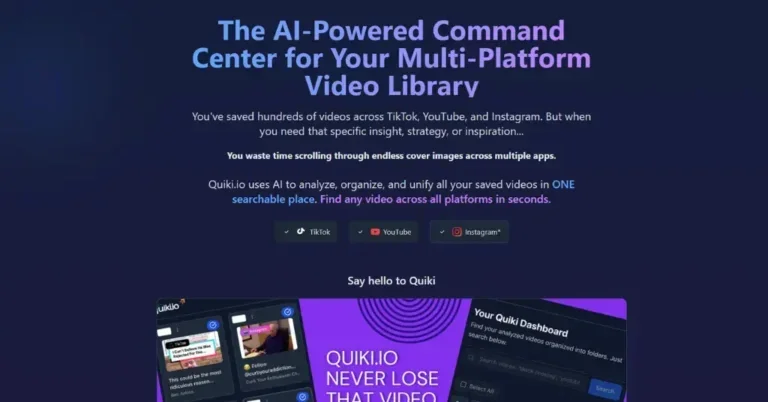
Quiki.io هي منصة لتنظيم وإدارة المحتوى المرئي المحفوظ من TikTok وYouTube وInstagram باستخدام الذكاء الاصطناعي، حيث تعمل على تحويل مكتبة الفيديوهات الشخصية إلى قاعدة معرفة قابلة للبحث والتحليل. تتيح المنصة للمستخدمين إضافة الفيديوهات من خلال لصق رابط الفيديو مباشرة أو استيراد مجموعة من الروابط، ثم تقوم بتحليل المحتوى تلقائيًا وإنشاء ملخصات بالذكاء الاصطناعي، واستخراج الكلمات المفتاحية، وتصنيف الفيديوهات داخل مجلدات منظمة وقابلة للبحث.
تدعم Quiki.io إنشاء مكتبة موحدة للفيديوهات المحفوظة من ثلاث منصات رئيسية هي TikTok وYouTube وInstagram، مع توفير 47 تصنيفًا ذكيًا للبدء، وإمكانية إنشاء مجلدات مخصصة، والبحث النصي الكامل داخل جميع الفيديوهات، والبحث داخل نصوص YouTube Transcript، وتحليل TikTok photo posts.
تعتمد المنصة على ثلاث خطوات أساسية تبدأ بإضافة الفيديو عبر لصق الرابط أو استيراد قائمة روابط، ثم تحليل الفيديو من خلال إنشاء الملخصات واستخراج الكلمات المفتاحية وتصنيف المحتوى، وأخيرًا البحث داخل المكتبة باستخدام ما يتذكره المستخدم من خلال الملخصات والعلامات والنصوص والملاحظات.
توفر Quiki.io أيضًا وضع Swipe Mode الذي يحول مكتبة المستخدم إلى موجز فيديو بملء الشاشة لعرض مقاطع TikTok وInstagram وYouTube المحفوظة، مع إمكانية طلب ملخصات الذكاء الاصطناعي، والانتقال إلى التحليل الكامل الذي يتضمن Transcript والتحليل المتقدم والملاحظات، بالإضافة إلى مشاركة الروابط وإعادة ترتيب المحتوى باستخدام Shuffle.
كما توفر المنصة إمكانيات متقدمة لوكلاء الذكاء الاصطناعي من خلال Model Context Protocol (MCP) server، حيث يمكن للوكلاء المتوافقين مثل Claude وCodex وOpenClaw مسح الفيديوهات، واستخراج النصوص الكاملة، والبحث داخل المكتبة برمجيًا.
⭐ ما الذي تقدّمه فعليًا بناءً على تجربة المستخدمين؟
- تنظيم الفيديوهات المحفوظة من TikTok وYouTube وInstagram داخل مكتبة واحدة.
- إنشاء ملخصات تلقائية للفيديوهات باستخدام الذكاء الاصطناعي.
- استخراج الكلمات المفتاحية وتصنيف المحتوى تلقائيًا داخل مجلدات.
- البحث داخل الفيديوهات باستخدام الكلمات المفتاحية أو اسم المؤلف.
- إنشاء الملاحظات والعلامات والمجلدات لتنظيم المحتوى.
- توفير نصوص كاملة قابلة للبحث مع الطوابع الزمنية للفيديوهات.
- دعم تحليل TikTok وYouTube بشكل أعمق من خلال Deep Scans.
- دعم Instagram Reels واستيراد بيانات TikTok وYouTube وInstagram بشكل جماعي.
- توفير Frame-by-frame insights وتحليلات لاستراتيجيات المحتوى.
- تحويل مكتبة الفيديوهات إلى تجربة تصفح Swipe Mode مشابهة لخلاصات الفيديو القصيرة.
- مشاركة الروابط وإعادة ترتيب المحتوى باستخدام Shuffle.
- توفير أكثر من 100K+ فيديو تم تحليلها، ودعم 3 منصات، و99.9% uptime.
🤖 هل تتضمّن الأتمتة؟
نعم، تتضمن Quiki.io أتمتة تعتمد على الذكاء الاصطناعي لتنظيم وتحليل الفيديوهات تلقائيًا. بعد إضافة الروابط، تقوم المنصة تلقائيًا بمسح الفيديوهات، وإنشاء الملخصات، واستخراج الكلمات المفتاحية، وتصنيف المحتوى داخل المجلدات المناسبة، بالإضافة إلى إنشاء النصوص القابلة للبحث وتحليل المحتوى.
كما توفر أتمتة متقدمة من خلال Model Context Protocol (MCP) server، مما يسمح لوكلاء الذكاء الاصطناعي المتوافقين مع MCP بالتفاعل مع مكتبة الفيديوهات وإجراء عمليات البحث والتحليل برمجيًا.
💰 نموذج التسعير:
تعتمد Quiki.io على نموذج Freemium يجمع بين خطة مجانية دائمة وخطة مدفوعة بنظام الدفع حسب الاستخدام (Pay As You Go) من خلال حزم Credits، دون الحاجة إلى اشتراك شهري.
🆓 تفاصيل الخطة المجانية:
| الميزة | التفاصيل |
|---|---|
| اسم الخطة | Free |
| السعر | $0 forever |
| طريقة الاستخدام | مجانية بدون الحاجة إلى بطاقة ائتمان |
| الاستخدام الأساسي | تجربة الخدمة وتنظيم الفيديوهات المحفوظة |
| تحليل الفيديو | عمليات مسح سريعة لمقاطع TikTok وYouTube باستخدام ملخصات الذكاء الاصطناعي |
| الملاحظات | إنشاء الملاحظات والعلامات والمجلدات |
| التنظيم | التنظيم التلقائي للفيديوهات |
| البحث | البحث باستخدام الكلمات المفتاحية أو اسم المؤلف |
| فيديوهات البداية | 10 مقاطع فيديو مختارة مسبقًا عند التسجيل |
| عمليات المسح | 10 عمليات مسح يوميًا |
💳 تفاصيل الخطط المدفوعة:
| الخطة | السعر | المزايا |
|---|---|---|
| Credits | تبدأ من $9.99 | نظام Pay As You Go من خلال حزم Credits |
| حزم Credits | 1k / 5k / 10k credits | الحزم لا تنتهي صلاحيتها |
| الاستخدام المتقدم | — | مخصصة للمستخدمين الذين يحتاجون إلى عمليات مسح أعمق وتحليل النصوص والذكاء الاصطناعي |
| المزايا الإضافية | — | جميع ميزات الخطة المجانية بالإضافة إلى Deep TikTok and YouTube scans |
| النصوص | — | Searchable timestamped transcripts (نصوص كاملة قابلة للبحث مع الطوابع الزمنية) |
| المنصات | — | دعم Instagram Reels |
| الاستيراد | — | استيراد بيانات TikTok وYouTube وInstagram بشكل جماعي |
| التحليلات | — | Frame-by-frame insights واستراتيجيات المحتوى |
| الأولوية | — | Priority queue |
| التكاملات | — | REST API وMCP access |
| نطاق الحزم | — | من 1,000 إلى 10,000 credits لكل حزمة |
🧭 طريقة الوصول إلى الأداة:
| الطريقة | التفاصيل |
|---|---|
| الويب | متاحة عبر موقع Quiki.io |
| تطبيق | توفر تطبيقًا للوصول إلى الخدمة |
| API | متوفر ضمن خطة Credits من خلال REST API |
| MCP | متوفر ضمن خطة Credits عبر MCP access لوكلاء الذكاء الاصطناعي |
🔗 رابط التجربة أو الموقع الرسمي:
https://www.quiki.io