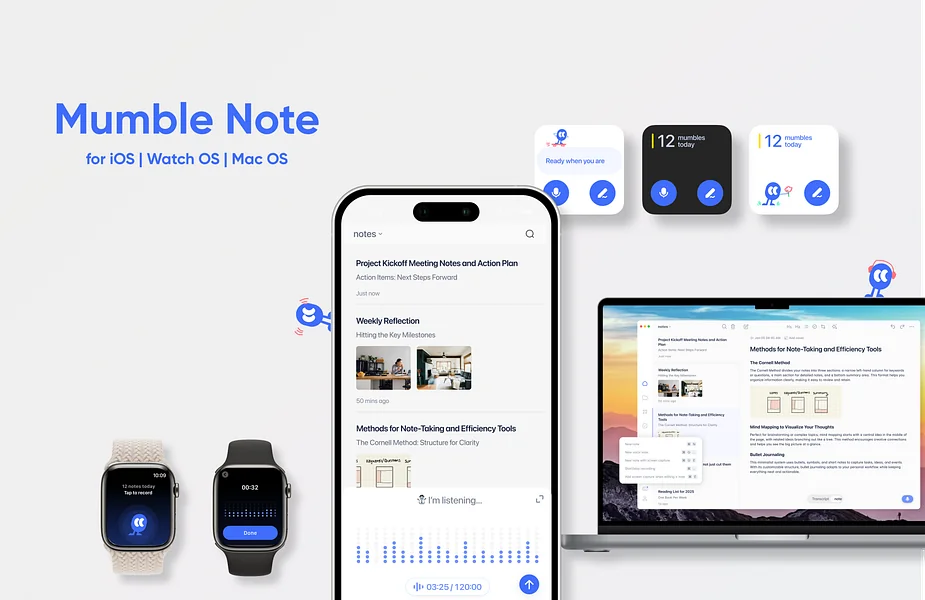
Description
️ 🖼Tool Name:
Mumble Note
🔖 Categories:
Text-to-Speech / Speech-to-Text
Study Aids & Smart Notes
Summarization, Headings, and Ideas
Meeting Summaries and Notes
Education and Research
Rewriting and Style Improvement
Translation
Automation and Smart Agents
Integrations and APIs
️ ✏What does this tool offer?
Mumble Note is an AI-powered platform for recording meetings, ideas, and voice notes and converting them into transcriptions, summaries, and organized tasks. It allows you to record voice notes up to two hourslong, then uses AI to process and organize the resulting content.
The platform also offers the ability to chat with the AI about your notes, automatically organize content, translate notes into over 40 languages,and integrate with other apps.
Mumble Note is available as an app on iOS and Apple Watch,and a Mac version is currently in open beta.
⭐ What does it actually offer based on user experience?
- Recording meetings, ideas, and voice notes.
- Transcribing audio recordings into text.
- Creating summaries using artificial intelligence.
- Converting notes into tasks.
- Chat with AI about your notes.
- Automatically organize notes.
- Translate content into more than 40 languages.
- Record voice notes for up to two hours.
- Unlimited text notes.
- Support for the latest AI models in paid plans.
- Collection Auto Mode available in the Pro plan.
- Chat with Mumble AI on the Pro plan.
- Early access to beta features in the Pro plan.
- Integration with other apps.
- App available on iOS and Apple Watch.
- Mac version available in open beta.
🤖 Does it include automation?
Yes. Mumble Note uses artificial intelligence to automatically transcribe voice notes into text, summaries, and tasks, as well as to automatically organize and translate notes.
The Pro plan offers additional automation features, including Collection Auto Mode,as well as the ability to interact with notes through Mumble AI.
💰 Pricing Model:
Freemium — A free plan is available, along with the paid Starter andPro plans. The platform also offers discounts for annual subscriptions: 50% off the Starter plan and33% offthe Pro plan.
🆓 Free Plan Details:
| Plan | Price | Details |
|---|---|---|
| Free | $0 | Unlimited text notes, 60 minutes of voice notes per month, with a maximum of 2 minutes per note. |
💳 Paid plan details:
| Plan | Monthly Price | Key Features |
| Starter | $3 per month | Unlimited text notes, 3,000 minutes of voice notes per month(up to 2 hours per note), 30 AI tools per month, and access to the latest AI models. A 50% discount is available with an annual subscription. |
| Pro | $10 per month | Unlimited AI voice notes, notes up to two hours long, unlimited AI tools, Collection Auto Mode,chat with Mumble AI,access to the latest models, and early access to beta features. Get 33% off with an annual subscription. |
🧭 How to access the tool:
| How to access | Details |
| Web | Available via the Mumble Note website. |
| App | Yes, available on iOS and Apple Watch;a Mac version is currently in open beta. |
| API | Not mentioned in the provided information. |
| Additional | Not mentioned in the provided information. |
🔗 Trial link or official website:
Mumble Note – Official Pricing Page