Tool name:
Commabot
Tool category: 🔖
• Analytics and dashboards
• Data preparation and cleaning
• Data and analytics
️ What does this tool offer? ✏
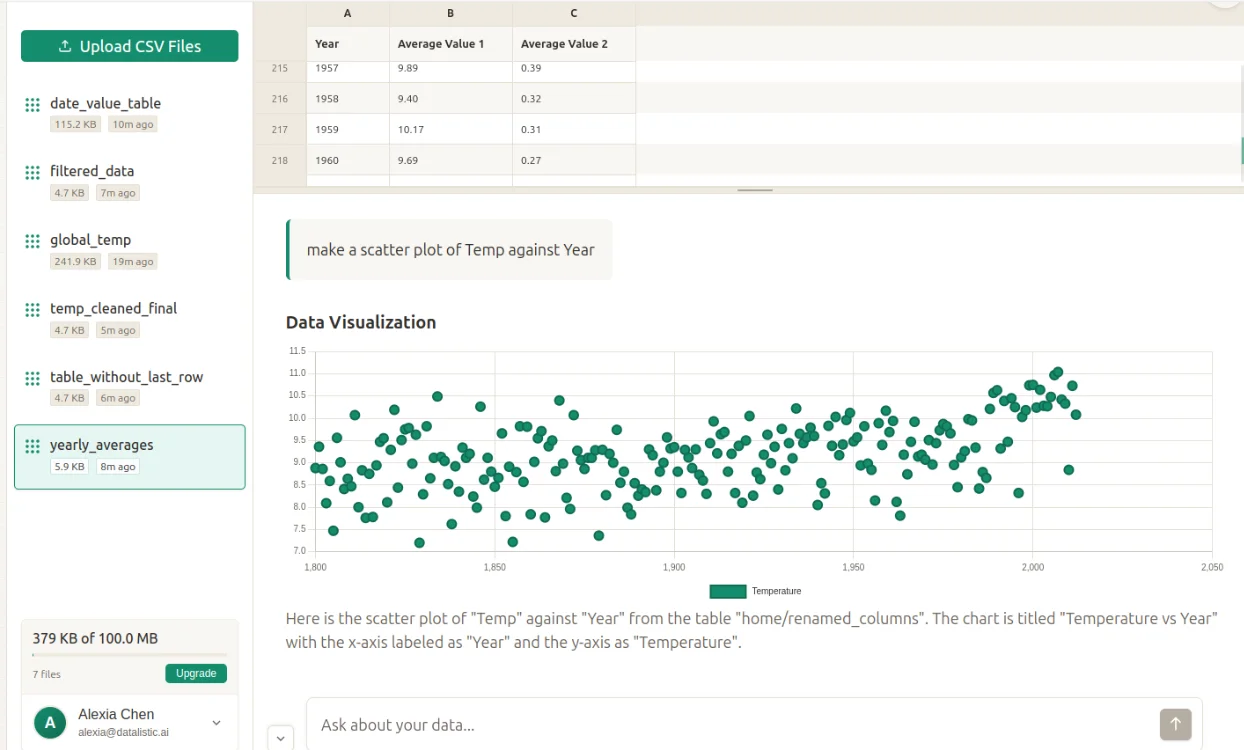
Commabot provides an interactive environment for data analysis based on conversational AI rather than traditional methods that rely on complex formulas or advanced analytical software. The platform allows users to upload data files, especially CSV files, and then start asking questions about the content of these files using simple natural language, and the system analyzes the data and answers directly.
The tool helps users quickly understand their data through a range of functions such as analyzing data, cleaning it of errors or duplicates, making adjustments, and extracting useful insights from it. It can also create charts, graphs, and statistical summaries that help clarify information in an easy-to-understand visual format.
Commabot can be used in many practical scenarios, such as analyzing sales reports, reviewing survey results, studying financial records, or dealing with any other type of data stored in CSV files. The main goal of the platform is to make data analysis easier and faster, even for users who do not have advanced experience with traditional data analysis tools such as spreadsheets or data analysis languages.
What does it actually offer based on user experience? ⭐
According to the tool's description and how it works, users can upload data files directly to the platform and then interact with them via text chat with the system. Artificial intelligence analyzes the data presented and provides answers, summaries, or statistics based on the questions asked.
Users can also perform data cleaning operations such as removing duplicate values or modifying certain fields, as well as creating graphs that help understand trends or patterns within the data. This method makes data analysis simpler compared to traditional methods that require advanced knowledge of formulas or specialized analysis tools.
Does it include automation? 🤖
Yes, Commabot relies on AI-powered automation to perform many of the operations associated with data analysis. When you upload a data file and ask questions, the system automatically analyzes the information and performs operations such as data cleaning, statistics extraction, graph creation, and summarization without the need for complex manual steps by the user.
Pricing model: 💰
Commabot uses a pricing model known as Freemium, which means it offers a free version for basic use alongside paid plans that include more advanced features.
According to the information currently available on the official website and public sources, there is no clear official price list that specifies fixed monthly subscriptions with specific figures such as $9, $12, or $17. This means that the platform does indeed offer free initial use, as well as paid options with additional capabilities, but the exact pricing details have not yet been officially published.
🆓 Free plan details:
The free version of Commabot allows users to try out the tool's basic functions and learn how it works in data analysis. Users can upload CSV files and interact with them via a conversation with artificial intelligence to analyze and understand the data in a simplified way.
This version also allows for basic operations such as cleaning data and removing duplicates, creating summaries and statistics about the file's content, and making simple modifications to the data using plain text commands instead of complex programming formulas. This version is often intended for trial use or light data analysis.
Paid plan details: 💳
Commabot's paid plans add a range of advanced capabilities compared to the free version. These include the ability to upload larger data files, perform more complex analyses, and perform advanced data cleaning and transformation.
These plans may also include integration capabilities with other systems such as customer relationship management systems or various data analysis tools, as well as features that facilitate collaboration between team members or broader data management within organizations.
In many cases, the pricing of these features is based on the level of usage or the volume of data processed, rather than a fixed monthly subscription that is clearly stated in the currently available sources.
How to access the tool: 🧭
The tool can be used through its online platform, where the user logs in to the website, uploads a data file such as CSV, and then starts interacting with the system via a chat interface to ask questions about the data and analyze it.
Link to the trial or official website: 🔗
https://commabot.com/