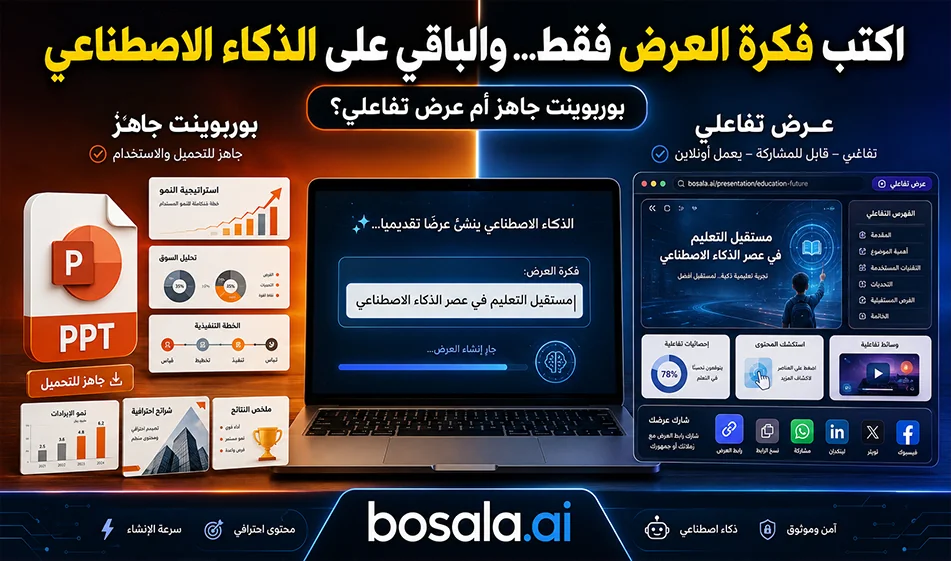
A Comparison of Twistly andPageOn for Creating AI-Powered Presentations
If you want to create a complete presentation without starting from scratch, there are two tools you can try: Twistly andPageOn. All you need to do is type in your presentation idea or topic title, then follow the steps within the tool, and the tool will generate the presentation with content, formatting, images, and slide order—ready to use and fully customizable.
An important feature is that both tools support Arabic, making them suitable for students, trainers, entrepreneurs, and content creators who want to quickly prepare presentations.
How do the two tools work?
In both tools, you start by typing the presentation topic, such as:
“A presentation on artificial intelligence in education”
or
“A presentation on an e-commerce project.”
Next, you select some settings, such as the number of slides, language, visual style, and target audience. The tool then generates a complete presentation containing headings, paragraphs, images, and a ready-made visual layout. After generation, you can edit the text, delete slides, change images, or rearrange the content.
Twistly: Ideal for those who want a ready-made PowerPoint file
Link: https://twistly.ai/
The most important feature of Twistly is that it ultimately gives you a presentation that can be downloaded as a PowerPoint file to your device. This is very important if you want to use the presentation at university, in training sessions, at meetings, or present it without relying on the internet.
Therefore, Twistly is best suited for those who want:
- A ready-made presentation in PowerPoint format
- The ability to edit the file later in PowerPoint
- A file that can be saved and sent to others
- Use the presentation in a classroom or meeting without opening the website
PageOn: Suitable for interactive presentations and sharing from the website
Link: https://www.pageon.ai/app
PageOn, on the other hand , is better suited for those who want to create a modern, interactive presentation that can be shared directly from the website. Instead of focusing solely on uploading a PowerPoint file, it offers an experience closer to a web presentation ready for sharing.
Therefore, PageOn is suitable for those who want to:
- Share the presentation as a link
- A modern visual presentation directly from the browser
- An experience suited for digital content
- Easily edit and share the presentation online
Practical Comparison
If you’re working on a formal presentation and need a downloadable file for delivery, Twistlyis often the best choice; its PowerPoint download feature makes it easier to use for study, work, and training.
However, if you want a modern digital presentation that you can share as a link or use directly in your browser, PageOnmay be a better fit, especially for presentations that rely on interactivity and quick sharing.
Free Trial and Pricing
Both tools usually offer a free trial or limited usage, but the number of free presentations or usage limits may vary depending on the account and updates within each platform.
While preparing this guide, I was unable to verify exact pricing figures from reliable public sources, so it is best not to publish an unconfirmed number. The safe wording for the site is:
Both tools offer a limited free trial to test creating presentations, but frequent use, file uploads, or access to advanced features may require a paid plan. It’s best to check the pricing page within each tool before subscribing, as free offerings and pricing may change from time to time.
Which one should you choose?
Choose Twistly if you want a ready-made PowerPoint presentation that you can download to your device and use at university, for training, or in meetings.
And choose PageOn if you want a modern visual presentation that can be shared as a link from the website, and is better suited for digital and interactive presentations.
Compass Tip
Don’t just write a general idea like: “Create a presentation on marketing.” It’s better to write a clear idea, specifying the audience and objective, such as:
“An 8-slide presentation in Arabic on content marketing, aimed at small business owners, with practical examples and brief tips.”
The clearer the idea, the more organized and immediately usable the resulting presentation will be.
Conclusion
Both Twistly andPageOn help you create AI-powered presentations in Arabic simply by typing in your idea.
Twistly stands out by providing you with a ready-to-download PowerPoint file, while PageOn offers sharing directly from the website and a modern digital presentation experience. The choice between them depends on your needs: Do you want aready-to-use PowerPoint file, or an interactive presentation that can be shared as a link?