Prompt for creating worksheets to teach children how to write Arabic letters
· 5 min read
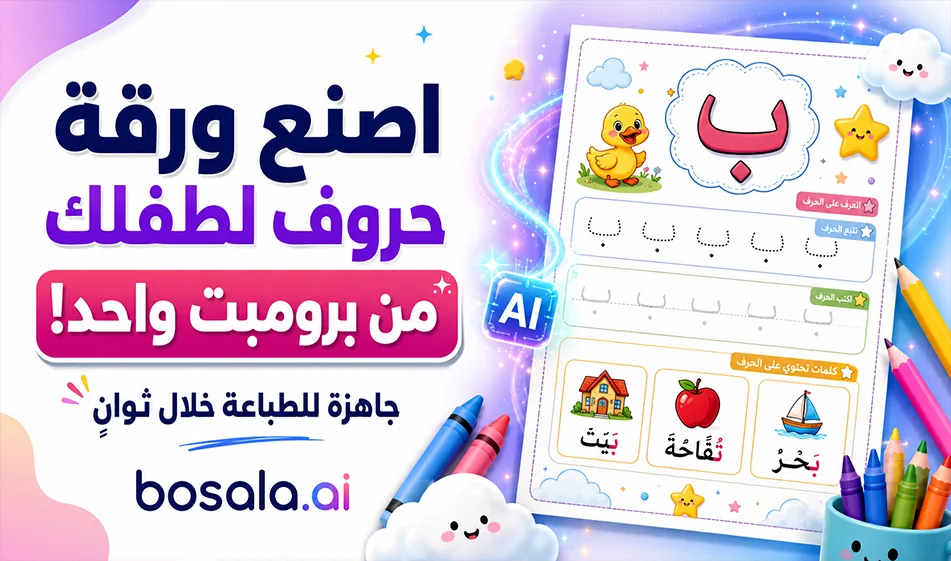
A template for creating worksheets to teach children how to write Arabic letters
If you want to create a ready-made worksheet to teach children how to write Arabic letters in a fun and easy way, this idea is perfect for you. All the user has to do is copy the prompt from the Bousla website after commenting on the video, then go to ChatGPT or Gemini,select the image generation mode with portrait orientation,paste the prompt, and simply replace the desired letter.
In seconds, the tool generates a print-ready worksheet that helps the child recognize the letter, see how to write it correctly, and then trace and practice it independently. This makes the experience very useful for parents, teachers, daycare providers, and anyone who wants to quickly create worksheets for children without manual design.
How does it work?
The method relies on a pre-made prompt specifically designed to generate worksheets for preschool-aged children. This prompt instructs the tool to create a vertical worksheet with a cheerful and organized layout, including:
- A clear title for the letter
- A large image of the letter
- Arrows indicating the correct writing direction
- Pictures of objects that start with the same letter
- Dotted lines for tracing
- Blank lines for practice
- A simple footer with the name bosala.ai
The key feature here is that the user doesn’t need to edit the prompt every time; they simply replace the phrase “hereis the letter” with the Arabic letter they want to teach, such as: أ, ب, ت, ث, ج… and so on.
How to use
- Copy the prompt from the Bosala website.
- Open ChatGPT or Gemini.
- Select image mode.
- Select the aspect ratio.
- Paste the prompt.
- Replace "Character here" with the desired character.
- Tap Generate.
- Download the final image.
- Print it so your child can start learning and writing.
What does the worksheet contain?
The resulting worksheet is designed to be child-friendly and typically includes:
- An attractive header with the letter’s name
- The letter in large, clear print
- Arrows and writing directions to illustrate how to form the letter
- Colorful educational images of words beginning with the letter
- Dotted lines for the child to trace the letter
- Blank lines for children to practice writing on their own
- A cheerful design suitable for printing and use at home or in the classroom
Why is this method special?
Because it saves parents and teachers a lot of time. Instead of searching for ready-made worksheets or designing them by hand, you can create a new worksheet for any letter in just seconds. The design is also child-friendly in terms of colors, layout, and clarity, making children more engaged with the worksheet and more eager to learn.
Bousla Tip
When using the prompt, be sure to change only the letter and leave the rest of the text as is, because the prompt is designed so that the tool automatically generates a complete worksheet. It’s also best to try one letter at a time, then print the worksheet so the child can practice it well before moving on to the next letter.
Ready-made prompt
Create a vertical printable Arabic handwriting worksheet for kindergarten children, designed for early learning of Arabic letters.
TARGET LETTER:"Here is the letter"
Use the TARGET LETTER consistently throughout the worksheet.
Page format:
- Portrait orientation
- A4 print-ready layout
- High resolution
- Clean white background with colorful, playful educational design
- Attractive, cheerful, and engaging for preschool children
Main goal:
Teach children how to recognize, trace, and write the Arabic letter defined in TARGET LETTER.
Layout structure:
1) Header section at the top:
- A cute, colorful header designed for children
- Include the Arabic title:
" تعلم الحرف: TARGET LETTER"
- Add small, playful decorative elements such as stars, clouds, pencils, or cheerful shapes
- Make it look like a professional children’s learning worksheet
2) Letter introduction section:
- Show the TARGET LETTER in a very large, clear form
- Show the correct writing direction using arrows and stroke order
- Make the direction visually simple and easy for kindergarten children to understand
- Ensure the Arabic letter is perfectly correct and clearly readable
3) Example images section near the top:
- Add 3 to 5 cute, colorful illustrations of objects, animals, or foods that begin with the TARGET LETTER
- Each image should be clear, child-friendly, and easy to recognize
- Keep the illustrations educational, bright, and visually appealing
- Arrange them neatly across the top or upper-middle part of the page
- If exact matching words are difficult, choose common simple Arabic vocabulary appropriate for kindergarten
4) Tracing practice section:
- Add several practice rows for writing the TARGET LETTER
- First row: large dotted version of the TARGET LETTER repeated multiple times for tracing
- Second row: medium dotted versions for tracing
- Third row and below: empty handwriting lines for the child to practice writing the letter independently
- Include clear writing guidelines and enough spacing for small children
- Make the tracing lines smooth, clean, and printable
5) Design style:
- Educational worksheet style
- Fun, friendly, colorful, and visually exciting for children
- Balanced layout, not overcrowded
- Easy to print and use in the classroom or at home
- Use soft, bright colors suitable for kindergarten
- Ensure all Arabic text is accurate and free of spelling mistakes
6) Footer section:
- Add a neat footer at the bottom
- Include the text:
" © bosala.ai"
- Make it small, clean, and professional
- Add a simple educational worksheet feel
Important requirements:
- Use only the letter written in TARGET LETTER
- The Arabic letter must appear correctly in all places
- Arabic writing direction must be visually correct
- The worksheet must look polished, professional, and ready to print
- The page should feel like a real preschool learning sheet
- Keep the final result as a single complete image ready for printing
Summary
This method provides an easy and quick way to create Arabic letter writing worksheets for children without the need for manual design. Just copy the prompt, paste it into ChatGPT or Gemini, change the desired letter, then generate the image and print it. The result is a beautiful, accurate worksheet suitable for teaching children to write in a fun way.
About ChatGPT
- Answers with improved factual accuracy and a 400k token context window
- Offers Advanced Voice Mode with emotion understanding, real-time translation and natural interruptions
- Provides Canvas, a side-by-side workspace for writing and coding
- Remembers preferences, projects and instructions across conversations
- Generates short video clips with Sora integration for Plus and Pro users
- Available as native apps for Windows, macOS, iOS and Android
About Gemini 2.5 Pro
- Processes text, images, audio and video in a single context
- Handles up to 1 million input tokens for large projects and documents
- Function calling to run commands within the conversation
- Executes code directly as part of its reasoning
- Retrieves real-time information through web search
- Advanced reasoning for complex coding, math and science problems
- Controls the tone and style of audio output
- Available via Google AI Studio, Gemini API, Vertex AI and the Gemini app
About Google Gemini
- Plans and executes multi-step tasks such as trip planning, booking and emailing
- Understands text, real-time video, 3D spatial relationships and audio
- Integrates with Android, Google Workspace and Gemini for Home
- Reasons through complex logic by default with a 2 million+ token context window
- Shares camera or screen in real time with Gemini Live
- Runs autonomous Deep Research and produces reports with citations
- Turns PDFs, Docs or Slides into conversational podcast-style Audio Overviews
- Generates video with Veo 3 and edits images with Nano Banana
- Runs Gemini Nano on-device for offline summaries and translations
About Nano Banana
- Edits and transforms photos from text prompts
- Creates designs in cartoon, artistic, creative and realistic styles
- Generates short videos in portrait, square and landscape formats
- Adds audio or creates silent videos
- Provides ready-made templates that are updated regularly
- Available on iOS, iPadOS, macOS and visionOS
Related Tips
- How to Use the Pokecut Tool to Easily Extract Images
- A professional prompt for turning a meal name into a full recipe infographic
- Bosala Brand Studio Explains: How to Create a Complete Visual Identity from a Logo in Minutes?
- How to Create a Series of Educational Videos Using ChatGPT, PixVerse, and Nabat?
- An Explanation of GeminiGen AI for Creating Videos and Images for Children