Muse Pro
An iOS app for drawing and creative tools.
Last updated
Features
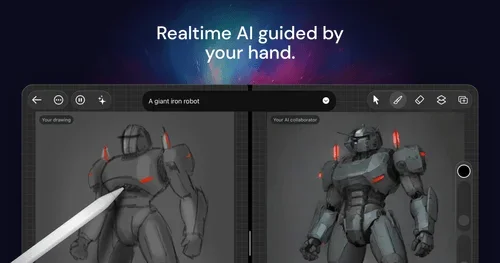
- Real-time AI-guided drawing that responds to your strokes
- Text-to-image prompts to shift creative direction
- Randomize function to overcome creative blocks
- One-tap Enhance for refined, print-ready visuals
- Sliders, seed shuffling, pause control and multi-layer support
- Built-in brushes, shapes and assets
- Upscaling for high-resolution export
- Apple Pencil and touch support on iPhone and iPad
Pricing Details
💰 Pricing Model:
Freemium with free trial and paid upgrade
🆓 Free Plan Details:
• Free download with initial usage
• Full access to AI painting features during trial
💳 Paid Plan Details:
• Transition to paid tier after trial; pricing not publicly detailed
Related Tips
- 🐥 Want to create a music video for kids in minutes... with artificial intelligence? · Audio & Voice, Text-to-Speech / Speech-to-Text…
- Head-to-head comparison: IconifyAI or Illustroke? · Audio & Voice, Voice Cloning…
- Sora 2 cinematic video via MindVideo - A quick guide · Audio & Voice, Text-to-Speech / Speech-to-Text…
- Turn a description into a professional image on Mage.space (3 steps) | Free · Audio & Voice, Voice Cloning…
- Start with just one sentence or a short description... and let Plexigen.ai create a cinematic scene for you with dazzling quality! · Audio & Voice, Text-to-Speech / Speech-to-Text…