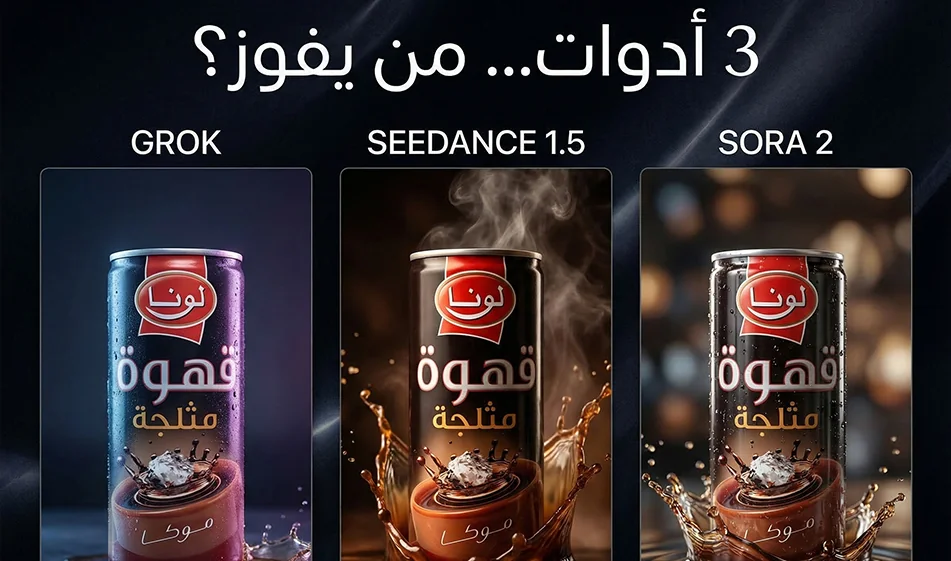
Comparison of Grok, Seedance 1.5, and Sora 2 when using the same prompt and the same product to create an advertising video

Comparison of Grok, Seedance 1.5, and Sora 2 when using the same prompt and the same product to create an advertising video

Comparison of Grok ,Seedance 1.5 ,andSora 2 when using the same prompt and the same product to create an advertising video

The idea here isn’t“which tool is better overall,” but rather:
When using the same product image, the same prompt,and the same settings, which tool gives you a smoother, clearer ad video that’s closer to real-life footage without distortion?

This comparison will help you choose the right tool based on your ad type: fast-paced and trendy, cinematic and realistic, or static product shots.

Watch the video:

1) Why do we use the same prompt and the same product?

Because any difference in the text or image makes the results unfair.
A fair comparison gives you a clear answer:

  • Who determines the product’s appearance and label?
  • Who maintains the lighting and shadows?
  • Who provides cinematic camera movement without shaking or flickering?

2) Compass settings for a fair comparison

Before rendering in any tool, set these values:

  • Aspect ratio: 9:16
  • Duration: 8 seconds
  • Video from product image if available
  • No text within the video
  • Only one camera movement

Then apply the exact same prompt to all three tools.

3) How do you briefly understand the three video tools?

Grok

  • is very well-suited for“trendy” and quickshots, andfor quickly generating a variety of ideas.
  • It deliversexcellent results when the scene is simple and camera movement is minimal.


’sstrengths:speed, a fun experience, and quick iteration.


’scommon challenge:With complex scenes or many details,you may need to regenerate the scene to achieve better stability.

Seedance 1.5

  • Tends to produce“realistic commercial” videoswith a good cinematic feel.
  • Strong in scenes that rely on realistic lighting and beautiful gradients.

Strengths
: Realism, good lighting, and clean commercial shots.


’sCommon Challenge: It sometimes requires very precise calibration to minimize distortion, especially on posters.

Sora 2

  • It often excels when you want a cohesive cinematic shot and greater stability in“motion logic.”
  • Excellent for shots that need a real cinematic feel, depth, and realistic motion.

Strengths
:High cinematic quality and more cohesive motion.


’scommon challenge: It may be slower or require more precise settings to achieve a perfect result.

4) One prompt template for comparison (copy it as is)

Replace“product” with the actual product name:

An 8-second9:16 vertical productad video .
A close-up of the product on a clean studio table with a simple background.
Soft studio lighting, realistic shadows, and a slight reflection on the surface.
A very slow zoom-in camera movement with a slight rotation around the product.
High detail, natural colors, product clearly centered.
No text within the video, no watermarks, no shaking, no flickering, no distortion of the product or label.

5) Judging Criteria: Who Wins the Ad Video?

After creating 3 videos, evaluate them using this checklist:

  1. Product and label stability
    Are the logo and label clear and consistent?
  2. Smoothness of movement
    Is the camera movement smooth and shake-free?
  3. Lighting Stability
    Are there any flickers or sudden changes in lighting?
  4. Realism of Shadows and Reflections
    Does the product look like a real“object” or a“sticker”?
  5. Ready for publication
    Is the video ready to go or does it need major editing?

6) What should you do if the results are poor?

Don’t change the entire prompt. Apply the compass rule:

  • Modify just one line, such as:
    • Make the camera movement slower
    • Keep the product and label the same
    • Reduce shaking and flickering
      Then regenerate just once.

7) Quick Compass Summary

  • If you want a fast, trendy video with lots of effects: Grok isexcellent.
  • If you want a clean, realistic ad shot with good lighting: Seedance 1.5 ispowerful.
  • If you want a more cinematic feel and smoother motion: Sora 2 usually comes out on top.

But the final decision isn’t based on expectations—it’s based on experience: usethe same prompt and the same product, then choose the winner based on the criteria above.

For more AI tools: bosala.ai

March 17, 2026 04:28 PM GMT
About Grok

️ 🖼Tool name:
Grok (with versions Grok 4 and Grok 4.1)

🔖 Tool Category:
Conversation/audio agents, summarization, headings and ideas, programming and development, text and image to video, study assistants and smart notes/text to audio/audio to text

️ ✏What does this tool offer?
A super-intelligent AI assistant with the ability to access real-time information from the web and the X platform. Grok 4 provides advanced reasoning, complex math, and programming capabilities. It also includes the Grok Imagine engine for generating high-quality images and videos, and DeepSearch for in-depth research and analyzing conflicting sources to provide an accurate answer.

What do you actually offer based on user experience?
- Grok is known as the "bold assistant" that provides unrestricted answers with optional humor.
- Super fast response time.
- Used by researchers and investors to follow real-time market trends.
- Relied upon by developers to debug huge code with a context window of up to 256k tokens in advanced versions.

🤖 Does it include automation?
Yes, it includes advanced automation via Agents that can use browsers, execute code, and coordinate tasks between multiple AI models simultaneously (Multi-agent system) to solve complex issues.

💰 Pricing model:
Mixed Freemium model with standalone subscriptions or bundled with the X platform.

🆓 F reemium plan details:
- Available to users of the X Platform and grok.com.
- Usage limits: About 10 requests every two hours.
- Access to basic Grok models (such as Grok 3 or Lite).
- Limited access to advanced features.

💳 Details of paid plans:

  • X Premium/Premium+ ($8 - $40/month): Priority access across the X platform, higher usage limits, additional platform features.

  • SuperGrok ($30/month): Standalone subscription via grok.com, full access to Grok 4, 128K tokens of memory, unlimited photo and video generation.

  • SuperGrok Heavy ($300/month): For professionals and developers, access to Grok 4 Heavy, 256,000 tokens of memory, top processing priority.

🧭 How to access the tool:
via grok.com,X App, mobile apps (iOS/Android), and developer API via the xAI platform.

🔗 Link to the demo or official website:
https://grok.com/

About Sora

Tool Name:

Sora (by OpenAI)

Tool Category:

AI-powered text-to-video generation; primarily under Video Generation and Animation Generation, with strong relevance to Content Creation & Communication, Generative AI & Media Creation, and Productivity & Automation. 

What does this tool offer?

Sora enables text, image, or video-to-video generation with several creative features:

  • Text-to-video and video remixing: Generate original videos from prompts, or remix existing scenes by adding, removing, or transforming elements like setting or objects. 

  • Editing capabilities: Supports recuts, seamless loops, storyboard organization, and applying visual style presets. 

  • High-resolution outputs: Up to 1080p (Pro tier) with longer durations and multi-generation support. 

What does the tool actually deliver based on user experience?

  • Fast prototyping and conceptualization—creatives see quick scene visualizations without elaborate production setups. 

  • Accessible filmmaking—filmmakers and educators use it for sizzle reels and previsualization, though quality limitations remain. 

  • Industry debate—while hailed as revolutionary (notably by Tyler Perry), critics highlight concerns around copyright, authenticity, and job displacement.

Does it include automation?

Yes — Sora automates every stage of video generation:

  • Transforms textual, image, or video prompts into coherent clips complete with lighting, context, and effects. 

  • Handles advanced editing like blending and looping without manual intervention. 

Pricing Model:

Sora is available through ChatGPT subscription tiers:

  • ChatGPT Plus (~$20/month): Enables 720p video generation up to 10 seconds. 

  • ChatGPT Pro (~$200/month): Offers faster generation, 1080p resolution, videos up to 20 seconds, and concurrent processing. 

Free Plan Details:

  • No free tier—access is available only via paid ChatGPT plans.

Paid Plan Details:

  • All Sora capabilities are gated behind Plus and Pro subscription plans, with higher tiers unlocking better resolution, duration, and performance. 

Access Method:

  • Fully web-based through the ChatGPT interface—no separate installation needed. 

Experience Link:

https://openai.com

About Grok Imagine

️ 🖼Tool name:
Grok Imagine

🔖 Category:
Artificial Intelligence photo and video generator


️ ✏What does this tool offer?
Grok Imagine offers a complete platform for creating diverse visual content using artificial intelligence, allowing users to:

  • Convert text into still images: Create high-quality images of up to 1024×1024 pixels, including photographs, logos, artwork, and commercial designs.

  • Convert images to short videos: Convert still images into 6-second videos with sound effects, perfect for short social media content.

  • Convert text to short videos: Create short 6-second videos with sound, based on text descriptions, revitalizing the popular short video format.

  • AI photo editing: Edit existing photos, including changing styles, backgrounds, and colors, without the need for advanced editing skills.


What does the tool actually deliver based on user experience?
Experiments show that Grok Imagine is characterized by the following:

  • Ease of use: The user interface is simple and straightforward, allowing the creation of visual content without the need for advanced technical skills.

  • Speed of performance: Generating images and videos is very fast, boosting productivity.

  • Variety of styles: Supports a wide range of styles, including photographs, animations, and various artistic styles.

  • High resolution: Produce images and videos in high resolution and quality, enabling them to be used in various fields.


🤖 Does the tool include automation?
Yes, Grok Imagine includes advanced automation features, such as:

  • Automatic conversion of text into images and videos: Enables users to create visual content from text descriptions without the need for manual intervention.

  • Automatic image editing: Automatically modify existing images based on text commands, saving time and effort.


💰 Pricing model:
Grok Imagine is based on a monthly subscription model, with access to advanced features through paid plans.


🆓 F ree plan details:
Grok Imagine offers a limited free plan that gives users access to some basic features, such as:

  • Create a limited number of photos and videos per month.

  • Access to some basic styles.

  • Access to basic editing tools.


💳 Paid plans details:
Grok Imagine offers paid plans that provide advanced features, such as:

  • Professional Plans: Gives access to advanced features such as creating unlimited photos and videos, access to additional styles, and advanced editing tools.

  • Organizational Plans: Intended for teams and businesses, offering features such as group collaboration, access to APIs, and dedicated technical support.


🧭 Access:
Grok Imagine can be accessed via the official website:

Dedicated apps are also available on different operating systems, allowing users to easily create visual content from any device.


🔗 Trial link:
To get started with Grok Imagine, you can visit the official website: grokimagine.ai

About Sora 2

️ 🖼Tool name:
Sora 2

🔖 Tool Rating:
A standalone tool for creating short videos using artificial intelligence that automatically converts text into videos with virtual characters and visual elements.

️ ✏What does it do?

  • Convert text to video: The user can write a short text or script, and Sora 2 turns it into a visually appealing video in a matter of seconds.

  • Virtual Cameo Characters: The tool allows the use of realistic digital characters, which can mimic facial expressions and basic movements while displaying text, increasing the realism and interactivity of the video.

  • Video duration: Currently, very short videos can be produced up to about 10 seconds per creation, with the ability to merge multiple clips later.

  • Seamless export and sharing: Videos are exported in formats ready to post directly to social media platforms such as TikTok, Instagram, and YouTube Shorts.

  • Simplified user interface: The app is designed to be standalone and easy to use, so the user doesn't need high technical expertise or advanced video editing tools.

What does it actually offer based on user experience?

  • Fast video production: Short videos can be produced in seconds, significantly reducing labor time compared to traditional production.

  • Limited but varied visual creativity: Videos are short and focused, with a simple and realistic visual effect, making them suitable for marketing, social content, and quick learning.

  • Integration with Cameo content: Allows the addition of real virtual characters to interact with text, enhancing the personalization and appeal of the content.

  • Current limitations: Videos are very short, each clip is limited in length, and does not yet support long or complex productions like Luma Ray 3 or Synthesia Creator.

🤖 Does it include automation?
Yes ✅

  • The tool fully relies on artificial intelligence in all stages of video production:

    1. Analyzing the text provided by the user.

    2. Choosing the right characters and movements (Cameo).

    3. Automatic generation of graphics, lighting and motion.

    4. Outputting the video in a directly publishable format.

  • All of these steps are done without technical manual intervention, making it an effective tool for rapid content creation.

💰 Pricing model:

  • Official pricing details have yet to be announced, but the tool is currently available as a standalone version in the US and Canada.

  • It is expected that there will be limited free options or a paid subscription to access full production features, as is the case with other AI video tools.

🧭 How to access the tool:

  • Sora 2 was launched as a standalone tool that can be downloaded or accessed via the official app in the US and Canadian markets.

  • The user needs to create an OpenAI account and try out the current beta version.

  • Availability in other regions, support for multiple languages or additional platforms has not yet been announced.

🔗 Link to the trial or official website:
https://www.reuters.com/world/americas/openai-launches-ai-video-tool-sora-standalone-app-2025-09-30/

About Sora 2.1 Pro

️ Tool name: 🖼
Sora2 AI

Tool category: 🔖

• Text and images to video
• Video, montage, and motion
• Video ideas and scripts
• Motion graphics, titles, and subtitles
• Automation and smart agents

️ What does this tool offer? ✏
Sora2 AI enables users to create high-quality short videos using artificial intelligence, with different options for quality and duration and the ability to remove watermarks, with full support for creating professional content quickly and easily.

What does it actually offer based on user experience? ⭐
Users can produce videos ranging from 8 to 15 seconds in length, in standard or high quality, with control over the number of daily videos, watermark removal, and support for fast or high-quality processing as needed, without the need for advanced video editing skills.

Does it include automation? 🤖
Yes, the tool works automatically to convert images or text into ready-made videos, with automatic motion and visual logic processing.

Pricing model: 💰
🆓 Free plan details:
There is no free plan, but small credit packages can be purchased for trial use.

Paid plan details: 💳
Annual subscriptions:

  • Basic: $8.33/month (200 credits per month, 20 Sora2 videos or 13 Veo 3.1 Fast videos, priority support, and basic features).

  • Pro: $24.99/month (700 credits, 70 Sora2 videos or 46 Veo 3.1 Fast videos, 9 high-quality videos, advanced support).

  • Enterprise: $83.33/month (3,000 credits, 300 Sora2 videos or 200 Veo 3.1 Fast videos, 40 high-quality videos, dedicated support, and professional features for teams).

Credit packs:

  • Basic: $4.9 for 80 credits (8 Sora2 videos or 5 Veo 3.1 Fast videos)

  • Standard: $14.9 for 300 credits (30 Sora2 videos or 20 Veo 3.1 Fast videos)

  • Enterprise: $59.9 for 1,500 credits (150 Sora2 videos or 100 Veo 3.1 Fast videos)

How to access the tool: 🧭
Sora2 AI can be accessed via a browser after creating an account, with the option to purchase a subscription or credit packages as needed.

Trial link or official website: 🔗
https://aisora2.org

About Seed by ByteDance

🖼️ Tool Name:

Seed by ByteDance

✏️ Overview & Key AI Features (2026 Edition):

  • Seedance 2.0 (Video Revolution): The first model to offer "Native Audio-Video Generation." Unlike other tools, it generates sound and visuals simultaneously, ensuring perfect lip-sync across 8+ languages and logical multi-shot storytelling.

  • Seedream 4.5/5.0 (Precision Visuals): Solves the "AI text" problem with perfect rendering of complex fonts and curved text in images. It supports up to 14 reference images for perfect character consistency.

  • Seed-TTS (Emotional Audio): Provides zero-shot voice cloning from just a few seconds of audio, achieving a 9.6/10 similarity score compared to human speech.

  • Unified Agentic Interaction: The Seed-1.8/2.0 series can "think" through multiple steps, using web search, code execution, and visual perception to solve real-world office tasks autonomously.

  • MCP Integration: Fully supports the Model Context Protocol, allowing developers to connect Seed models to local databases and custom tools securely.

  • Physical Intelligence (GR-Series): Beyond the screen, ByteDance's GR-3 and GR-RL models enable robots to perform delicate tasks with reinforcement learning, marking a transition to "Physical AI."

⭐️ User Experience (2026):

  • "The All-in-One Powerhouse": Rated 4.9/5 by developers and creators. It is widely considered the strongest competitor to OpenAI’s Sora and GPT series, often surpassing them in speed and video-audio integration.

  • Seamless Ecosystem: Users can start a script in Doubao, generate visuals in Dreamina, and deploy them as apps via BytePlus APIs without ever leaving the ByteDance infrastructure.

💵 Pricing & Plans (February 2026 Status):

PlatformPrice (Approx.)Key Features
Doubao AppFree / Ad-supportedConsumer-level access to chat, image, and basic video gen.
Jimeng / Dreamina~$9.60 - $84 / moProfessional creator tier; 4K output; no watermarks; multi-shot video.
BytePlus / VolcenginePay-as-you-goDeveloper pricing: ~$0.04/image; ~$0.10 - $0.80/min of video (resolution based).

🎁 How to Get Started:

For individuals, visit Dreamina.com (international) or the Doubao app. For developers, sign up for a BytePlus (Global) or Volcengine (China) account to access ModelArk, where you can generate your first 200 images for free using Seedream 4.5.

⚙️ Access or Source:

  • Official Research Site

  • Creative Platform

  • Developer Console

  • Category: Generalist Foundation Models, Multi-modal AI, Robotics, Creative Suites.

🔗 Experience Link: 

https://seed.bytedance.com/en/