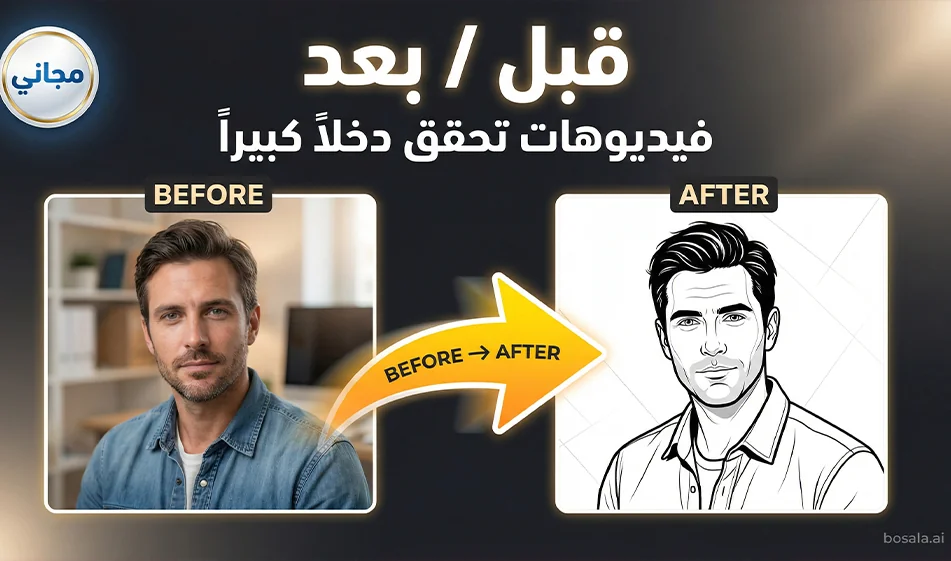
A "before and after" video using just two photos

A "before and after" video using just two photos

A "Before and After" Video Made from Just Two Photos

Did you know that before-and-after videos like these can become a source of income that matches or even exceeds a salary for some people?

Bousla Tip: You can create a trendy “before and after” video in minutes by combining two tools:
The first is for creating two static before-and-after images, and the second is for seamlessly animating the two images into a single video.

Links to the two sites:

Image site: https://gemini.google.com/app

Video site: https://uncensored.com/ai/video-generator

Step 1: Create a "before" and "after" image

Open Gemini and type two separate requests:

Before image prompt

  • Ask for a simple, realistic snapshot with normal lighting, no exaggeration, and no text in the image.

After image prompt

  • Exactly the same scene, but with an “enhanced result,” better lighting, and a cleaner composition—also without text in the image.

Compass Tip: The most important thing is consistency

  • Same shooting angle
  • Same distance
  • Same location
    so the viewer feels the transformation is real.

Ready-made template for a “before” image

Use this text and change whatever you want
A realistic "before" image: normal lighting, natural colors without exaggeration, clear details, consistent shooting angle, no text in the image, no logos.

Ready-made template for a "after" image

A realistic "after" style image, exactly the same scene and angle, but with soft studio lighting, more beautiful colors, a cleaner composition, high quality, no text inside the image, no logos.

Step 2: Combine the two photos into a single video

Go to any reliable “Two Photos to Video” tool, then

1 Upload the “Before” image as the start frame
2
Upload the “After” image as the end frame
3
Select the 9:16 aspect ratio
4
Select a duration of 6 to 8 seconds
5
Paste the following animation description, then generate the video

Ready-made motion description

Vertical 9:16 video,8 seconds long.
Start with the first image as the camera zooms in very slowly.
Smooth transition to the second image via a soft fade with a slight zoom.
Gradually reveal the difference over two seconds, then freeze the shot after one second at the end.
Smooth motion with no shaking, no flickering, no distortion, no text in the video, no music, no sound.

The secret to a successful trend

  • Do not include text in the video during rendering. Add it later using a neat Arabic font.
  • Keep the video short—6–8 seconds—so it loops automatically.
  • Set the last second to “After” because that’s the moment of surprise.
  • Create only 3 versions:
    (light version),
    (dark, luxurious version),and
    (usage scene version).

March 24, 2026 04:26 PM GMT
About Google Gemini

🖼️ Tool Name:

Google Gemini 

🔖 Core Classifications:

  • Generative AI & Agents: Capable of planning and executing logistics (e.g., "Plan my trip, book the hotel, and email the itinerary to my team").

  • Multimodal Mastery: Native understanding of text, 60fps real-time video, 3D spatial relationships, and high-fidelity audio.

  • Ecosystem Integration: Deeply embedded into Android, Google Workspace, and the new Gemini for Home(replacing legacy Google Assistant).

✏️ Key Features:

  • Gemini 3.0 Pro & Flash: Features "Built-in Reasoning" by default, meaning the AI automatically "thinks" through complex logic without needing a manual toggle. It handles a context window of 2 million+ tokens(entire codebases or hours of video).

  • Gemini Live (Visual Interface): You can now share your camera or screen in real-time. Point your phone at a broken appliance, and Gemini will provide an augmented reality (AR) overlay to show you how to fix it.

  • Deep Research Mode: A specialized tool that performs autonomous, hours-long web research, synthesizing thousands of sources into a professional report with verified citations.

  • Audio Overviews: Powered by NotebookLM technology, Gemini can turn any PDF, Doc, or Slides presentation into a two-person, conversational podcast episode.

  • Veo 3 & Nano Banana: High-end video generation (up to 8-second clips with sound) and state-of-the-art text-to-image editing are now integrated directly into the chat.

⭐️ User Experience Highlights:

  • "The Personal Assistant": Android users use Gemini to manage their calendars, summarize missed WhatsApp threads, and even draft replies that match their personal writing style.

  • "The Research Partner": Students and researchers use Gemini 3's "Multi-document insights" to find contradictions or patterns across hundreds of research papers simultaneously.

💵 Pricing Plans (2026 Status)

PlanPrice (Approx.)Key Features
Gemini Free$0Access to Gemini 2.5 Flash, basic Workspace integration, and limited image generation.
Gemini Advanced$19.99 /moAccess to Gemini 3 Pro, Deep Research, Veo 3 video, and 2TB Google One storage.
Google AI Ultra~$29.99 /moPriority access to experimental models, higher video/image limits, and advanced "Agent" features.
Workspace Business$20 - $30 /userEnterprise security, AI in Docs/Gmail, and Workspace Studio for automating business flows.

🎁 Is the free version a trial or completely free?

It is Free Forever. Google provides a robust free tier using its "Flash" models, which are optimized for speed and daily tasks. While free users don't get the "Deep Research" or "Veo 3" video tools, they still benefit from a massive context window and the ability to analyze files and photos.

⚙️ Access or Source:

  • Official Website

  • Mobile: The default assistant on most 2026 Android phones; available as an app on iOS.

  • On-Device: Gemini Nano runs locally on high-end phones for private, offline summaries and translations.

🔗 Experience Link: 

https://gemini.google.com/

About Gemini 2.5 Pro

️ 🖼Tool name:
Gemini 2.5 Pro
(Gigantic Multimodal Model from Google DeepMind)

🔖 Tool Category:
Multimodal General AI Model
Supports text, images, audio, and video - developed by Google DeepMind.


️ ✏What does this tool offer?

  • Multimodal understanding and generation: Supports input and processing of text, images, video, and audio within the same context.

  • Huge context capacity: Capable of handling up to 1 million tokens in input, allowing for the analysis of large-scale projects and documents.

  • Function Calling: Can execute commands and code within the conversation itself.

  • Execute code directly as part of the reasoning process.

  • Direct integration with research tools for real-time information retrieval.

  • Advanced Reasoning: Outstanding performance in solving complex problems in coding, math, and science.

  • Vibe-Coding and controlling the tone and style of audio output.


⭐ What does the tool actually offer based on user experience and official news?

  • Gemini 2.5 Pro tops Benchmark's global scores in programming, logic, and math.

  • Native Multimodal integration without the need for intermediate conversions.

  • It relies on accurate scheduling to price tokens (inputs/outputs) according to the volume of usage.

  • It is characterized by a secure architecture that adheres to Safety & Securitystandards, with a clear commitment to transparency and addressing ethical challenges.


🤖 Does it include automation?
Yes - to a very high degree.

  • Functions are implemented directly within the conversation to integrate with external services and developer tools.

  • Self-runs code within analytical responses.

  • Searches the web in real-time to fetch the latest information and data during the interaction.


💰 Pricing model:
Pay-as-you-go based on the number of tokens:

  • 💵 Input: $1.25 per million tokens (no caching )

  • O 💵utput: $10.00 per million tokens

  • If the input exceeds 200,000 tokens,progressively higher rates apply.

  • Prices are officially displayed on the Gemini Pro page on the DeepMind/Google website.


🆓 F ree plan details:

  • There is no comprehensive free plan for the model itself.

  • Limited trial or free tiers can be accessed across platforms:
    - Google AI Studio
    - Gemini API
    - Vertex AI

  • These platforms make it possible to try out some of the capabilities within the limits of free usage.


💳 Paid plan details:

  • Payment is based on the number of tokens actually used (Input + Output).

  • There is a different pricing for exceeding the 200k token limit in Input.

  • Organizations can manage usage via Google Cloud/Vertex AI accounts with professional options for scaling.


🧭 Access:

  • Via Google AI Studio to experience the model directly.

  • Through the Gemini API to integrate it into applications and software projects.

  • Via Vertex AI within Google Cloud to run it at enterprise scale.

  • Also available in the official Gemini app and Google's integrated platforms.


🔗 Link to the demo/source:
https://deepmind.google/models/gemini/pro


About Uncensored AI

️ 🖼Tool Name:
Uncensored AI

🔖 Categories:
Automation and Smart Agents
Chatbots/Voice Agents
Programming and Development
Image Design and Creation
Audio, Speech, and Music
Integrations and APIs
Text-to-Image Generation
Text-to-Speech / Speech-to-Text

️ ✏What does this tool offer?
Uncensored AI is a multimedia AI platform that provides access to a range of AI models for conversation, generation, voice, media, programming, and APIs. It allows users to ask questions, explore ideas, role-play, solve problems, and be entertained, as well as receive, create, and retrieve media—including media generated or retrieved from the web—conduct real-time information searches, and engage in voice interaction. Its capabilities include advanced conversational models, instant web search, voice interaction, Code Mode, AI-powered predictive input, and vision models for multimedia processing. It also provides an image generator based on in-house models and Flux.1 models, allows users to compare more than 50 models, and offers an API for developers. According to the official website, available models include Claude, DeepSeek, Gemini, GPT, Grok, Kimi, Qwen, GLM, MiniMax, and others, with the list of available models continually updated. The platform was first launched in beta in December 2022.

⭐ What does it actually offer based on user experience?

  • It allows users to access multiple AI models through a single platform.
  • It provides real-time information search across the web.
  • It allows you to interact with the models using your voice and hear the responses audibly.
  • It allows you to send media to the conversation and process it using vision models.
  • It enables image generation using in-house image generation models and Flux.1 models.
  • It offers Code Mode for creating code, with the option to use the Model T model in this mode.
  • It allows you to compare more than 50 models and select the desired one, with the option to use the developer API.
  • The official website states that the service has over 10 million users.
  • A review posted on the website on September 9, 2026, mentioned that a user named carlosm was impressed with the free tier and upgraded on the same day, noting that he used the Grok 4.6 model. This is a user review posted on the website and is not an independent verification of this experience.

🤖 Does it include automation?
The platform includes AI-powered features that operate automatically within the conversation, such as real-time web search, predictive input, and smart suggestions, media processing, image analysis, and image generation, as well as Code Mode, which helps with code generation. However, the official website does not describe the platform as a standalone tool for workflow automation or RPA.

💰 Pricing Model:
Free / Freemium / Monthly subscription / Annual subscription / Credit-based usage. The platform offers a free account with limited access, as well as paid plans. The current terms of service list a monthly plan priced at $29.99, a Premium monthly plan with 1,000 credits priced at $99, and an annual plan priced at $149.99. Additional credits can also be purchased, with each credit costing $0.10; these credits are used for supported features such as photos, videos, audio, and chat once the free or included allowance has been exhausted.

🆓 Free Plan Details:

PlanPriceBenefits
FreeFreeLimited free access to the service. Plans include a free or included usage quota for certain non-conversation-related features, and capacity varies depending on system demand. The platform also offers a free trial of the service.

The Terms of Service stipulate that only one free account is allowed per person.

💳 Paid Plan Details:

PlanPriceFeatures and Differences
Monthly$29.99 per monthFull access to the chat app’s features, including text models, voice interaction, and vision models, with a free or included usage quota for non-chat features.
Monthly Premium with Credits$99 per monthAccess to the app’s features, with 1,000 credits.
Yearly$149.99 per yearFull access to the chat app’s features, including text models, voice interaction, and vision models, with a free or included usage allowance for non-chat features.
Credits$0.10 per CreditAdditional credits can be purchased in-app after the free or included usage has been exhausted, and are used for supported features such as images, video, audio, and additional chat usage.

The Terms of Service state that paid plans include high monthly limits for conversation model usage; once these limits are exceeded, usage continues on a pay-as-you-go basis. Some features with high computational costs may be subject to a fair use policy. Subscriptions renew automatically unless canceled before the renewal date.

🧭 How to access the tool:

How to AccessDetails
WebA web app that runs directly in your browser and does not require installation.
iOSAvailable on iPhone devices according to the official website.
AndroidAvailable on Android devices; it can be installed as a PWA from the browser.
APIAn API is available to developers, and the platform provides API access to Premium users, with $5 in free credits for Premium users during the current expansion phase.
DesktopAccessible via the web on desktop devices.

🔗 Trial link or official website:
Uncensored AI – Official Website and Demo