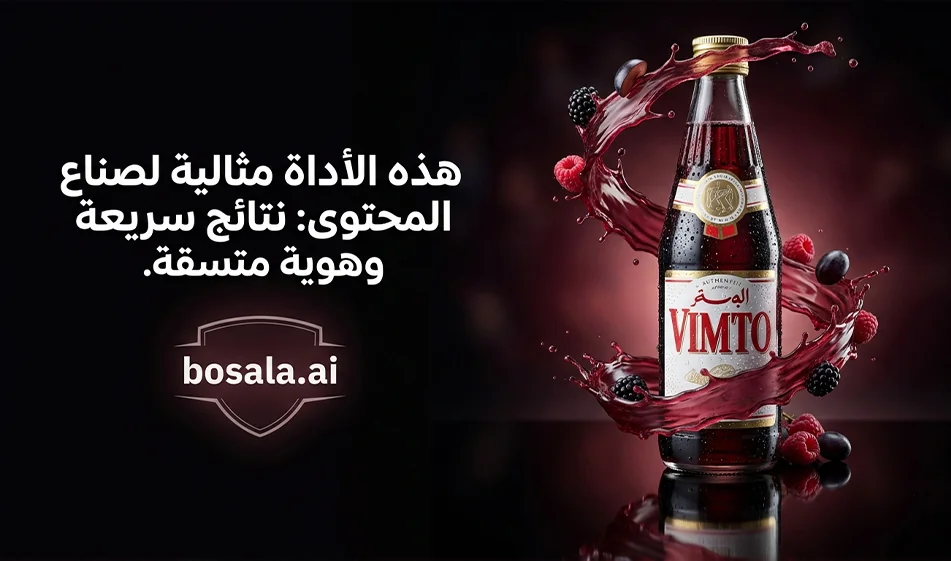
Krea for Image and Video Generation and Training a LoRA Modelfor Identity Stability
with example prompts for a Vimto ad
Website link: https://www.krea.ai/refer/M4943WEA
Krea is a platform that brings three things together in one place
Generate professional images from text or an image
Generate short videos from text or an image
and train LoRA to maintain consistency in the product, character, or style across all results
The practical goal for content creators and advertisers
Take a single product image and generate an entire campaign from it
Post images, Stories, and short video clips ready for publication
No photography and no heavy editing required
- How to get started for free the smart way
The free plan usually gives you a limited daily credit in usage units and allows you to try out the photo and video tools within certain limits that vary depending on updates and server load
Bousla’s tip for getting the most out of the free plan:
Start with short clips and one strong shot instead of dozens of attempts:
Generate only two versions for each prompt, then choose the best one:
If a problem arises, don’t change the entire prompt—just tweak a single line, like:
Smoother camera movement:
Simpler background:
Greater stability for the product without distortion
- Step-by-step image generation in Krea
Step 1: Choose the generation type
Text-to-image when you want to create an ad from scratch
Image-to-image when you want to keep the product’s shape and then change the background, lighting, and atmosphere
Step 2: Choose the right size for your post
1:1 Square post
4:5 Strong ad post
9:16 Story or Reels cover
Step 3 Write the prompt in an advertising style
Focus on 4 elements
Product as the hero in the center
Realistic studio lighting
Clean, uncluttered background
Empty space for text later
Step 4: Generate and Select
Generate only 2 to 4 versions
Select the best version basedon
The poster’s stability without distortion
Clarity of texture details and shine
Cleanliness of the background
Absence of random text
Golden rule
Do not include Arabic text within the image during generation. If you notice errors in the letters
, add the Arabic text later in Canva using a neat Arabic font
- Generating the video in Krea step by step
Step 1: Choose the video type
Text to Video for a cinematic scene from scratch
Image to Video to animate the product image with greater stability
Step 2 Recommended settings
Aspect ratio 9:16
Short duration—6 to 10 seconds is usually best for socialmedia
Only one camera movement
End with a half-second static shot of the subject to increase rewatchability
No text on screen
No subtitles
Step 3: Write the prompt as a shooting plan
Location and atmosphere
What happens in a few seconds
Clear and simple camera movement
Realistic lighting and textures
Error prevention guidelines
No distortion, no stretching, stable framing, smooth motion
Note on audio
If the audio option is available to you, request “only light effects and ambiance” and avoid adding music during rendering if you plan to add it later
- What is LoRA and why is it important for ads
LoRA is a lightweight training method that helps the tool “recognize” consistent identities such as
product packaging and labels
consistent cartoon characters for children
consistent lighting styles and textures for campaigns
When to use it
When you notice that the product’s shape changes from one image to another
or that the label is distorted
or you want an entire campaign with the same identity without variation
- Practical LoRA Trainingin Krea
First, prepare the training images
. 15 to 30 images are recommended to startwith
. Include various angles of the product
: front
, side
, 45 degrees
, close-up macro
. Use a simple background and clear lighting
. Avoid mixing different products within the same training set
Second, create a LoRA
Upload training images
Choose a single, clear trigger word such as
vimto_brand
You will later place this word inside any prompt to activate the identity
Third: Post-training usage
When generating an image or video, include the activation word in the prompt
Then add a strong stabilization line suchas
Keep the packaging and label exactly as they are, without distortion or alteration
Tip:
Ifyour LoRA trainingbudgetislimited, use it only for products that will appear frequently in ads
For one-off products, rely on image-to-image generation with label-stabilizing prompts
- Pricing and Free Usage at a Glance
Krea typically operates on a pay-as-you-go basis
with a free plan offering a limited daily credit
followed by higher-tier monthly plans with more units and expanded features such as more video, more powerful models, and LoRA trainingwith greater capacity
A quick summary to help you choose without getting bogged down in numbers that may change
The free plan is suitable for testing and creating one or two samplesperday
The Basic plan is suitable for those who publish several times a week
The Pro plan is suitable for daily content creators or multiple client projects
The Premium plan is suitable for intensive production andfrequent LoRA training
A tip from Busla before you pay:
Test the tool on 3 different products:
If it works easily and consistently with all three, then subscribing makes sense
- Example prompts for a Fimto beverage ad
First, ready-made image prompts
Prompt 1: Studio Shot
Professional ad image design featuring a Vimto bottle in the center of the frame, soft studio lighting, realistic shadows, slight reflection on a glossy surface, clean, luxurious background with subtle gradients, very high detail, no text within the image, no watermark, stable poster without distortion, empty space for text later
Prompt 2: Refreshment and Ice
A realistic advertisement image of a Vimto bottle with visible condensation droplets, ice cubes beside it, cool and refreshing lighting, a simple, uncluttered background, the product is the star in the center, high detail, no text inside the image, label stability without distortion, no watermark
Prompt 3: Elegant Ramadan Atmosphere
An advertising image for Vimto with a warm Arabic atmosphere: Softly lit lanterns, clean wooden or marble background, subtle golden glow, a cup next to the product with very light steam, product is stable and clear, no text within the image, no watermark, label is stable without distortion
Trendy SocialMediaPrompt 4
A modern advertising image for Vimto with an elegant color gradient background, very simple elements around the product that suggest the flavor without clutter, clean commercial lighting, empty space for text later, no text within the image, no watermark, label positioned without distortion
Second: Ready-to-use video prompts
Video Prompt 1: 8-second film studioshot
An 8-second vertical 9:16 video for a Vimto bottle advertisement. Starts with a very close-up shot of condensation droplets, then a slow zoom-in reveals the entire bottle, soft studio lighting, slight reflection, ending with a static shot of the product for half a second. No text on screen, no subtitles, no shaking, no flickering, stable logo without distortion
Video Prompt 2:10-second usage scene
10-second vertical 9:16 video: Hand pouring Vimto into a glass with ice, realistic fluid motion, warm lighting, clean, uncluttered kitchen background, then a close-up of the product and the glass side by side. No faces, no on-screen text, half-second freeze frame at the end, stable logo without distortion, no shaking or flickering
8-second Ramadan-themed video prompt
8-second vertical video (9:16 aspect ratio): Opening shot of a glowing lantern and a warm background, followed by a smooth transition showing a Fimto bottle on a clean marble table, with light steam rising from a glass next to it, soft golden lighting, and a static close-up shot at the end. No on-screen text, no subtitles, no music, and the logo remains stable without distortion
SummaryKrea is very useful for quickly creating advertising images and videos, and its strongest feature is LoRA trainingto maintain product or character identity across all results. Start smart with the free version: only two versions per prompt, short duration, simple motion, then switch to the paid version only when you’re sure the results are consistent and serve your weekly production.