Integrating ChatGPT or Nano Banana into food photography designs featuring Arabic text, and then animating them.
· 4 min read
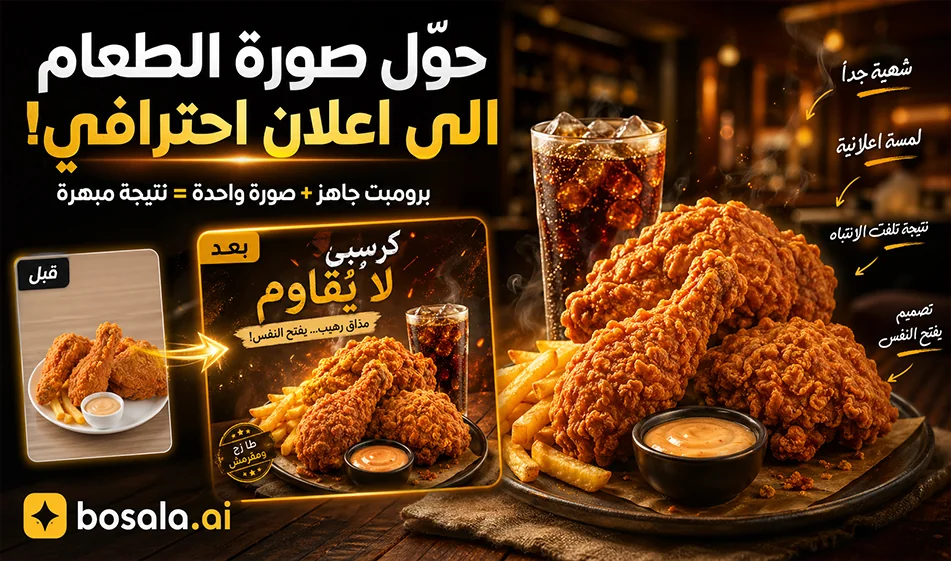
Integrate ChatGPT or Nano Banana into food photography designs with Arabic text, and then animate them.
If you want to turn an ordinary meal photo into a professional design reminiscent of trendy magazines and restaurant posts, you can rely on ChatGPT or Nano Banana in a very simple way: Upload the food photo, then paste the ready-made prompt to get an image featuring elegant Arabic text, short captions, arrows, and visual touches that make the meal more appealing.
This method is ideal for restaurants, cafes, content creators, and social media designers, as it transforms a food photo from an ordinary snapshot into a publish-ready promotional design—such as an image featuring the meal with handwritten Arabic comments about the crispiness, taste, sauce, fries, and drink.
Links used:
https://www.mindvideo.ai/image-to-video/
How does it work?
Start by uploading a photo of the meal to ChatGPT or Nano Banana, then paste the custom prompt. The tool analyzes the image, identifies the main element, and adds short Arabic text in a modern style reminiscent of magazines or modern café notebooks.
The result is a single final image with the text integrated into the design itself, ready to be used directly in social media posts, reel covers, ads, or digital menus.
How do we turn the image into an animated video?
Once you have the final image, you can convert it into a video using the MindVideo Image to Videotool . The process is simple: upload the designed image, paste in a suitable motion prompt, and then click the Generate button to get an animated video from the image. The tool’s page explains that the process involves uploading an image, customizing the video, and then clicking Generate to create the video; it also positions itself as a tool for converting static images into animated videos.
The animation can include effects such as: a gentle zoom over the meal, a slow camera movement, text appearing gradually, or a cinematic feel that makes the design suitable for Reels and Shorts.
Image Animation Prompt
Animate this food advertisement image with a slow cinematic camera movement. Add a gentle zoom-in toward the main dish, subtle depth movement, and soft parallax between the food, drink, packaging, and background. Make the handwritten Arabic annotations feel naturally integrated, with a light reveal effect as if they are being drawn softly on the image. Keep the original design, colors, logo, Arabic text, and food details unchanged. The motion should feel elegant, warm, appetizing, and suitable for a professional restaurant social media reel.
Ready-to-use prompt for image design
Analyze the uploaded photo and add stylish handwritten Arabic annotations like a modern lifestyle magazine.
First, identify the main motif of the photo and treat it as the clear subject. Focus most comments on that main motif. At least 70–80% of the annotations should relate directly to the main motif. Do not place comments on background elements or minor objects unless they clearly support the subject.
Add a small headline, short side notes, tiny callouts, and one soft emotional phrase. Keep the text short, natural, and human. The writing should feel emotive, tasteful, slightly poetic, and editorial.
Use handwritten Arabic text with thin pen-like strokes and a stylish rough feel. Make the text slightly larger and easy to read. Use dark text on bright areas and white or off-white text on dark areas. Keep the layout elegant, balanced, and not overcrowded. Use arrows, circles, underlines, or dotted marks when helpful.
The Arabic text should feel modern, minimal, and aesthetically pleasing — similar to lifestyle magazines or café journals.
Output a single finished image with the handwritten annotations already embedded.
Tip
For best results, use a clear food photo where the meal is the main subject, with good lighting and an uncluttered background. After generating the image, convert it into a short video with subtle motion to make it more engaging for viewers on social media.
Summary
Integrating ChatGPT or Nano Banana with image-to-video conversion tools gives restaurants and content creators an easy way to produce professional visual content. A single image, a ready-made prompt, and a simple animation step can be enough to produce a distinctive and appealing food design for posting.
About ChatGPT
- Answers with improved factual accuracy and a 400k token context window
- Offers Advanced Voice Mode with emotion understanding, real-time translation and natural interruptions
- Provides Canvas, a side-by-side workspace for writing and coding
- Remembers preferences, projects and instructions across conversations
- Generates short video clips with Sora integration for Plus and Pro users
- Available as native apps for Windows, macOS, iOS and Android
About Gemini 2.5 Pro
- Processes text, images, audio and video in a single context
- Handles up to 1 million input tokens for large projects and documents
- Function calling to run commands within the conversation
- Executes code directly as part of its reasoning
- Retrieves real-time information through web search
- Advanced reasoning for complex coding, math and science problems
- Controls the tone and style of audio output
- Available via Google AI Studio, Gemini API, Vertex AI and the Gemini app
About Google Gemini
- Plans and executes multi-step tasks such as trip planning, booking and emailing
- Understands text, real-time video, 3D spatial relationships and audio
- Integrates with Android, Google Workspace and Gemini for Home
- Reasons through complex logic by default with a 2 million+ token context window
- Shares camera or screen in real time with Gemini Live
- Runs autonomous Deep Research and produces reports with citations
- Turns PDFs, Docs or Slides into conversational podcast-style Audio Overviews
- Generates video with Veo 3 and edits images with Nano Banana
- Runs Gemini Nano on-device for offline summaries and translations
About MindVideo
- Generates videos from text or images
- Switches between Kling AI, Luma Ray, Veo 3, Runway Gen-4.5 and Sora 2
- Effects such as AI Kiss, AI Hug and AI Morph
- Animates still images while keeping the subject consistent
- Native AI audio engine for synced sound effects and music
- Magic Brush to choose which area of an image to animate
- Preview clips in under 60 seconds
Related Tips
- A video prompt that gives you the feel of GTA with an Arabic twist
- 2 million free tokens to create videos! on Seedance
- How to Use the Pokecut Tool to Easily Extract Images
- A professional prompt for turning a meal name into a full recipe infographic
- Bosala Brand Studio Explains: How to Create a Complete Visual Identity from a Logo in Minutes?