️ Tool Name: 🖼
Microsoft Designer
Tool Category: 🔖
Image Design and Creation
Generate images from text
Social media templates and automated editing
️ What does this tool offer? ✏
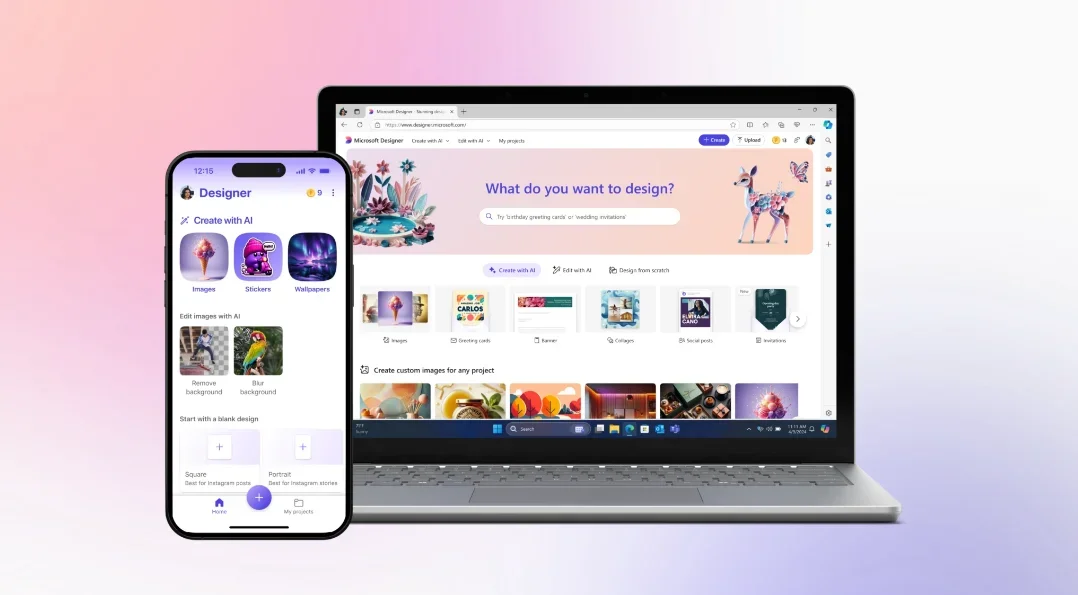
The tool offers an integrated AI-powered design platform that allows users to create images, posters, cards, backgrounds, and avatars using a simple text description. Users can choose a design type or enter an idea directly, and the system will generate ready-to-use, editable results. It also offers features such as smart editing, color selection, size customization, and the ability to create designs from scratch or using pre-made templates.
What does it actually offer based on user experience? ⭐
The interface shows that usage is simple and straightforward: the user starts by typing what they want to design into the input bar, then chooses between “Create with AI,” “Edit with AI,” or starting from scratch. The tool provides ready-made categories such as images, icons, posters, and social media posts, as well as ready-made templates like greeting cards that can be easily customized. You can also create an avatar by providing a detailed description and specifying colors and size, while saving projects in “My Projects” for later access.
Does it include automation? 🤖
Yes, the tool relies primarily on AI-powered automation, automatically converting text into ready-made designs, with automatic image enhancements and the ability to edit content using AI without complex manual intervention.
Pricing model: 💰
The tool offers a free plan with the option to upgrade via a Microsoft 365 subscription to access additional benefits such as increased storage capacity and higher usage limits.
🆓 Free Plan Details:
The free plan allows you to use the tool to create various AI-powered designs
It provides cloud storage starting at 5 GB
Access to basic design and generation features
Limited use of some AI features compared to paid plans
Paid Plan Details: 💳
Personal Plan (approx. $5.69 per month):
Intended for a single user
Includes additional storage and usage benefits
Enhanced access to Copilot features
Family Plan (approx. $7.69 per month):
Supports multiple users (up to 6 people)
Provides more storage space per user
Suitable for families or small teams
Premium Plan (approx. $13.99 per month):
Offers the highest level of usage
Advanced AI features
Larger storage capacity of up to several terabytes
Additional capabilities such as security and professional tools
How to access the tool: 🧭
The user logs in via “Sign in,” then types a description of the design they want into the input bar. Next, they choose to create the design using “Create with AI,” edit an existing design, or start from scratch. They can select the design type or use ready-made templates, then save or share their work.
Demo link or official website: 🔗
https://designer.microsoft.com/image-creator?scenario=avatar-texttoimage