Screenshot to Code
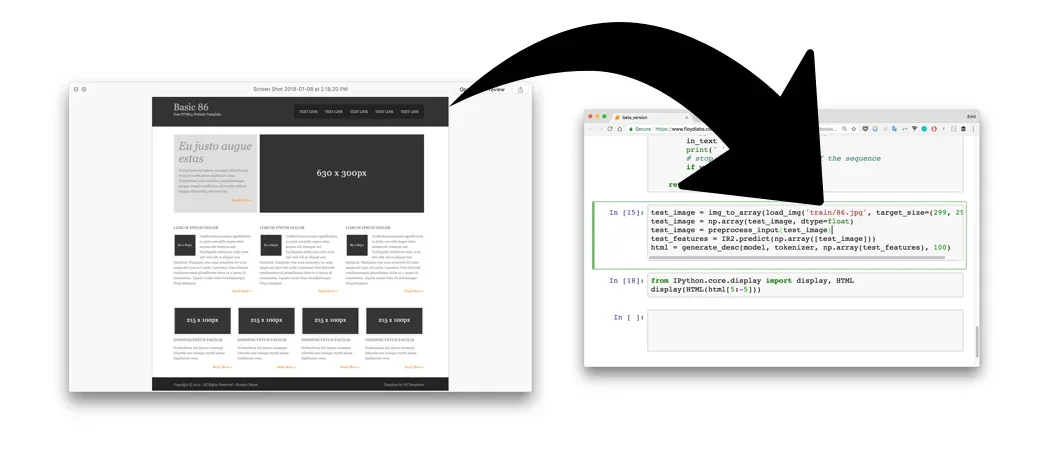
Description
🖼️ Tool Name:
Screenshot to Code
🔖 Tool Category:
Programming & Development — it falls under AI-powered tools that convert visual UI designs (screenshots or mockups) into functional front-end code.
✏️ What does this tool offer?
Screenshot to Code is an AI tool that takes a screenshot or UI design image and automatically generates corresponding code — typically HTML, CSS, or frameworks like React or Tailwind. It’s designed to accelerate front-end prototyping and development by bridging the gap between design and code. Developers and designers can use it to reduce manual effort when translating UI visuals into structured markup and styles.
⭐ What does the tool actually deliver based on user experience?
• Converts UI screenshots into clean HTML/CSS or React code
• Supports modern design-to-code workflows (including Tailwind, Next.js)
• Works well with Figma exports, mockups, or hand-drawn wireframes
• Helps developers prototype interfaces much faster
• Great for beginners who want to learn from visual UI patterns
• Offers real-time previews and downloadable code snippets
🤖 Does it include automation?
Yes — it is fully automated:
• Parses images or screenshots and applies computer vision + AI models
• Detects UI structure and hierarchy
• Automatically generates code components and layout
• No manual slicing or tagging required
💰 Pricing Model:
Freemium — free access with limited usage, with premium upgrades available
🆓 Free Plan Details:
• Limited number of conversions per month
• Access to core features (upload screenshot → get code)
• No account required for basic usage
💳 Paid Plan Details:
• Pro Plans typically start from ~$10/month
• Higher conversion quotas
• Priority processing and access to advanced frameworks
• Some platforms offer downloadable full projects (React/Next.js)
🧭 Access Method:
• Web-based tools (e.g., screenshot-to-code.com, frontendgpt.dev)
• Some open-source alternatives available on GitHub
• Also available as Figma plugins or browser-based AI tools
🔗 Experience Link: