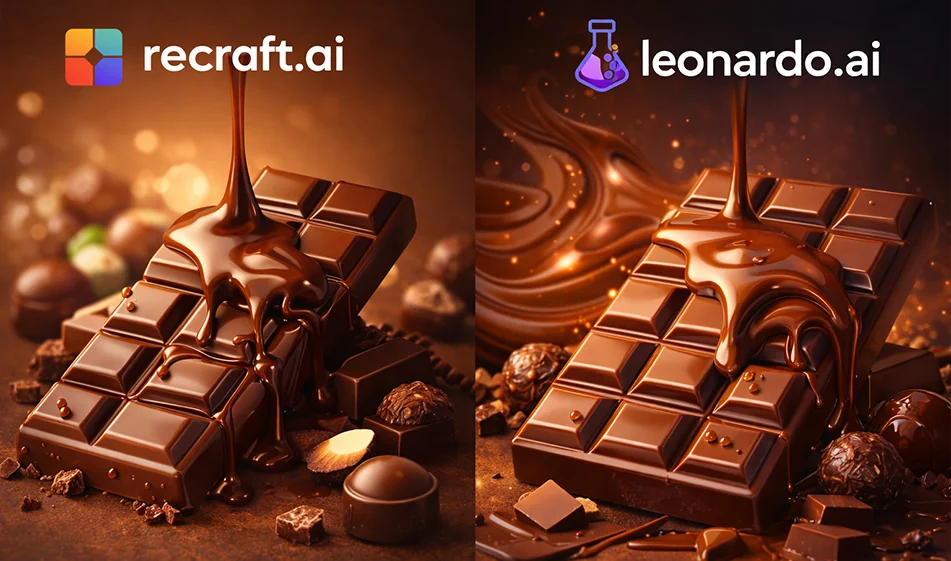
๐Ÿซ Compass comparison: Recraft.ai vs Leonardo.ai for a chocolate product ad

๐Ÿซ Compass comparison: Recraft.ai vs Leonardo.ai for a chocolate product ad

๐Ÿ’ก Compass Tip

If your goal is to produce a chocolate ad image that looks "campaign-ready" in a short time, the key is not the best tool overall, but the one that best serves the type of ad you want: Photorealistic? Or a clean ad design with clear elements, graphics and identity?

โœ… Practical difference between the two tools

1) Recraft.ai (usually suited for clean advertising design)

  • Powerful when you want an uncluttered ad style: Simple backgrounds, clean shapes, design elements, and multiple copies quickly.
  • Suitable if you need a poster/banner-like output with a clear text area, and a touch more "design" than "photography".
  • Excellent choice for producing auxiliary elements: Icons, decorations, shapes, backgrounds, or semi-Vector styles that support the brand's identity.

When to choose it?
If your ad relies on a "clean visual identity" and clear design components, rather than a very realistic photo shoot.

2) Leonardo.ai (usually suited for realistic and cinematic product shots)

  • Strong when you want an ad image that looks like product photography: Chocolate shine, light reflection, textures, details of pieces and crumbs.
  • Suitable for producing cinematic scenes: Melting chocolate, flying pieces, light vapor, deep background, studio lighting.
  • Useful if your focus is more on the "shot" itself than a poster design.

When to choose it?
If your ad relies on high realism and a premium look and feel inproduct photography.

๐Ÿงช Quick test to choose the best one (10 minutes)

Apply the same idea to both tools and then compare with these criteria:

  1. The realism of the chocolate texture (shine + melt + detail)
  2. Cleanliness of the background and space to add a price/display
  3. Consistency of the product's appearance across multiple versions
  4. Attractiveness of the ad at first sight (contrast, lighting, composition)
  5. How easy it is to get 5 different versions quickly

๐Ÿงฉ Prompt ready for a chocolate ad (copy and edit brackets)

"Luxury Product Photography" version (more suitable for Leonardo usually):
"Chocolate product ad image (product name), professional studio product photography, softboxlighting,luxurious dark background with simple gradient, chocolate bar in the center with small pieces around it, realistic texture and natural shine, high detail, realistic shadows, simple depth of field, close-up, clean commercial style, blank space at the top for text"

"Clean Poster" version (usually more suitable for ReCraft):
"Poster for a chocolate product (product name), clean and modern design, simple gradient background, drawn chocolate elements/semi-Victorian or design style, neat composition with clear text space, soft lighting, fancy colors, commercial style, social media friendly version"

โญ A brief business plan to produce a ready-made ad

  1. Produce 3 copies in each tool with the same prompter.
  2. Change only one thing in each version: (background/camera angle/close-up).
  3. Choose the best version of each widget.
  4. It's the finalized ad:Add a price/offer/logo in a design editor (depending on your style).
  5. Keep the best prompter and make a series of them for other products.

๐Ÿ’ฐ Pricing Note

Both tools often offer a free trial option (with a limited amount or number of generators), and then paid plans for higher quality and higher quantity of generators.It's best to test the chocolate ad itself on the free plan first, then decide.

๐Ÿงญ Golden Compass Tip

For chocolate ad images, always ask for: Soft studio lighting + realistic shadows + space for text. A successful ad is not only the most beautiful image, but an image that "sells" because it is clear and leaves room for the message.

For more AI tools: bosala.ai

December 28, 2025 01:58 PM GMT
About Leonardo.ai

๐Ÿ–ผ๏ธ Tool Name:
Leonardo.ai

๐Ÿ”– Tool Category:
AI-powered image and video generation platform; it falls under Image Generation, Media Editing & Enhancement, Generative AI & Media Creation, and even supports 3D Texture Generation—enabling creators to produce high-quality visuals, animations, and asset textures with full stylistic control.

Leonardo.ai leverages advanced Stable Diffusion-based models and its proprietary “Phoenix” foundational model to:
• Generate high-fidelity images from text prompts with granular options like aspect ratio, styles, and reference images 
• Offer an interactive AI Canvas for inpainting, outpainting, sketched input, and real-time tweaking
• Produce transparent PNG elements, pattern tiles, and animated video clips via “Veoโ€ฏ3” (“Motion” feature)
• Generate 3D textures by uploading 3D assets for contextual AI-enhanced texture baking 

๐Ÿ’ฐ Pricing Model:
Tiered subscription + free plan

๐Ÿ†“ Free Plan Details:
• Daily allowance of 150 fast tokens (≈10–15 image generations); limited Canvas use and single-job concurrency 

๐Ÿ’ณ Paid Plan Details:
Apprentice: $12/mo (billed annually) – 5,500 fast tokens + token rollover
Artisan: $30/mo – unlimited images, art guidance features
Maestro: $60/mo – priority access, Motion video generation
Teams: from $24 per user, includes collaboration & API access 

๐Ÿงญ Access Method:
• Web app at – full-featured Canvas, VoE, texture tools 
• Mobile apps on Android and iOS for on-the-go creation
• Developer-friendly API/SDK with credit-based pricing and usage calculator 

๐Ÿ”— Experience Link:
• Official site: https://leonardo.ai

About Recraft

๐Ÿ–ผ๏ธ Tool Name:
Recraft

๐Ÿ”– Tool Category:
AI-powered vector and graphic design tool; it falls under the category of Design & Creativity and Image Generation.

โœ๏ธ What does this tool offer?
Recraft is an AI design tool that enables users to generate vector art, illustrations, icons, and logos from text prompts. It’s tailored for designers and branding professionals who want to create scalable, editable assets (like SVGs) with creative control and professional polish — all powered by generative AI.

โญ What does the tool actually deliver based on user experience?
• AI-generated vector illustrations and icons from natural language prompts
• Output in fully editable formats (SVG, PNG, JPG)
• Control over design elements: color palettes, shapes, styles
• Presets for UI design, branding, social graphics, and more
• Ability to refine, remix, or evolve designs iteratively
• Simple and intuitive interface for professionals and beginners alike
• Great for logo design, pitch decks, infographics, and brand kits

๐Ÿค– Does it include automation?
Yes —
• Generates editable vector graphics from text
• Suggests style options and improvements
• Auto-adjusts visual balance and scaling for different use cases
• Allows for batch generation and quick edits

๐Ÿ’ฐ Pricing Model:
Freemium

๐Ÿ†“ Free Plan Details:
• Unlimited personal use
• Export with watermark or limited resolution
• Access to core design styles and prompt options

๐Ÿ’ณ Paid Plan Details:
• Pro version includes:

  • High-res and watermark-free downloads

  • Commercial usage license

  • Priority rendering and advanced editing tools

  • Team collaboration and brand workspace features

๐Ÿงญ Access Method:
• Web App

๐Ÿ”— Experience Link:

https://www.recraft.ai

About Leonardo AI

๐Ÿ–ผ๏ธ Tool Name:
Leonardo AI

๐Ÿ”– Tool Category:
Text-to-Image Generation (and partly Text/Images→Video) — falls under the category of “Text to Image Generation” (primary) and also “Text and Images to Video” (emerging video/animation features) in your list.

โœ๏ธ What does this tool offer?

  • Leonardo AI is a generative-AI platform that enables users to create high-quality images from text prompts, edit images (via upload + text/image mix), upscale images, and even generate brief motion/animation (video) features. 

  • It provides a variety of fine-tuned models/presets for different art styles (anime, photorealism, concept art, 3D textures) as well as an editing “Canvas” for polishing work. 

  • Has features like upscaling, background removal, “Realtime Canvas” where you doodle + prompt, plus special models (e.g., “PhotoReal”, “Kino XL”) for higher-fidelity output. 

โญ What does the tool actually deliver based on user experience?
• Users report that Leonardo AI delivers high-quality visuals, strong style control, and a robust set of presets/models that make it suitable for professional work (e.g., game assets, concept art).
• It supports “Prompt Enhance” features (help refine prompt) and a library of models aimed at different styles, which makes iteration faster and more flexible.
• The motion/video generation side is still emerging: while it offers a “Motion” tool that converts static images into short motion/animation clips, it is not yet at the level of full video creation performance of dedicated video-generation tools. 

๐Ÿค– Does it include automation?
Yes — Leonardo AI uses automation in the following ways:
• From natural-language text prompts to image generation: the entire pipeline is automated.
• Image editing features: upscaling, background removal, in-painting/out-painting are automated.
• Style/model presets/collections reduce manual configuration: you select style + model, and the system handles much of the detail.
• Emerging motion/animation features automate parts of video generation from image + prompt.

๐Ÿ’ฐ Pricing Model:
According to reviews:
• There is a free tier: e.g., you receive a certain number of free “tokens”/credits per day. 
• Paid tiers: Examples cited — Apprentice ~$12/month, Artisan Unlimited ~$30/month, Maestro Unlimited ~$60/month.

๐Ÿ†“ Free Plan Details:
• The free version provides limited credits (e.g., 150 tokens per day) and limited generation options/resolutions. 
• Users can experiment with many styles though the highest-quality features may be in paid plans.

๐Ÿ’ณ Paid Plan Details:
• Paid plans raise limits, grant access to more advanced models (e.g., “Motion” video feature), higher resolution exports, possibly commercial usage rights. 

๐Ÿงญ Access Method:
• Web-based platform
• Mobile app versions: Available on Android & iOS (for image generation) according to app store listings. 

๐Ÿ”— Experience Link:

https://www.leonardo.ai