🍶 Comparison: Dzine vs insMind for creating Almarai milk ad images with artificial intelligence
· 3 min read
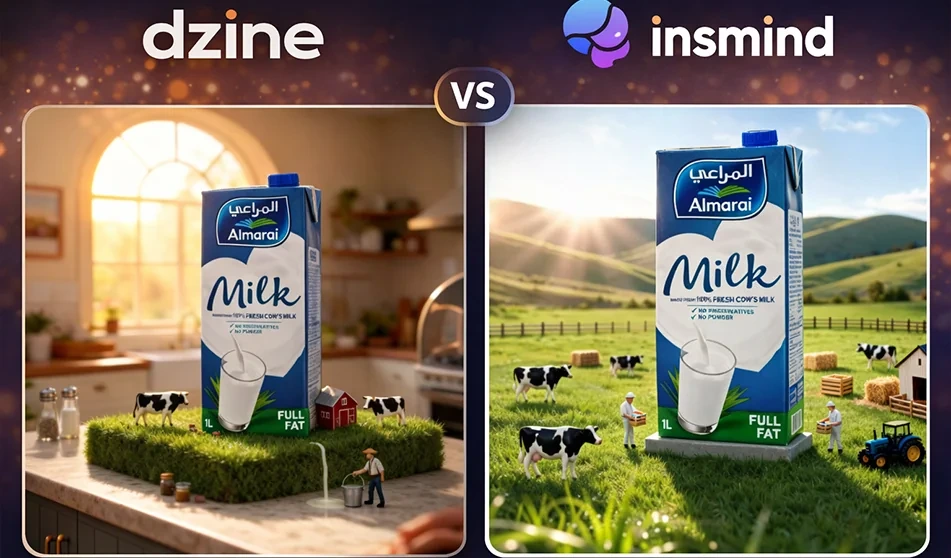
: Dzine vs insMind for creating Almarai milk ad images with artificial intelligence
💡 Compass tip
If your goal is to quickly produce a professional advertisement image for a product such as Almarai milk (attractive background + studio lighting + multiple angles), then the choice of tool depends on the type of work you do: Do you want a platform that focuses on "backgrounds and product advertisements"? Or a quick processing platform (background cropping + enhancement + backgrounds with descriptions) in one place?
1) Dzine: Strongest for ready-made advertising images with product backgrounds
When does it excel?
- When you have a ready-made product image and want to quickly place it in advertising backgrounds with good control over lighting and colors.
- Suitable for producing multiple copies (multiple backgrounds and angles) to choose the best for your campaign.
- Gives strong results in "product photography" with a clean advertising style.
Suitable for: store advertisements, catalog photos, product posters with professional backgrounds.
2) insMind: Stronger for quick preparation before advertising
When does it excel?
- When you first need to accurately remove the background of a milk carton before anything else.
- Excellent for cleaning up the image: cropping, enhancing, and quick editing before moving on to the final design.
- Useful if you want to quickly replace backgrounds without getting into too many details.
Suitable for: Quickly preparing product images, cleaning edges, and replacing backgrounds in simple steps.
The best workflow for the "Almarai Milk" ad (practical and fast)
- Get started with insMind
- Upload a photo of the milk carton
- Automatically remove the background
- Make sure the edges are clean, especially around the cap and white edges
- Then use Dzine to create multiple ad copies
- Upload the product after unpacking
- Request 6–10 copies with different backgrounds and angles (studio, morning kitchen, luxury ad, etc.)
- Choose the best 2–3 images for the campaign
- Add text and price later in Canva or any design editor
- to ensure the accuracy of Arabic writing and the consistency of font and visual identity
🧩 3 ready-made descriptions for an advertisement image (copy and edit the name only)
1) Clean studio ad (for store and catalog)
“Professional advertisement image for Almarai milk carton, clean white background, soft studio lighting, realistic shadows, close-up shot, 45-degree angle, high detail, slight reflection, empty space above the image for text”
2) Morning advertisement (for social media)
“Almarai milk carton on a breakfast table, warm kitchen, natural morning lighting from the window, simple bread and fruit, tidy composition, product in the center, realistic shadows, clean commercial style.”
3) Luxury advertisement (for displays and banners)
“Almarai milk carton in a luxurious advertising style, dark gradient background, soft spot lighting, halo behind the product, high detail, realistic shadows, simple composition with empty space for text, high quality.”
🧭 Golden Compass Tip
Don't test "the best tool" with a general question. Test it with this rule:
Same product image + same idea + five copies
Then choose the image that meets three conditions: product clarity + background suitable for text + realistic lighting.
For more AI tools: bosala.ai
About Dzine AI
- Create and edit images using a variety of templates, with the ability to control the image's composition and style.
- Generate videos from text or images, with tools for creating animations and videos.
- Use a layered workspace where you can drag, drop, and reposition elements to adjust the image composition.
- Apply predefined styles to customize designs without having to write complex commands to describe the style.
- Automatically identify elements and separate them into independent layers, with the option to save them as assets for later use.
- Improve image clarity and correct visual defects, with tools to enhance the quality of photos and videos.
- Synchronizing speech with lip movement, along with tools for generating dialogues and podcasts, converting text to speech, and creating speaking characters.
- Create reusable characters with multiple angles, outfits, and expressions to maintain consistency in their appearance across scenes.
- Providing an asset library, analyzing scripts and converting them into organized scenes, real-time collaboration, managing seats, credits, and spaces; and tracking work references, orders, templates, revisions, and approvals, along with tools to monitor copyright risks and potential similarities.
About insMind
- Removes backgrounds automatically
- Removes unwanted objects from images
- Enhances image quality
- Upscales images without quality loss
- Generates avatars, artistic and professional images
- Creates AI backgrounds, fashion model images and design templates
- Processes images in batches on advanced plans
- Runs in any browser without installation
Related Tips
- How to Use the Pokecut Tool to Easily Extract Images
- A professional prompt for turning a meal name into a full recipe infographic
- Bosala Brand Studio Explains: How to Create a Complete Visual Identity from a Logo in Minutes?
- An Explanation of GeminiGen AI for Creating Videos and Images for Children
- A Comparison of VisualGPT and NoteGPT for Creating Free Images and Designs on GPT Image 2