How to Create an Advertisement Image and Visual Guide for Any Product Using Nano Banana

How to Create an Advertisement Image and Visual Guide for Any Product Using Nano Banana

How to Create an Advertisement Image and Visual Explanation for Any Product Using Nano Banana

Website link: https://gemini.google.com/

The Idea
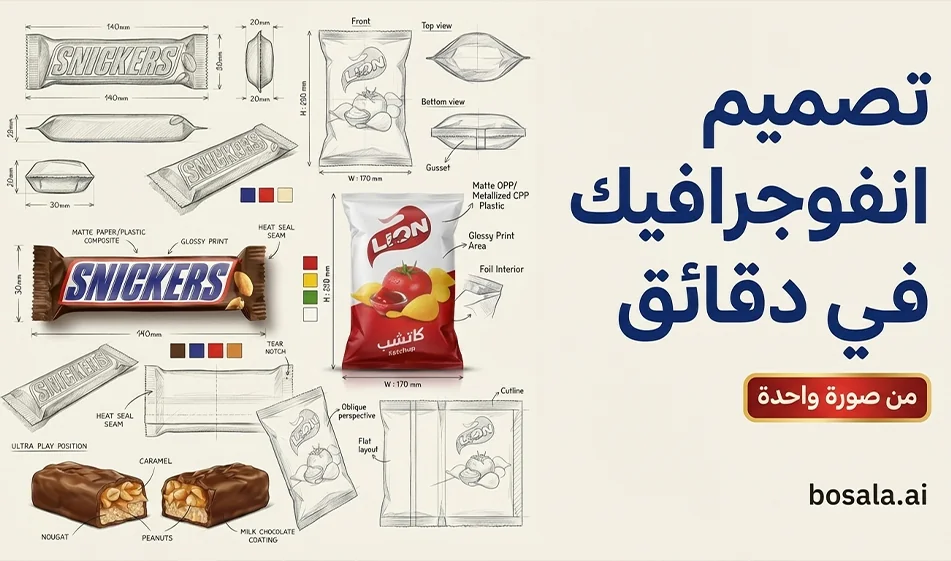
Instead of a regular product image, create a professional infographic that resembles the work of industrial designers
Show the product in the center as a 3D hero shot
Surrounded by multiple technical angles with dimension lines, materials, finishes, and colors
The result is ideal for brand owners, designers, and retailers because it conveys a sense of professionalism and high credibility

Why this style works
It makes the product look like it was carefully designed, not just a photo
It quickly illustrates the packaging’s shape, angles, and materials
Excellent for ads, presentations, and product pages
Works with any product—just upload an image and switch the packaging type

Step-by-step instructions on Nano Banana

Step 1: Prepare the product image
Upload a clear image of the packaging or product
A simple background and good lighting are preferred
If the image is poor quality, the technical details will be unclear

Step 2: Enter the package type
Inside the prompt, you’ll see “PACKAGE TYPE
.” Replace it with the type of packaging you want to describe, such as:
tea box carton
perfume bottle glass
shampoo plastic bottle
coffee cup packaging
chocolate bar wrapper

Step 3: Paste the prompt into Nano Banana
The important thing here is to paste only the main text in plain text
The " parameters " sectionis optional and may not be needed by the site
If you notice that the site messes up the formatting due to parentheses and commas
use the simplified version provided below

Step 4: Generate only two versions, then choose the best one
A version with a clean, light background
A version with a sketchbook or sketch paper background
Then choose the version with
clear corners
clean proportions
realistic texture
without clutter

Step 5: Add Arabic text later
Do not include Arabic text in the design
Write the title, price, and description in Arabic later in Canva using a neat font
Because text within image generators may contain errors

Tips for a better result
Request a clean background so measurements don’t get mixed up
Request measurements in millimeters only
Request clear measurement arrows and thin lines
Request a combination of pencil sketches and realistic rendering
Do not distort the logo or label, if present


Using the attached image, create an illustration sheet of professional industrial design packaging for the package PACKAGE TYPE. A centered heroic 3D rendering with realistic materials, soft studio lighting, and commercial-quality finishes. Surrounding technical views: front, side, top, bottom, oblique perspective, and flat position. Include sketches of the frame structure, crease lines, seam details, and size arrows in millimeters. Indicate materials and finishes (matte, glossy print, plastic, paper, glass) in handwritten annotations. Add color swatches, realistic product illustrations, and subtle shadows. Clean sketchbook background, realistic rendering combined with pencil sketch style, modern design, ultra-detailed, portfolio-ready. No Arabic text, no watermark.

Simplified version if the site is cluttered with details
Using the attached image, create a professional packaging design sheet for PACKAGE TYPE.
Center: one hero 3D render, soft studio lighting, realistic materials, commercial finish.
Around it: technical views (front, side, top, bottom, oblique, and flat).
Add pencil sketch lines, crease lines, seam details, and size arrows in millimeters.
Add small material notes (matte, glossy, print, plastic, paper, glass), color swatches, and subtle shadows.
Clean sketchbook background, ultra-detailed, portfolio-ready. No text.

How to choose the best product shape within the layout
For food products, request paper textures, glossy stickers, and warm accents
For perfumes, request glass, shine, luxury, and a light dark background
For supplements, request a clean, medical look, clear measurement lines, and a white background

Ready-to-use ideas
An Instagram post explaining the packaging to followers
A store page that showcases the product professionally
A presentation for a client or manufacturer
A portfolio of your designs

Compass Summary
This method transforms a single product image into a professional visual presentation similar to the work of industrial designers. Upload the image in high resolution, change the packaging type, generate just two versions, then add Arabic text later in a neat font to get a design ready for publication.

April 08, 2026 12:03 PM GMT
About Google Gemini

🖼️ Tool Name:

Google Gemini 

🔖 Core Classifications:

  • Generative AI & Agents: Capable of planning and executing logistics (e.g., "Plan my trip, book the hotel, and email the itinerary to my team").

  • Multimodal Mastery: Native understanding of text, 60fps real-time video, 3D spatial relationships, and high-fidelity audio.

  • Ecosystem Integration: Deeply embedded into Android, Google Workspace, and the new Gemini for Home(replacing legacy Google Assistant).

✏️ Key Features:

  • Gemini 3.0 Pro & Flash: Features "Built-in Reasoning" by default, meaning the AI automatically "thinks" through complex logic without needing a manual toggle. It handles a context window of 2 million+ tokens(entire codebases or hours of video).

  • Gemini Live (Visual Interface): You can now share your camera or screen in real-time. Point your phone at a broken appliance, and Gemini will provide an augmented reality (AR) overlay to show you how to fix it.

  • Deep Research Mode: A specialized tool that performs autonomous, hours-long web research, synthesizing thousands of sources into a professional report with verified citations.

  • Audio Overviews: Powered by NotebookLM technology, Gemini can turn any PDF, Doc, or Slides presentation into a two-person, conversational podcast episode.

  • Veo 3 & Nano Banana: High-end video generation (up to 8-second clips with sound) and state-of-the-art text-to-image editing are now integrated directly into the chat.

⭐️ User Experience Highlights:

  • "The Personal Assistant": Android users use Gemini to manage their calendars, summarize missed WhatsApp threads, and even draft replies that match their personal writing style.

  • "The Research Partner": Students and researchers use Gemini 3's "Multi-document insights" to find contradictions or patterns across hundreds of research papers simultaneously.

💵 Pricing Plans (2026 Status)

PlanPrice (Approx.)Key Features
Gemini Free$0Access to Gemini 2.5 Flash, basic Workspace integration, and limited image generation.
Gemini Advanced$19.99 /moAccess to Gemini 3 Pro, Deep Research, Veo 3 video, and 2TB Google One storage.
Google AI Ultra~$29.99 /moPriority access to experimental models, higher video/image limits, and advanced "Agent" features.
Workspace Business$20 - $30 /userEnterprise security, AI in Docs/Gmail, and Workspace Studio for automating business flows.

🎁 Is the free version a trial or completely free?

It is Free Forever. Google provides a robust free tier using its "Flash" models, which are optimized for speed and daily tasks. While free users don't get the "Deep Research" or "Veo 3" video tools, they still benefit from a massive context window and the ability to analyze files and photos.

⚙️ Access or Source:

  • Official Website

  • Mobile: The default assistant on most 2026 Android phones; available as an app on iOS.

  • On-Device: Gemini Nano runs locally on high-end phones for private, offline summaries and translations.

🔗 Experience Link: 

https://gemini.google.com/

About Nano Banana

️ 🖼Tool Name:
Nano Banana

🔖 Tool Category:
AI Photo & Video Generator for smartphones and tablets (iOS, iPadOS, macOS, visionOS)

️ ✏What does this tool offer?

  • AI photo editing with text commands (Prompts).

  • Generate short videos (5-8 seconds) with cinematic quality using the Gemini Veo 3 API.

  • Multiple image styles (cartoon, artistic, creative, realistic...).

  • Support for different video formats: Longitudinal, square, horizontal.

  • Ability to add sound or silent clips to videos.

  • Constantly updated ready-made templates for quick use.

  • Easy to use interface with simple control suitable for beginners and professionals.

What does the tool actually deliver based on user experience?

  • Easily turn personal or ordinary photos into artistic or cartoonish designs.

  • Suitable for social media content, creative projects, digital marketing, and personal use.

  • Some reviews showed connectivity issues and delays in generating images or videos, but recent updates have fixed some of these issues.

  • Overall rating in the App Store: 4.1/5 (20 reviews).

🤖 Does it include automation?
Yes, the app is fully automated: Enter a description → Automatically generate a photo or video in seconds using AI models.

💰 Pricing Model:

  • Free to download and basic use.

  • Paid via subscriptions or credit packs (In-App Purchases).

🆓 Free Plan Details:

  • Free download from the App Store.

  • Allows some basic features to be used for free.

💳 Paid Plan Details:

  • Weekly subscription: $4.99.

  • Discounted Credits Package: $7.99.

  • Annual subscription: $59.99.

  • Some advanced features such as video generation or featured styles require a subscription.

🧭 Access Method:

  • Available via the Apple App Store for iOS, iPadOS, macOS (M1+ devices), and visionOS.

  • After installation, the user can enter text commands (Prompts) and convert photos and videos directly.

🔗 Experience Link:
https://banana.tools/

About Gemini 2.5 Pro

️ 🖼Tool name:
Gemini 2.5 Pro
(Gigantic Multimodal Model from Google DeepMind)

🔖 Tool Category:
Multimodal General AI Model
Supports text, images, audio, and video - developed by Google DeepMind.


️ ✏What does this tool offer?

  • Multimodal understanding and generation: Supports input and processing of text, images, video, and audio within the same context.

  • Huge context capacity: Capable of handling up to 1 million tokens in input, allowing for the analysis of large-scale projects and documents.

  • Function Calling: Can execute commands and code within the conversation itself.

  • Execute code directly as part of the reasoning process.

  • Direct integration with research tools for real-time information retrieval.

  • Advanced Reasoning: Outstanding performance in solving complex problems in coding, math, and science.

  • Vibe-Coding and controlling the tone and style of audio output.


What does the tool actually offer based on user experience and official news?

  • Gemini 2.5 Pro tops Benchmark's global scores in programming, logic, and math.

  • Native Multimodal integration without the need for intermediate conversions.

  • It relies on accurate scheduling to price tokens (inputs/outputs) according to the volume of usage.

  • It is characterized by a secure architecture that adheres to Safety & Securitystandards, with a clear commitment to transparency and addressing ethical challenges.


🤖 Does it include automation?
Yes - to a very high degree.

  • Functions are implemented directly within the conversation to integrate with external services and developer tools.

  • Self-runs code within analytical responses.

  • Searches the web in real-time to fetch the latest information and data during the interaction.


💰 Pricing model:
Pay-as-you-go based on the number of tokens:

  • 💵 Input: $1.25 per million tokens (no caching )

  • O 💵utput: $10.00 per million tokens

  • If the input exceeds 200,000 tokens,progressively higher rates apply.

  • Prices are officially displayed on the Gemini Pro page on the DeepMind/Google website.


🆓 F ree plan details:

  • There is no comprehensive free plan for the model itself.

  • Limited trial or free tiers can be accessed across platforms:
    - Google AI Studio
    - Gemini API
    - Vertex AI

  • These platforms make it possible to try out some of the capabilities within the limits of free usage.


💳 Paid plan details:

  • Payment is based on the number of tokens actually used (Input + Output).

  • There is a different pricing for exceeding the 200k token limit in Input.

  • Organizations can manage usage via Google Cloud/Vertex AI accounts with professional options for scaling.


🧭 Access:

  • Via Google AI Studio to experience the model directly.

  • Through the Gemini API to integrate it into applications and software projects.

  • Via Vertex AI within Google Cloud to run it at enterprise scale.

  • Also available in the official Gemini app and Google's integrated platforms.


🔗 Link to the demo/source:
https://deepmind.google/models/gemini/pro


About NanaBanana.pro


️ 🖼Tool name:
NanaBanana.pro

🔖 Tool Category:
AI Image Generation Tool; falls under the AI Image Generation Tools category and the Creative Visual Tools category.

️ ✏What does it offer?
NanaBanana.pro is an AI image generation and editing tool with simple Text-to-Image commands.
It provides a professional image generation experience with high speed and excellent quality with cloud storage options, a commercial license, and the ability to purchase Credits without an ongoing subscription.
Suitable for designers, content creators, and advertisers who need fast visual production without complicated tools.

What does it actually offer based on user experience?
- Generate high-quality images via Text Prompts.
- Fast processing depending on the plan (Standard/Priority/Fastest).
- Secure cloud storage of generated images (from 30 days to permanent).
- Full commercial license and unrestricted use in paid plans.
- Simple and fast loading web interface.
- Ability to purchase additional credits at any time without a subscription.

🤖 Does it include automation?
Yes.
- The tool automatically generates images from text without human intervention.
- It can automatically edit and optimize images (e.g. improve quality or lighting).
- Processing and storage is automated via the cloud.

💰 Pricing model:
Monthly subscriptions + one-time purchase of credits (Credit Packs).

🆓 F ree plan:
No free plan; usage starts with paid plans.

💳 Paid plans:

  1. Basic - $9.9/month

    • 1000 Credits per month.

    • Standard processing speed.

    • 30-day cloud storage.

  2. Pro - $19.9/month

    • All Basic features +

    • 2000 Credits per month.

    • Commercial license and unrestricted use.

    • Priority processing speed.

    • 365-day cloud storage.

  3. Ultra - $39.9/month

    • All Pro features +

    • 4000 credits per month.

    • Full commercial license and unlimited usage.

    • Fastest processing speed (Fastest).

    • Permanent cloud storage (Forever).

🪙 Credit Packs:
One-time credits that don't expire - suitable for those who don't want a monthly subscription:

  • 1800 Credit - $25.9

  • 3600 Credit (most popular) - $51.9

  • 7200 Credit - $103.9
    All include a commercial license, unrestricted use, and do not expire.

🧭 How to access:
- Via the website: https://nanobanana.pro