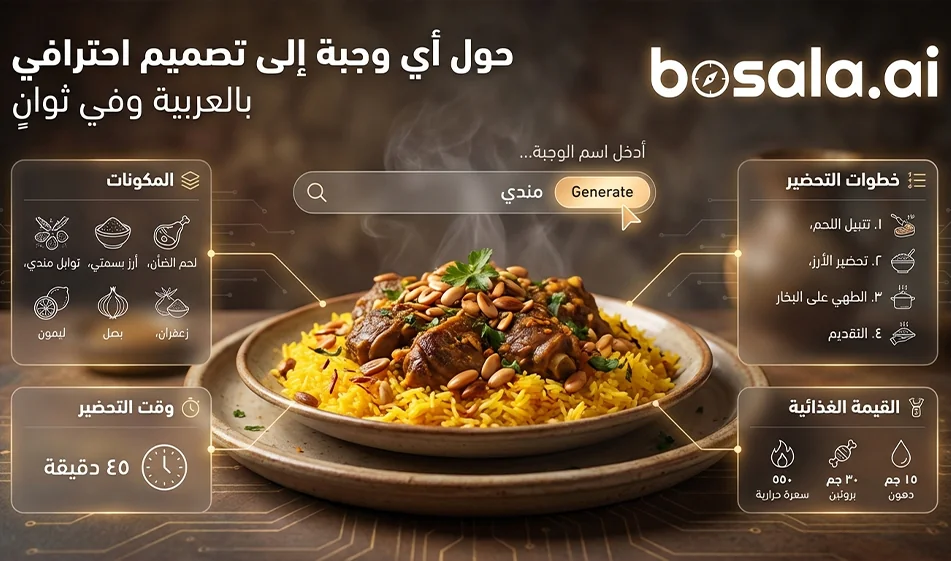
One prompt turns any meal into a ready-to-publish Arabic infographic

One prompt turns any meal into a ready-to-publish Arabic infographic

One prompt turns any meal into a ready-to-publish Arabic infographic

The Idea
Instead of writing a long recipe description, use this prompt as a ready-made template
Just type in the name of the dish
and an infographic image will be generated automatically
It shows the dish in an appetizing way
and lists the ingredients and quantities in Arabic
and a summary of the preparation method in numbered steps
along with information such as calories, cooking time, and number of servings
All of this in a clean, modern design suitable for social media

When is this template useful
For cooking and recipe pages
For restaurants that want to share recipes or informative posts
For health content explaining calories and preparation time
For nutrition coaches who want quick and eye-catching posts

Step-by-step instructions
1
Open the image generator you use
2
Paste the prompt as is
3
Replace "favorite food" with the name of the meal you want
4
Generate only two images, then choose the best one in terms of
clarity of the Arabic text
layout
the beauty of the dish's image
5
If the Arabic text is crowded
ask for a re-generation to reduce the text and shorten the steps
and don’t change the entire prompt; just add two lines like
Keep the text very short and clear
Do not exceed 6 ingredients and 5 steps

Tip: Use a compass for a cleaner result
Choose well-known meals so the ingredients come out correctly
Make the dish name very clear
such as Chicken Maklouba
Chicken Shawarma
Pasta with Béchamel
Fattoush salad
Pancakes

Important Note
Request that all text be in Arabic only
and do not use any English words at all
And request no watermark

Ready-made prompt
Copy and paste it as is, then just replace the name of your favorite food

A recipe infographic with a very modern and clean look. Highlight the name of your favorite food in its final form—sliced, glazed, or already served—slightly tilted or from a perspective to add depth. Arrange the ingredients, steps, and tips about the dish in a dynamic editorial layout, avoiding a static composition in the top view.
Mandatory Language: All text, titles, labels, descriptions, numbers, captions, buttons, and any typographic elements must be exclusively in Arabic.Do not use English or any other words in any part of the image.
Ingredients Section: Include icons or small illustrations for each ingredient, including quantities. Organize them into groups, lists, or circular flows that visually connect to the main dish.
Step Section: Present the preparation in numbered panels with arrows or lines indicating the logical sequence around the panel.Include small supporting icons—knife, frying pan, oven, timer—when it makes sense.
Optional Additional Information Total calories, prep time, cook time, number of servings, and spice level can be displayed as clean labels or badges near the dish.
Visual Style Blend editorial information with lifestyle photography Natural, vibrant food colors, soft shadows, minimalist vector icons, modern typography, and panels with soft gradients or a glass effect Use bold colors to highlight important data such as calories and prep time.
Guidelines Feature the finished dish as the main focal point or perspective. Organize ingredients and steps seamlessly. Clear visual hierarchy: dish first, then steps, then ingredients, then additional information.Sufficient negative space to keep the design airy and readable.
Lighting and Background Soft, natural studio lighting. A textured or subtly gradient background to convey a distinctive editorial look.
Outputs 1080×1080 resolution. Optimized for social media without a watermark.

Compact Compass Version If the results are cluttered
If you notice that the tool is generating too much text or the Arabic font is too small
Add this line at the end of the prompt before generating
Keep the text very short and clear, with no more than 6 components and 5 steps, and use a large, legible Arabic font

Conclusion
This template saves you hours of design and writing. Just type in the name of the meal and generate a ready-to-publish Arabic infographic.

April 10, 2026 10:11 PM GMT
About Google Gemini

🖼️ Tool Name:

Google Gemini 

🔖 Core Classifications:

  • Generative AI & Agents: Capable of planning and executing logistics (e.g., "Plan my trip, book the hotel, and email the itinerary to my team").

  • Multimodal Mastery: Native understanding of text, 60fps real-time video, 3D spatial relationships, and high-fidelity audio.

  • Ecosystem Integration: Deeply embedded into Android, Google Workspace, and the new Gemini for Home(replacing legacy Google Assistant).

✏️ Key Features:

  • Gemini 3.0 Pro & Flash: Features "Built-in Reasoning" by default, meaning the AI automatically "thinks" through complex logic without needing a manual toggle. It handles a context window of 2 million+ tokens(entire codebases or hours of video).

  • Gemini Live (Visual Interface): You can now share your camera or screen in real-time. Point your phone at a broken appliance, and Gemini will provide an augmented reality (AR) overlay to show you how to fix it.

  • Deep Research Mode: A specialized tool that performs autonomous, hours-long web research, synthesizing thousands of sources into a professional report with verified citations.

  • Audio Overviews: Powered by NotebookLM technology, Gemini can turn any PDF, Doc, or Slides presentation into a two-person, conversational podcast episode.

  • Veo 3 & Nano Banana: High-end video generation (up to 8-second clips with sound) and state-of-the-art text-to-image editing are now integrated directly into the chat.

⭐️ User Experience Highlights:

  • "The Personal Assistant": Android users use Gemini to manage their calendars, summarize missed WhatsApp threads, and even draft replies that match their personal writing style.

  • "The Research Partner": Students and researchers use Gemini 3's "Multi-document insights" to find contradictions or patterns across hundreds of research papers simultaneously.

💵 Pricing Plans (2026 Status)

PlanPrice (Approx.)Key Features
Gemini Free$0Access to Gemini 2.5 Flash, basic Workspace integration, and limited image generation.
Gemini Advanced$19.99 /moAccess to Gemini 3 Pro, Deep Research, Veo 3 video, and 2TB Google One storage.
Google AI Ultra~$29.99 /moPriority access to experimental models, higher video/image limits, and advanced "Agent" features.
Workspace Business$20 - $30 /userEnterprise security, AI in Docs/Gmail, and Workspace Studio for automating business flows.

🎁 Is the free version a trial or completely free?

It is Free Forever. Google provides a robust free tier using its "Flash" models, which are optimized for speed and daily tasks. While free users don't get the "Deep Research" or "Veo 3" video tools, they still benefit from a massive context window and the ability to analyze files and photos.

⚙️ Access or Source:

  • Official Website

  • Mobile: The default assistant on most 2026 Android phones; available as an app on iOS.

  • On-Device: Gemini Nano runs locally on high-end phones for private, offline summaries and translations.

🔗 Experience Link: 

https://gemini.google.com/

About Nano Banana

️ 🖼Tool Name:
Nano Banana

🔖 Tool Category:
AI Photo & Video Generator for smartphones and tablets (iOS, iPadOS, macOS, visionOS)

️ ✏What does this tool offer?

  • AI photo editing with text commands (Prompts).

  • Generate short videos (5-8 seconds) with cinematic quality using the Gemini Veo 3 API.

  • Multiple image styles (cartoon, artistic, creative, realistic...).

  • Support for different video formats: Longitudinal, square, horizontal.

  • Ability to add sound or silent clips to videos.

  • Constantly updated ready-made templates for quick use.

  • Easy to use interface with simple control suitable for beginners and professionals.

What does the tool actually deliver based on user experience?

  • Easily turn personal or ordinary photos into artistic or cartoonish designs.

  • Suitable for social media content, creative projects, digital marketing, and personal use.

  • Some reviews showed connectivity issues and delays in generating images or videos, but recent updates have fixed some of these issues.

  • Overall rating in the App Store: 4.1/5 (20 reviews).

🤖 Does it include automation?
Yes, the app is fully automated: Enter a description → Automatically generate a photo or video in seconds using AI models.

💰 Pricing Model:

  • Free to download and basic use.

  • Paid via subscriptions or credit packs (In-App Purchases).

🆓 Free Plan Details:

  • Free download from the App Store.

  • Allows some basic features to be used for free.

💳 Paid Plan Details:

  • Weekly subscription: $4.99.

  • Discounted Credits Package: $7.99.

  • Annual subscription: $59.99.

  • Some advanced features such as video generation or featured styles require a subscription.

🧭 Access Method:

  • Available via the Apple App Store for iOS, iPadOS, macOS (M1+ devices), and visionOS.

  • After installation, the user can enter text commands (Prompts) and convert photos and videos directly.

🔗 Experience Link:
https://banana.tools/

About Gemini 2.5 Pro

️ 🖼Tool name:
Gemini 2.5 Pro
(Gigantic Multimodal Model from Google DeepMind)

🔖 Tool Category:
Multimodal General AI Model
Supports text, images, audio, and video - developed by Google DeepMind.


️ ✏What does this tool offer?

  • Multimodal understanding and generation: Supports input and processing of text, images, video, and audio within the same context.

  • Huge context capacity: Capable of handling up to 1 million tokens in input, allowing for the analysis of large-scale projects and documents.

  • Function Calling: Can execute commands and code within the conversation itself.

  • Execute code directly as part of the reasoning process.

  • Direct integration with research tools for real-time information retrieval.

  • Advanced Reasoning: Outstanding performance in solving complex problems in coding, math, and science.

  • Vibe-Coding and controlling the tone and style of audio output.


What does the tool actually offer based on user experience and official news?

  • Gemini 2.5 Pro tops Benchmark's global scores in programming, logic, and math.

  • Native Multimodal integration without the need for intermediate conversions.

  • It relies on accurate scheduling to price tokens (inputs/outputs) according to the volume of usage.

  • It is characterized by a secure architecture that adheres to Safety & Securitystandards, with a clear commitment to transparency and addressing ethical challenges.


🤖 Does it include automation?
Yes - to a very high degree.

  • Functions are implemented directly within the conversation to integrate with external services and developer tools.

  • Self-runs code within analytical responses.

  • Searches the web in real-time to fetch the latest information and data during the interaction.


💰 Pricing model:
Pay-as-you-go based on the number of tokens:

  • 💵 Input: $1.25 per million tokens (no caching )

  • O 💵utput: $10.00 per million tokens

  • If the input exceeds 200,000 tokens,progressively higher rates apply.

  • Prices are officially displayed on the Gemini Pro page on the DeepMind/Google website.


🆓 F ree plan details:

  • There is no comprehensive free plan for the model itself.

  • Limited trial or free tiers can be accessed across platforms:
    - Google AI Studio
    - Gemini API
    - Vertex AI

  • These platforms make it possible to try out some of the capabilities within the limits of free usage.


💳 Paid plan details:

  • Payment is based on the number of tokens actually used (Input + Output).

  • There is a different pricing for exceeding the 200k token limit in Input.

  • Organizations can manage usage via Google Cloud/Vertex AI accounts with professional options for scaling.


🧭 Access:

  • Via Google AI Studio to experience the model directly.

  • Through the Gemini API to integrate it into applications and software projects.

  • Via Vertex AI within Google Cloud to run it at enterprise scale.

  • Also available in the official Gemini app and Google's integrated platforms.


🔗 Link to the demo/source:
https://deepmind.google/models/gemini/pro