Midjourney Prompt Helper
Description
️ 🖼Tool Name:
PromptFolder
🔖 Categories:
Content Management and Publishing; Content and Copywriting; Image Design and Creation; Productivity and Scheduling; Education and Research; SEO/ASO and Keyword Research; Automation and Smart Agents.
️ ✏What does this tool offer?
PromptFolder is a platform for managing and organizing AI prompts, allowing users to save, reuse, and organize their prompts instead of keeping them in separate text files or spreadsheets. The platform focuses on prompts for ChatGPT, Midjourney, and other AI tools, with the ability to copy, edit, run, and save prompts within the account.
PromptFolder supports the use of variables within prompts, allowing users to place variable elements in brackets, such as [topic], and then reuse the prompt by changing that value. The platform visually highlights variables, and their values are cleared when the command is run and revisited later, making it easy to reuse command templates without having to manually delete old values.
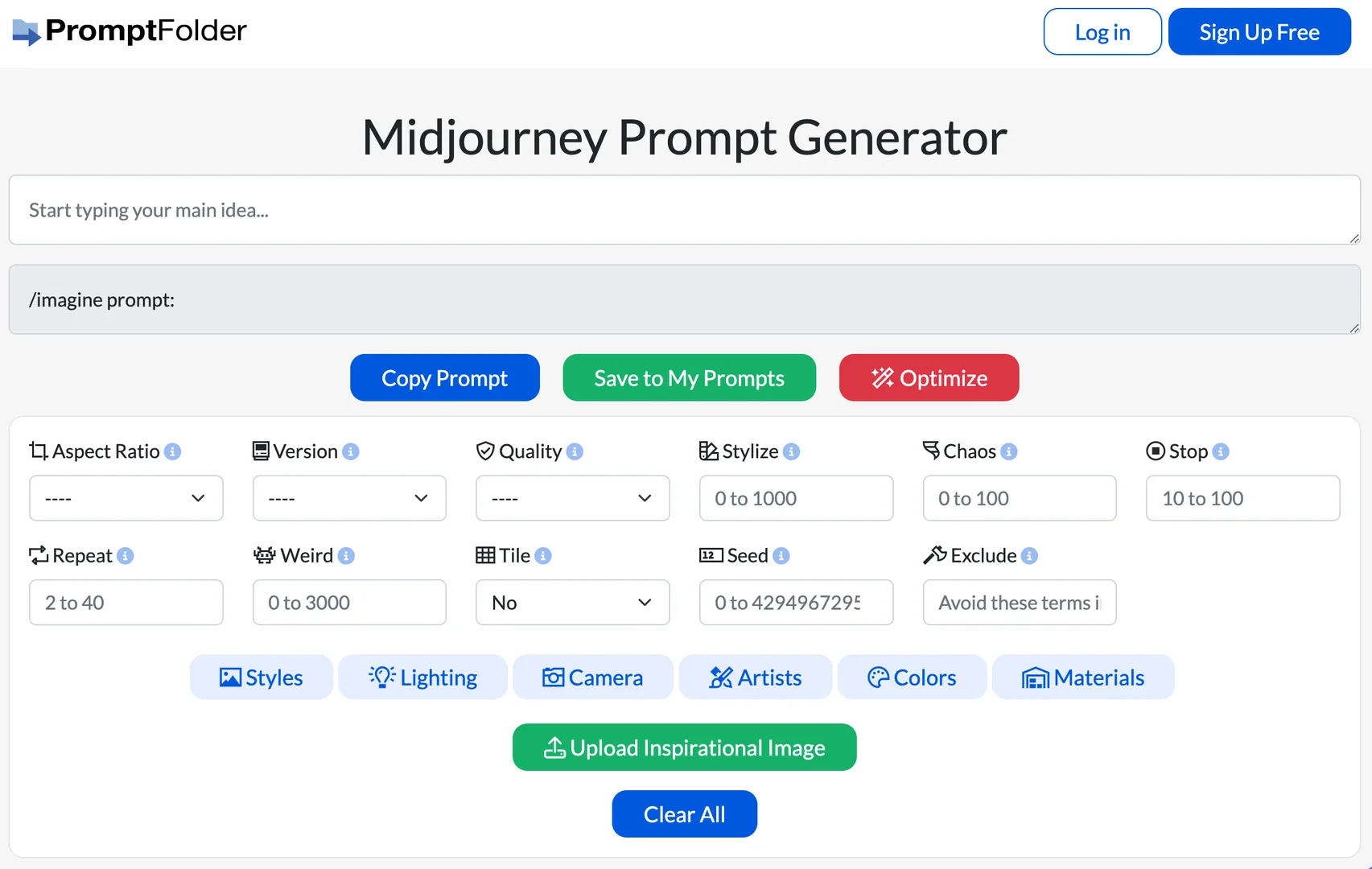
The platform provides tools to help users create and refine prompts, including the Midjourney Prompt Generator, which allows users to enter a basic idea and specify criteria such as aspect ratio, diversity level, and certain Midjourney settings, along with a selection of ready-made styles and elements that can be added to the prompt, then copy the resulting prompt and use it in Midjourney.
It also provides tools to assist with ChatGPT prompts, allowing users to enter a prompt and then copy, save, or refine it using the AI Optimized Promptfeature ,along with options such as tone, length, and units of length in some Prompt Helper tools.
The platform features a public library of prompts shared by users, including examples across various fields such as marketing, business analysis, writing, SEO, design, image generation, programming, and more. Published prompts can be saved to the user’s personal prompt collection.
PromptFolder also offers a Chrome extension that allows users to access saved prompts directly from within ChatGPT using the `/`command ,then search for and enter the desired prompt into the ChatGPT window, with the option to open and edit the prompt from PromptFolder.
The platform also offers free tools, including the Midjourney Prompt Generator,ChatGPT Detector, andAI YouTube Summarizer. PromptFolder has also acquired Noonshot and integrated its Midjourney Prompt Helper tool into the platform, adding the ability to save Midjourney prompts to a PromptFolder account.
⭐ What does it actually offer based on user experience?
- It helps you save AI prompts and revisit them instead of rewriting them from scratch.
- It allows you to organize and reuse prompts with customizable variables.
- It provides specialized tools for creating and optimizing Midjourney and ChatGPT prompts.
- It allows you to copy, edit, save, and run prompts directly within the platform.
- It offers a public library of commands posted by users across various fields and use cases.
- Allows you to use commands saved within ChatGPT by adding a Chrome extension using
/. - It provides tools for optimizing prompts using artificial intelligence.
- It provides free AI-related tools, such as the Midjourney command generator, YouTube summarizer, and ChatGPT detector.
🤖 Does it include automation?
PromptFolder includes some features that help speed up and reuse command-related workflows, but it is not a comprehensive task automation platform. Notable automated features include an AI-powered prompt optimizer, the ability to insert saved prompts directly into ChatGPT via a Chrome extension, and the reuse of variables within prompt templates.
The available official information does not indicate that it provides a comprehensive system for automating repetitive tasks or building standalone bots; therefore, its automation capabilities are classified as limited and focused on command management and optimization.
💰 Pricing Model:
Freemium / Paid subscription.
PromptFolder allows users to create an account and use the platform, in addition to a paid plan called PromptFolder Pro. The official PromptFolder page, which compares the platform to AIPRM, indicates that the Pro plan costs $8 per month, and unlocks a range of additional features such as unlimited custom prompts, AI-powered prompt optimization, advanced privacy settings, image uploads to Midjourney, and bulk import/export. The page also notes that the Chrome extension is available with both the free and paid plans.
🆓 Free plan details:
| Item | Details |
|---|---|
| Account | Ability to create a PromptFolder account |
| Command Management | Saving and Using Commands Within the Platform |
| Add Chrome | Also available with the free plan |
| Free Tools | Midjourney Prompt Generator, ChatGPT Detector, and AI YouTube Summarizer |
| General Commands | Access to commands posted by users |
| Privacy | Public prompts can be set to private based on account settings, though there are limitations compared to paid features |
Note: Currently available official sources do not provide complete numerical details regarding the free plan’s limits, so unverified figures have not been included.
💳 Paid Plan Details:
| Plan | Price | Key Features |
|---|---|---|
| PromptFolder Pro | $8/month | Unlimited custom prompts, AI-powered prompt optimization, advanced privacy settings, image uploads to Midjourney, bulk import and export |
PromptFolder notes that its paid plan consists of a single Pro plan, rather than multiple plans, with all paid features included.
🧭 How to Access the Tool:
| How to Access | Details |
|---|---|
| Web | Available via the PromptFolder website |
| Chrome Extension | Allows access to saved commands directly from within ChatGPT |
| ChatGPT | Saved commands can be entered within ChatGPT using the Chrome extension |
| Free tools | Midjourney Prompt Generator, ChatGPT Detector, and AI YouTube Summarizer |
| Command Library | Browse and save commands posted by users |
PromptFolder explains that the Chrome extension allows you to retrieve saved prompts from within ChatGPT by typing "/," then selecting the prompt and entering it directly into the chat window.
🔗 Link to the demo or official website: