️ 🖼Tool name:
ChatGPT Exporter
🔖 Tool category:
• Documents and software development toolkit
• Digital asset management
• Notes and analysis
• Education and research
• Business document creation
• Productivity and scheduling
️ ✏What does this tool offer?
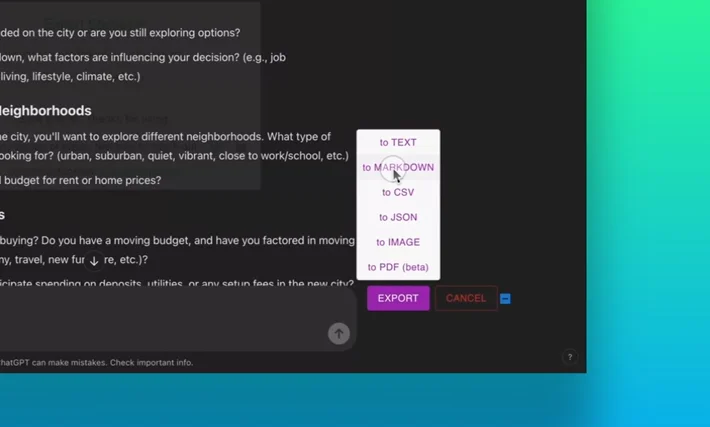
ChatGPT Exporter is a browser extension that allows you to extract your conversations from ChatGPT and convert them into files that can be saved and shared in multiple formats, such as PDF, Markdown, Text, CSV, JSON, and images. Its primary focus is to convert conversations into formatted PDF files that are ready for professional or academic use.
⭐ What does it actually offer based on user experience?
Fast and seamless export without complications
Neat and organized PDF files
Support for multiple formats suitable for archiving and analysis
High stability and excellent rating (4.8/5)
Suitable for everyday use with no payment required in most cases
🤖 Does it include automation?
Does not rely on smart automation or additional AI ❌
Relies on simple procedural automation (one-click direct export) ✅
💰 Pricing model:
Freemium (free plan + low-cost paid plans)
🆓 Free plan details:
Price: $0 per month
Create up to 3 PDFs per day
Export conversations to:
Markdown
Text
CSV
JSON
Image
No credit card required
Suitable for light, everyday use
💳 Paid plan details:
🔹 Starter Plan
Price: $1.99 per month (when paying annually)
Up to 30 PDF files per day
Branding removal
Support for multiple devices
Mute Export option
3-day money-back guarantee
🔹 Standard Plan (most popular)
Price: $2.99 per month (when paying annually)
Up to 100 PDF files per day
Remove branding
Support for multiple devices
Direct support from the developer
3-day money-back guarantee
🧭 How to access the tool:
Install the extension on Chrome
Also works on Edge, Brave, and all Chromium browsers
Open any conversation on chatgpt.com
Click the Export button and select the format
🔗 Link to the trial or official website:
https://www.chatgptexporter.com/en