Description

️ Tool Name: 🖼
Vectorizer.AI

Categories: 🔖
Image Design and Creation

Editing/Optimization/Resolution Enhancement

CAD Engineering

API Integrations and Interfaces

RPA Automation and Repetitive Tasks

️ What does this tool offer? ✏
Vectorizer.AI is an AI-powered tool that converts raster images into editable vector graphics. It works directly in your web browser without the need to install any software.

The tool supports converting images in PNG, JPG, GIF, BMP, and WebP formats into vector files in SVG, EPS, DXF, and PDF formats, as well as the option to obtain an optimized PNG version.

Vectorizer.AI uses an image processing engine that combines deep learning networks with traditional algorithms; the company explains that its AI models were developed in-house and trained using a proprietary dataset.

The tool converts pixels into editable geometric shapes, supporting straight lines, circular and elliptical arcs, quadratic and cubic Bézier curves, as well as fitting complete geometric shapes such as circles, ellipses, rectangles with rounded corners, and stars.

It also includes techniques for processing and smoothing corners, detecting mirror and rotational symmetry, adaptive simplification of boundaries, control over the number of colors in the color palette, and preservation of sub-pixel detail, with support for full 32-bit color and partial and full transparency.

The tool allows you to upload an image or drag and drop it onto the page; it then automatically analyzes, processes, and converts it into geometric shapes, providing a fully interactive preview of the result before downloading.

You can also crop the desired portion of the image before processing to take full advantage of the available resolution. The maximum image size is 3 megapixels, while the maximum file size is 30 megabytes.

The resulting vector graphics can be scaled to any size without loss of quality, and can be used in printing, web design, laser engraving, vinyl cutting, screen printing, as well as CAD and CNC paths, cutting, engraving, and embroidery.

Vectorizer.AI emphasizes that the conversion process is a true conversion from a raster image to vector graphics, not merely embedding the raster image within a vector file.

It also offers multiple options to customize the export process and optimize compatibility with various design software, including control over the file format version and the types of curves used.

The tool also supports the conversion of AI-generated images, providing a free interactive preview of the result before purchase.

Regarding privacy, the company clarifies that it does not claim any rights to the vector results and does not share images with third parties unless the user explicitly authorizes it. It currently retains uploaded images and results for 24 hours, after which they are permanently deleted, though the data retention policy may change in the future.

The Terms of Service prohibit the use of the tool’s output to train machine learning models, including deep learning models.

Vectorizer.AI also provides dedicated pages for developers, support, and pricing, as well as the ability to create an account, log in, and use the tool directly from the website.

What does it actually offer based on user experience? ⭐

  • Convert raster images to editable vector graphics.
  • Convert PNG, JPG, GIF, BMP, and WebP to SVG, EPS, DXF, and PDF.
  • Provides an optimized PNG version.
  • The ability to scale up vector graphics without losing quality.
  • Provides an interactive preview of the result before downloading.
  • Ability to crop the desired portion of the image before processing.
  • Support for logos, illustrations, diagrams, and hand-drawn graphics.
  • Support for print and web design.
  • Support for CAD, CNC, cutting, engraving, and embroidery applications.
  • Support for laser engraving, vinyl cutting, and screen printing.
  • Processing AI-generated images.
  • Convert pixels into editable geometric shapes.
  • Support for multiple types of curves and geometric shapes.
  • Automatically clean up and process corners.
  • Detection of mirror and rotational symmetry.
  • Adaptively simplify boundaries.
  • Control the number of colors in the color palette.
  • Support for full 32-bit color, partial transparency, and full transparency.
  • Customize export options to improve compatibility with various design software.

Does it include automation? 🤖
Yes. Image conversion is automated after upload; Vectorizer.AI analyzes the image, processes the pixels, and converts them into geometric shapes without the need to create paths manually.

Automated processing includes operations such as geometric shape alignment, corner handling, symmetry detection, adaptive edge simplification, and color control.

The tool also provides a dedicated API for programmatic use and automation, allowing the service to be integrated into software workflows for image conversion.

Pricing Model: 💰
Paid subscription

Vectorizer.AI offers separate pricing for the web app and the API, with the option to test and integrate the API for free without a subscription.

🆓 Free Plan Details:

Free ServiceDetails
Preview ResultsProvides a free interactive preview of the result before purchase
APIIntegrate and test the API for free without a subscription
API PreviewsLow-cost previews are available for 0.200 credits per preview; they are not completely free

Paid plan details: 💳

PlanPriceFeatures
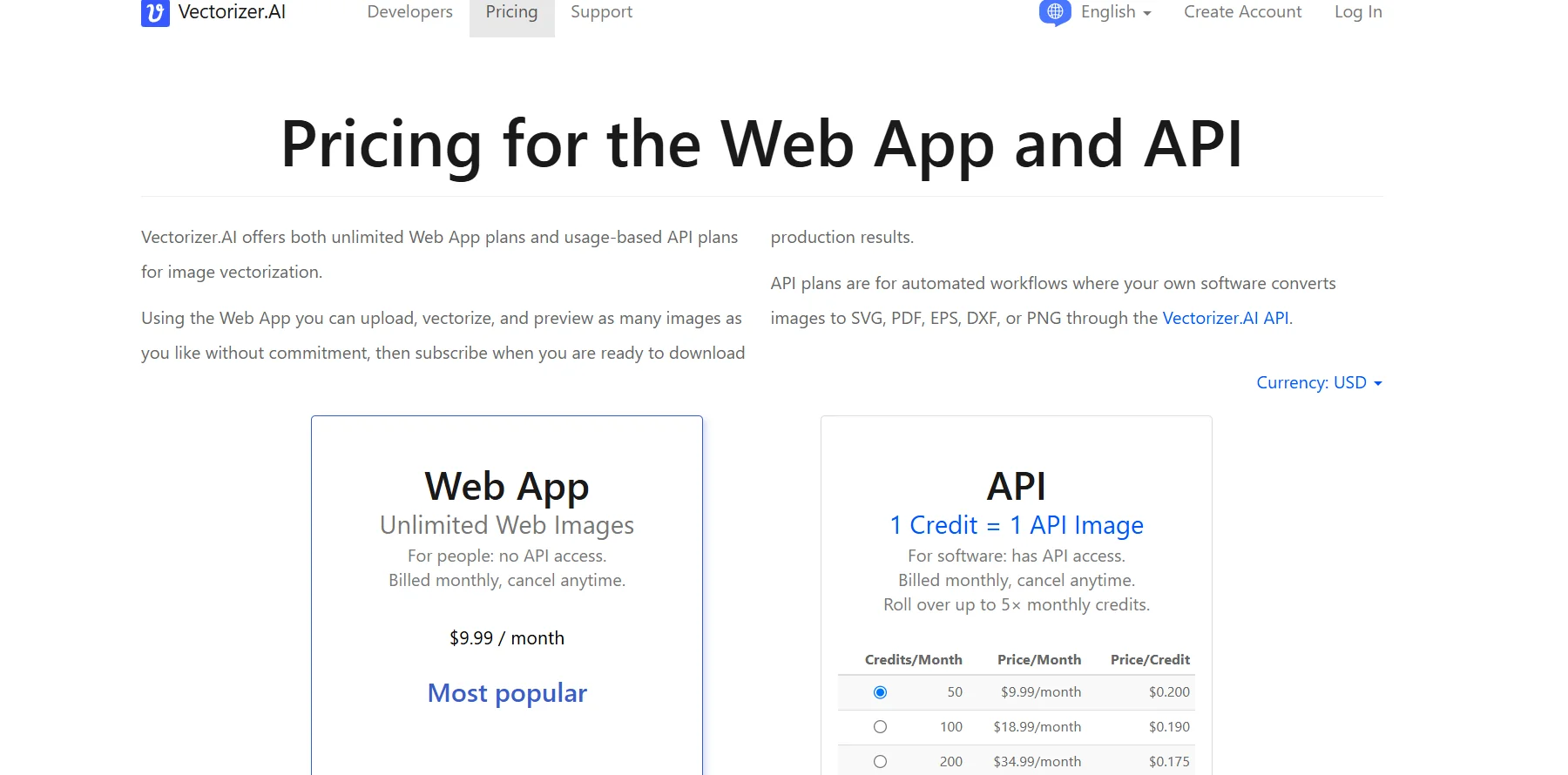
Unlimited Web Images$9.99/monthUpload, convert, preview, and download images through the website, with unlimited image usage; does not include API
API – 50 credits$9.99/month50 API credits, priced at $0.200 per credit
API – 100 credits$18.99/month100 API credits, at $0.190 per credit
API – 200 credits$34.99/month200 API credits, priced at $0.175 per credit

Additional API plans are available on the official pricing page.

In API plans, one credit equals one API image, and the API can be used to convert images to SVG, PDF, EPS, DXF, and PNG.

All API plans allow unused credits to be carried over to the following months, up to 5 times the monthly credit limit.

Automatic subscription renewal can be enabled when your credit runs low to prevent requests from being interrupted.

When API credits run out, new requests result in a 402 Payment Required error.

The company offers API previews at a cost of 0.200 credits per preview; the preview is a PNG image four times larger than the original image with a simple watermark.

Vectorizer.AI accepts all major credit cards and PayPal; it does not accept purchase orders or issue invoices.

The company does not offer special rates for academic institutions or nonprofit organizations.

You can upgrade, downgrade, or renew your subscription at any time, and you can cancel your subscription from the account page while continuing to use the service until the end of the current billing period.

There are no refunds for subscriptions, and any remaining balance is forfeited upon cancellation.

Subscriptions automatically renew and are billed until canceled; access to the service is granted immediately upon subscription. Subscriptions are personal and non-transferable.

How to access the tool: 🧭

  • Web: Works directly in your browser without the need to install any software.
  • API: Provides an API for programmatic use, automation, and image conversion.
  • User Account: You can create an account or log in to use the service and manage your subscription.
  • Developer Pages: The company provides resources dedicated to using the API.
  • Support Page: The company provides resources for support and assistance.

Demo link or official website: 🔗
https://vectorizer.ai/

Pricing Link:
https://vectorizer.ai/pricing

Pricing Details

Vectorizer.AI uses separate pricing models for its web app and API interface; the web app plans offer unlimited image usage, while the API plans are based on the number of images used per month. For the web app, the Unlimited Web Images plan is available for $9.99 per month. It is designed for users who want to upload images, convert them, preview the results, and download them through the website; it does not include API access. It is billed monthly and can be canceled at any time. The API plans, on the other hand, are designed for programmatic use and automation; one credit equals one API image, and the API can be used to convert images to SVG, PDF, EPS, DXF, and PNG formats. Plans start at 50 credits per month for $9.99 per month—$0.200 per credit—followed by 100 credits for $18.99 per month, or $0.190 per credit, and 200 credits for $34.99 per month, or $0.175 per credit, with additional plans available on the pricing page. All API plans allow unused credits to be carried over to the following months—up to five times the monthly credit limit—enabling you to choose a plan based on your average monthly usage while maintaining greater flexibility when demand increases. You can also integrate and test the API for free without a subscription, while the company offers low-cost preview results for use cases requiring a large number of API requests; these previews are PNG images four times larger than the original image with a simple watermark, and cost 0.200 credits per preview. When API credits run out, new requests result in a 402 Payment Required error; users can enable automatic subscription renewal when their balance is low to prevent requests from being interrupted. Vectorizer.AI accepts all major credit cards and PayPal; it does not accept purchase orders or issue invoices, nor does it offer special rates for academic institutions or nonprofit organizations. Users can upgrade, downgrade, or renew their subscription at any time. Subscriptions can also be canceled from the account page, though the service remains available until the end of the current billing period. There are no refunds for subscriptions, and any remaining balance is forfeited upon cancellation. Subscriptions continue to renew and are automatically billed until canceled, and access to the service is granted immediately upon subscription. Subscriptions are personal and cannot be shared.