Description
️ 🖼Tool Name:
Kapso
🔖 Categories:
Automation and Smart Agents; Chat/Voice Agents; Integrations and APIs; RPA and Repetitive Task Automation; No-Code Workflows; Support and Call Center Bots; Programming and Development; Marketing and Sales; Business and Operations Management.
️ ✏What does this tool offer?
Kapso is a platform for developers that allows them to integrate official WhatsApp into products and applications. It provides the necessary infrastructure for sending and receiving messages, managing templates and conversations, receiving events via Webhooks, and building workflows, automation, and AI agents. The platform describes itself as a fast way to add official WhatsApp to products, with access to WhatsApp’s user base of over 3 billion users,and notes that it is trusted by more than 30,000 developers worldwide. It also positions itself as an official partner within the Meta ecosystem.
You can connect to WhatsApp in several ways, including using a Kapso number —a U.S. number managed by Kapso that’s available upon registration without the need for a SIM card or verification codes— or using a user’s own number from any country with a one-time verification process, or using the WhatsApp Business App while continuing to use the app and syncing messages with Kapso. The platform also offers Sandbox mode for testing integrations,WhatsApp Webhooks for receiving messages, delivery statuses, and events in real time,API Logs for tracking API requests, data, and responses, as well as Message Tracking to monitor message status from sending to delivery and read receipts.
Kapso allows you to build integrations manually using the API, SDK, CLI, and MCP, or to use AI-powered development agents such as Kapso Agent, Claude Code, Cursor, and Codex. It also provides Agent Skills that can be added to development tools and supports the creation of WhatsApp Flows to build mini-apps within WhatsApp—such as forms, bookings, and catalogs—and connect them to API interfaces.
The platform provides tools for operating and managing WhatsApp, including Inbox for managing conversations,Workflows for building AI-powered visual automation,Broadcasts for sending campaigns,and Agents for building AI-powered assistants that can use the user’s APIs. Conversations can also be transferred from an automated agent to a human agent while preserving the conversation context through Human Handoff features.
For SaaS products that need to enable their customers to link their WhatsApp numbers, Kapso provides Customer Connection Links built on Meta’s official Embedded Signup flow; The product generates a setup link for each customer, who then completes Meta’s registration process. Once connected, the product can send messages and manage conversations via API and Webhooks.
⭐ What do you actually offer based on user experience?
- It provides a sandbox environment for testing the sending and receiving of WhatsApp messages before moving to production.
- It provides API logs, Webhooks, and tracking tools that help developers detect integration errors and monitor message statuses in real time.
- Developers can use the API, SDK, CLI, or MCP, or delegate a significant portion of the development process to AI-powered agents.
- You can build workflows, AI agents, and chat automation, with the ability to hand off the conversation to a human agent when needed.
- The platform can be used in SaaS products that need to connect and manage customers’ WhatsApp numbers from within the product itself.
- Kapso states that it is trusted by more than 30,000 developers—a figure published by the company itself, not an independent user rating.
🤖 Does it include automation?
Yes. Automation is a core feature of Kapso; it provides workflows for building automated processes and AI-powered decisions, which can be connected to applications and APIs and triggered in response to messages and events. It also offers AI Agents to create assistants that understand the context of a conversation and can connect to APIs to automate customer support, with the option to perform a “Human Handoff” when human intervention is needed. The official pricing page states that there is no limit to the number of Workflows you can create, and there are no additional fees for them.
💰 Pricing Model:
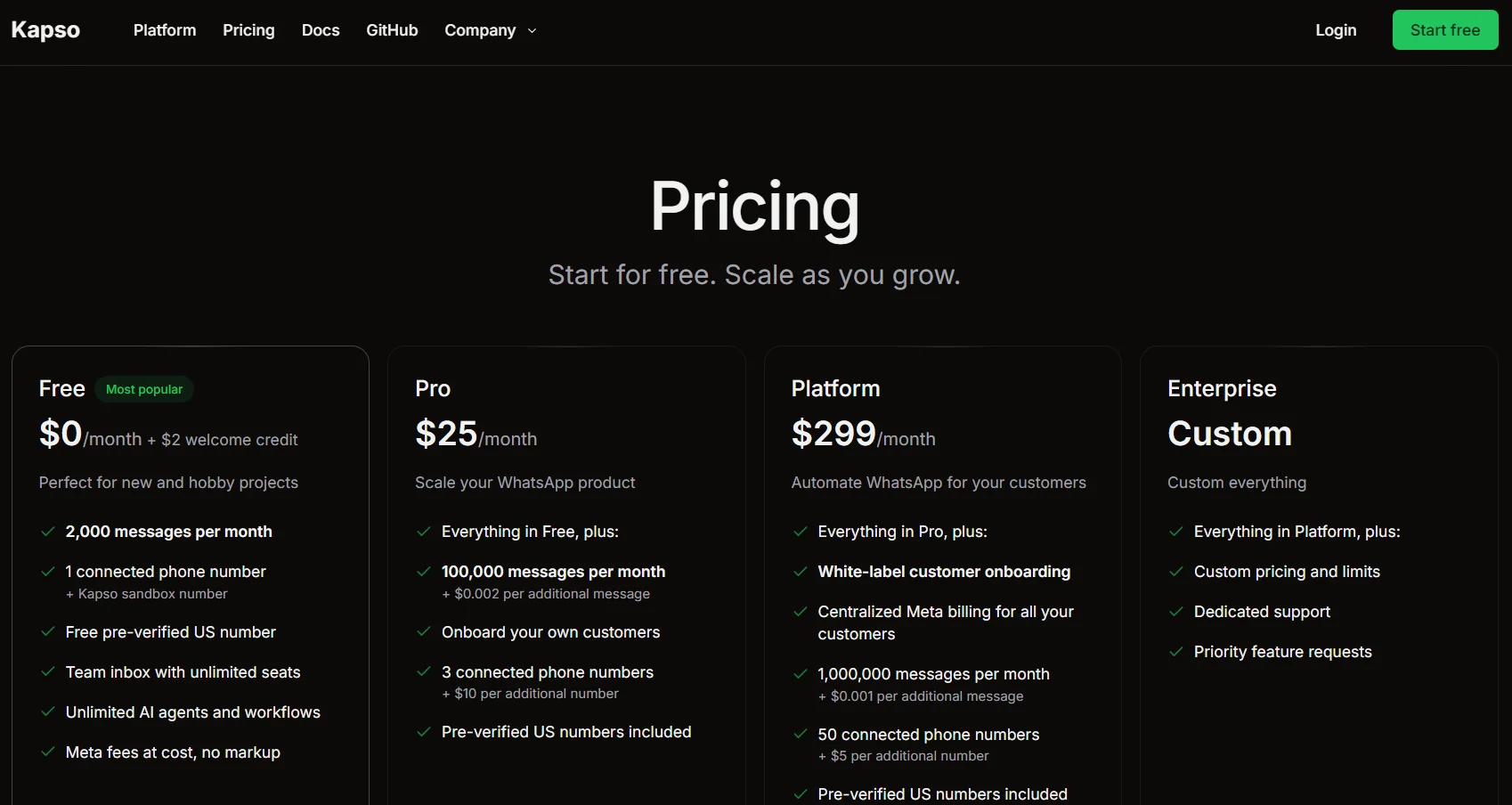
Freemium;Kapso offers a free plan at $0 per month,followed by the paid Pro andPlatform plans. Meta also charges WhatsApp fees separately from the Kapso subscription, and the company clarifies that these fees are passed on at cost with no markup. You can change or cancel your plan at any time with no contracts or hidden fees.
🆓 Free Plan Details:
| Feature | Details |
|---|---|
| Price | $0 per month |
| WhatsApp Messages | 2,000 messages per month |
| Connected Phone Numbers | One phone number |
| Function Calls | 100,000 calls per month |
| Media Storage | 1 GB |
| Audio Uploads | 30 minutes per month |
| Sandbox | Available for testing |
| Kapso-managed number | U.S. number provided for verification and setup |
| Workflows | Unlimited at no extra charge |
| Meta fees | Billed separately at cost, with no markup |
| Message rollover | Included messages are reset to zero monthly and do not carry over to the next month |
The prices and features above are taken from the current official pricing page.
💳 Paid plan details:
| Plan | Price | Features and Usage |
|---|---|---|
| Pro | $25 per month | 100,000 WhatsApp messages per month,then $0.002 per additional message;3 connected phone numbers, then $10 per month for each additional number;1,000,000 Function Calls per month,1,000 App Integration Calls per month,100 GB of media storage, and5 hours of voice transcription per month. |
| Platform | $299 per month | 1,000,000 WhatsApp messages per month, plus $0.001 per additional message,50 connected phone numbers plus $5 per month for each additional number,10,000,000 Function Calls per month,10,000 App Integration Calls per month,2,000 GB of media storage, and50 hours of audio transcription per month, intended for SaaS products that connect their customers’ phone numbers. |
| Enterprise | Currently not officially announced | The current pricing page does not list the Enterprise plan among the published plans; therefore, the current price or features of the Enterprise plan cannot be confirmed from the official pricing page. |
Note: The information I mentioned regarding Enterprise—custom pricing, dedicated support, and feature prioritization— is not currently listed in the official published pricing table, so I have not considered it confirmed pricing at this time. Additionally, the current pricing page displays additional usage details such as Function Calls, media storage, and audio offloading, which should be relied upon in place of older information.
🧭 How to access the tool:
| How to Access | Details |
|---|---|
| Web | Available via the Kapso platform for project management and WhatsApp setup |
| API | API interface for sending messages and managing templates, chats, and WhatsApp operations |
| SDK | Kapso provides a dedicated SDK for developers |
| CLI | Manage numbers, messages, chats, Webhooks, and workflows from the command line |
| MCP | Operate WhatsApp processes through MCP-enabled agents |
| Webhooks | Receive messages, events, and delivery statuses in real time |
| Workflows | A visual builder for creating automations and workflows |
| WhatsApp Flows | Create apps and flows within WhatsApp, such as forms, bookings, and catalogs |
| AI Agents | Build and integrate with AI agents |
| Sandbox | A testing environment using a shared Sandbox number |
🔗 Demo link or official website: