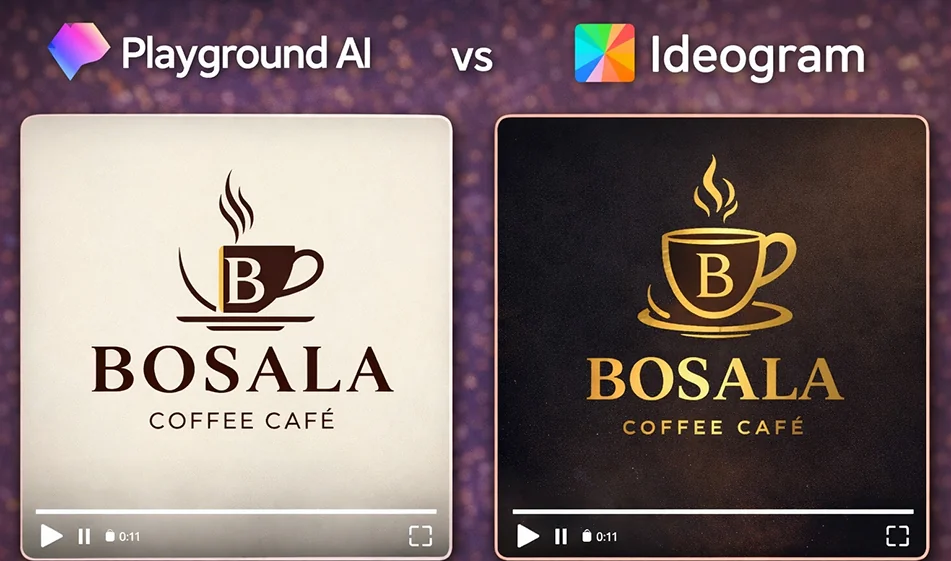
🎨 Comparison: Playground AI vs Ideogram for designing logos and slogans

🎨 Comparison: Playground AI vs Ideogram for designing logos and slogans

: Playground AI vs Ideogram for designing logos and slogans

💡 Compass tip

If you want a quick logo with artificial intelligence, the real difference between the two tools is not just "beauty," but rather:
Which one sticks to the logo idea and gives results that can be used as a visual identity?
Here is a practical comparison between Playground AI and Ideogram with a quick test method.

1) Ideogram: Better when the logo contains clear text

When does it excel?

  • When you need a logo that clearly displays the brand name or letters (usually Latin letters).
  • Suitable for generating"LogoType" and multiple copies with the same idea.
  • Gives you visually organized results when you request a "simple logo" with a clean background.

Suitable for: text logos, logos that combine an icon + name, quick identity suggestions.

2) Playground AI: Best for visual experiments, symbols, and icons

When does it excel?

  • When you want a symbol /icon for your logowithout a lot of text.
  • Excellent for quickly experimenting with different styles: flat, 3D, linear, negative/positive.
  • Suitable for generating many ideas and then choosing the best direction.

Suitable for: Identity icons, app icons, logos that rely on a strong visual form.

Which is best for logos? (Quick decision summary)

  • Want clear text in your logo? Ideogram isusually better.
  • Want a creative icon and lots of experimentation? Playground AI isusually better.

A fair test to determine which is best for you in 10 minutes

Apply the same request to both tools and then evaluate:

  1. Is the logo clear and suitable as a small icon?
  2. Are the details minimal and not crowded?
  3. Can it be printed in one color?
  4. Does it work on light and dark backgrounds?
  5. Does it look like an "identity" rather than a "drawing"?

🧩 Prompt ready for a professional logo (just copy and edit the name)

"Design a simple, modern logo for a brand called (brand name).
I want a logo that can be used as a visual identity: simple geometric shape, clean lines, visual balance, not too many details, suitable as a small icon, version with white background, version with dark background, no mockups, no textures, no shadows, flat design."

If you want the logo with text (preferably in English):
“Add the brand name in clear, balanced letters, with correct alignment.”

🔥 Golden Compass Tip for Logos

Don't rely on the resulting image as the final logo right away. Use artificial intelligence to create:

  • 10 initial ideas
    Then choose the best idea, request a “simpler” version and a “clearer font” version, and then convert it to vector using conversion tools.

For more artificial intelligence tools: bosala.ai

January 29, 2026 04:49 PM GMT
About Playground v3

️ 🖼Tool name:
Playground AI

🔖 Tool Category:

  • Text-to-Image

  • Designing and creating images

  • Productivity and scheduling

  • Automation and intelligent agents

️ ✏What does this tool offer?
Playground AI enables any user to easily create professional designs, whether a beginner or a professional. Write a text description or use ready-made templates to turn ideas into images and designs such as logos, posters, social media posts, backgrounds, and monograms. The platform offers a simple and intuitive interface without the need for complex design tools, and allows designing via the web or iOS app, with the ability to edit, optimize, and regenerate images.

What does it actually offer based on user experience?

  • Accuracy level: Generate attractive, high-quality images and designs.

  • Speed of performance: Produce images quickly compared to traditional design.

  • Ease of use: Easy and intuitive interface for all levels of users.

  • Strengths: Support for commercial use of images, ability to modify and regenerate images, creative community and marketplace.

  • Key notes or limitations: The free plan is limited in the number of images and edits, and you may experience wait times during high pressure.

🤖 Does it include automation?
Yes, the platform relies on AI automation to turn text into images and designs, with the ability to intelligently edit and regenerate images without much manual intervention.

💰 Pricing model:
Freemium with monthly subscription plans. A limited free plan is available, and paid plans offer higher image creation, editing, and background removal capabilities.

🆓 F ree plan details:

  • Create 10 images or edits every 3 hours using basic templates.

  • Download up to 10 designs per day.

  • Professional features such as background removal and resolution upscaling are not available.

  • Suitable for light personal use or experimenting with the platform.

💳 Details of paid plans:

  • Pro (~$12/month with annual payment):

    • More photos every 3 hours.

    • Features like background removal, resolution upscaling, and higher generation speed.

  • Pro Plus/Team (~$36/month with annual payment):

    • Unlimited photo creation.

    • Large number of advanced adjustments.

    • Unlimited upscaling and background removal.

    • Additional professional features and a shared workspace for teams.

🧭 How to access the tool:
The platform works via a web browser and offers an iOS app, allowing you to design and edit from your phone or computer with ease.

🔗 Link to the demo or official website:
https://playground.com

About Ideogram 2.0

🖼️ Tool Name:

Ideogram 2.0 / 3.0

✏️ What does this tool offer in 2026?

  • Impeccable Text Rendering: Generates long, complex sentences and stylized fonts (Handwritten, Gothic, Serif) with nearly 100% spelling accuracy.

  • Specialized Styles: Choose from Realistic (photographs), Design (flat graphics/logos), 3D (rendered objects), and Anime.

  • Magic Prompt & Describe: "Magic Prompt" automatically expands a simple idea into a detailed professional prompt, while "Describe" turns any uploaded image into a descriptive text prompt.

  • Ideogram Canvas: A powerful 2026 workspace that allows you to:

    • Magic Fill (Inpainting): Select an area to add or change objects.

    • Extend (Outpainting): Expand an image beyond its original borders.

    • Text Layering: Add specific text layers directly onto your compositions.

  • Character Consistency: Ensures the same character looks identical across different scenes—essential for storytellers and brand mascots.

  • Color Palette Control: Fine-tune your images to match specific brand hex codes or artistic color schemes.

⭐️ What does the tool actually offer? (User Experiences)

  • "The Designer's Shortcut": Small business owners use it to create professional-grade posters, t-shirt designs, and greeting cards without hiring a graphic designer.

  • Prompt Adherence: Unlike other models that "ignore" half of your prompt, Ideogram 2.0 is praised for following even the most granular instructions (e.g., "A neon sign saying 'Open 24/7' in a gothic blue font").

🤖 Does the tool have automation features?

Yes, it is a Creative Production Automation Tool:

  • Batch Generation (Pro Tier): Upload a spreadsheet of prompts to generate hundreds of designs at once for e-commerce.

  • API Access: Developers can integrate Ideogram’s text-rendering engine into their own apps or websites.

💵 Pricing (2026 Status)

Ideogram uses a "Priority Credit" system. Once priority credits are used, you switch to "Slow Credits" (unlimited on higher tiers).

PlanMonthly Price (Annual)Key Features
Free$010 credits/week (~40 images), Public gallery only, Limited Canvas access.
Basic$7 /mo400 priority credits, 100 slow credits/day, Quality exports, No watermarks.
Plus$15 /mo1,000 priority credits, Unlimited slow credits, Private generations, Image uploads.
Pro$42 /mo3,500 priority credits, Unlimited slow credits, Batch Generation, Priority support.

🎁 Is the free version a trial or completely free?

 It is a Free-forever model. You get a set of credits every week that refresh automatically. Note that on the free plan, all your creations are public and searchable by the community. You need the Plus plan or higher to keep your work private.

⚙️ Access or Source:

  • Official Website

  • Mobile Apps: Official iOS app (App Store) and a dedicated Android app (launched in late 2025).

🔗 Experience Link: 

https://ideogram.ai/

About Ideogram 3.0

️ 🖼Name of the tool:
Ideogram 3.0

🔖 Tool Category:
Artificial Intelligence Text-to-Image / Graphic Design tool

️ ✏What does it do?
Converts text descriptions into high-quality images, designs, and graphics, with the ability to integrate text into the image, modify backgrounds, control different elements, and choose multiple styles from photography, painting, drawing, and graphic design.

What do you actually offer based on user experience?

  • Produce realistic and accurate images in terms of lighting, details, and text formatting within the image.

  • Useful for designers, marketing companies, and entrepreneurs to quickly create logos, posters, web designs, or product images.

  • Image generation is relatively fast, allowing for a seamless "idea → design → edit" experience.

🤖 Does it include automation?
Yes - it relies on AI to automatically generate images and designs from textual descriptions, without the need for manual design skills.

💰 Pricing model:

🆓 F ree plan details:

  • Available for all users to try Ideogram 3.0 via the website or app.

  • There are often a limited number of prompts per day, but it's enough to try out the tool and create some basic images.

💳 Details of paid plans:

  • Offers wider features: Higher quality, commercial use, Batch Generation, and advanced design control.

  • Suitable for professional users or teams in a professional production workflow, with high-quality image uploads and visual identity standardization across style references.

🧭 How to access the tool:
Via the Ideogram website (ideogram.ai) or the app, enter the prompt, choose a style, and generate the image directly.

🔗 Experience Link:
https://ideogram.ai/features/3.0