How to Create an Advertisement Image and Visual Explanation for Any Product Using Nano Banana
Website link: https://gemini.google.com/
The Idea
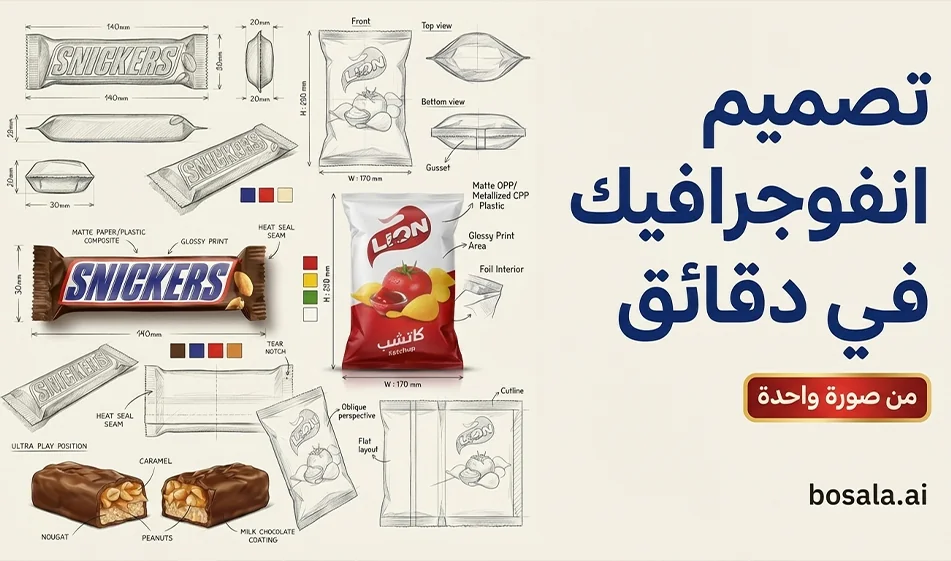
Instead of a regular product image, create a professional infographic that resembles the work of industrial designers
Show the product in the center as a 3D hero shot
Surrounded by multiple technical angles with dimension lines, materials, finishes, and colors
The result is ideal for brand owners, designers, and retailers because it conveys a sense of professionalism and high credibility
Why this style works
It makes the product look like it was carefully designed, not just a photo
It quickly illustrates the packaging’s shape, angles, and materials
Excellent for ads, presentations, and product pages
Works with any product—just upload an image and switch the packaging type
Step-by-step instructions on Nano Banana
Step 1: Prepare the product image
Upload a clear image of the packaging or product
A simple background and good lighting are preferred
If the image is poor quality, the technical details will be unclear
Step 2: Enter the package type
Inside the prompt, you’ll see “PACKAGE TYPE
.” Replace it with the type of packaging you want to describe, such as:
tea box carton
perfume bottle glass
shampoo plastic bottle
coffee cup packaging
chocolate bar wrapper
Step 3: Paste the prompt into Nano Banana
The important thing here is to paste only the main text in plain text
The " parameters " sectionis optional and may not be needed by the site
If you notice that the site messes up the formatting due to parentheses and commas
use the simplified version provided below
Step 4: Generate only two versions, then choose the best one
A version with a clean, light background
A version with a sketchbook or sketch paper background
Then choose the version with
clear corners
clean proportions
realistic texture
without clutter
Step 5: Add Arabic text later
Do not include Arabic text in the design
Write the title, price, and description in Arabic later in Canva using a neat font
Because text within image generators may contain errors
Tips for a better result
Request a clean background so measurements don’t get mixed up
Request measurements in millimeters only
Request clear measurement arrows and thin lines
Request a combination of pencil sketches and realistic rendering
Do not distort the logo or label, if present
Using the attached image, create an illustration sheet of professional industrial design packaging for the package PACKAGE TYPE. A centered heroic 3D rendering with realistic materials, soft studio lighting, and commercial-quality finishes. Surrounding technical views: front, side, top, bottom, oblique perspective, and flat position. Include sketches of the frame structure, crease lines, seam details, and size arrows in millimeters. Indicate materials and finishes (matte, glossy print, plastic, paper, glass) in handwritten annotations. Add color swatches, realistic product illustrations, and subtle shadows. Clean sketchbook background, realistic rendering combined with pencil sketch style, modern design, ultra-detailed, portfolio-ready. No Arabic text, no watermark.
Simplified version if the site is cluttered with details
Using the attached image, create a professional packaging design sheet for PACKAGE TYPE.
Center: one hero 3D render, soft studio lighting, realistic materials, commercial finish.
Around it: technical views (front, side, top, bottom, oblique, and flat).
Add pencil sketch lines, crease lines, seam details, and size arrows in millimeters.
Add small material notes (matte, glossy, print, plastic, paper, glass), color swatches, and subtle shadows.
Clean sketchbook background, ultra-detailed, portfolio-ready. No text.
How to choose the best product shape within the layout
For food products, request paper textures, glossy stickers, and warm accents
For perfumes, request glass, shine, luxury, and a light dark background
For supplements, request a clean, medical look, clear measurement lines, and a white background
Ready-to-use ideas
An Instagram post explaining the packaging to followers
A store page that showcases the product professionally
A presentation for a client or manufacturer
A portfolio of your designs
Compass Summary
This method transforms a single product image into a professional visual presentation similar to the work of industrial designers. Upload the image in high resolution, change the packaging type, generate just two versions, then add Arabic text later in a neat font to get a design ready for publication.