Comparison of Raphael vs. Kapwing KAI in generating images using the same prompt
· 7 min read
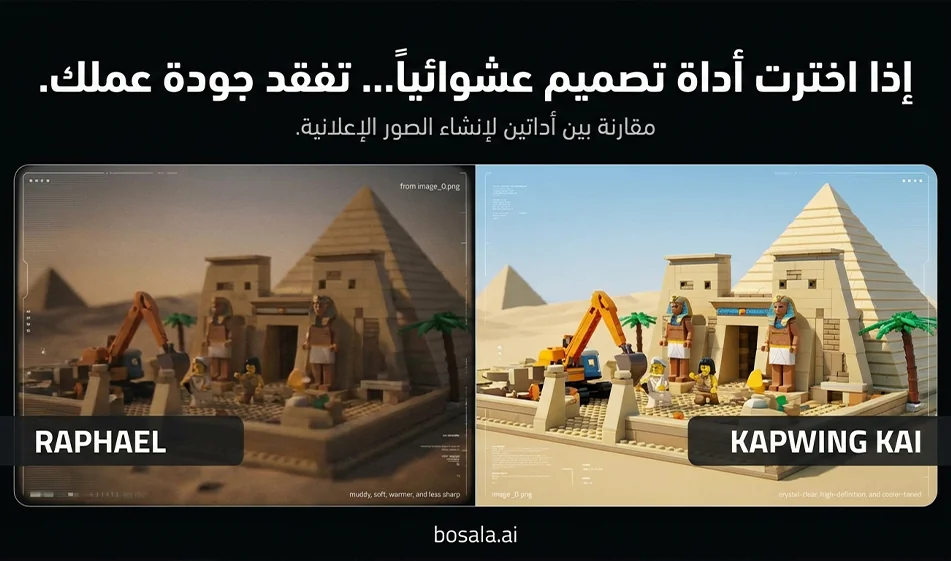
Comparison of Raphael vs. Kapwing KAI in generating images using the same prompt
Tool links
https://raphael.app/ar
https://www.kapwing.com/kai
The idea
We’ll compare performance fairly. Literally the same prompt. Same dimensions. Same number of attempts. Then we’ll pick the winner based on the result.
What we’re actually testing
Adherence to the prompt and details
Quality of plastic materials, lighting, and shadows
The beauty of composition, depth, and cinematic quality
Clarity and lack of distortion of the national flag
Image clarity and the absence of unwanted text or symbols
Speed and number of usable copies per attempt
Steps for a fair comparison in 10 minutes
1 Choose only one prompt for the first experiment, e.g., Egypt
2 Set the aspect ratio to 9:16
3 Generate 4 versions in Raphael and 4 versions in Kapwing KAI
4 Choose the best version from each site
5 Compare the two versions according to the criteria list above
6 Repeat the same steps for a second prompt, such as Algeria or Saudi Arabia, to confirm
Step-by-stepguideon how to create images with Raphael
1 Open the website and go to the image generation page
2 Select the "Text to Image" generation method
3 Set the aspect ratio to 9:16 if aspect ratio options are available
If there is no clear option, leave it as is and type " vertical 9:16 , which is already included in our prompts
4 Paste the entire prompt as is into the description field
5 Start with a small number of copies, just 2 to 4 copies
6 Click "Generate" and wait for the results
7 Choose the best image and download it in high quality
Tip from Bousla to improve Raphael’sresults
If the scene looks cluttered or has too many elements, add just one sentence at the end of the prompt
clean composition, fewer props, focus on landmark and minifigs
If unwanted text appears, add just one sentence
no letters, no numbers, no signage
If the flag is unclear, add just one sentence
flag clearly visible, large, accurate colors, not distorted
Kapwing KAI Step-by-Step Image Creation Guide
1 Open the website and access the image generator within Kapwing KAI
2 Select "Generate Image from Text"
3 Set the aspect ratio to 9:16 if the aspect ratio options are available
4 Paste the prompt as is, then generate 2 to 4 versions
5 Choose the best version, then open it in the Kapwing editorif the edit option appears
6 Here’s Kapwing’s practicalfeature
After selecting the best image, you can prepare it for publishing right away
Quick cropping
Simple sharpening
Add an Arabic title later in a neat font if you wish
7 Download the final image
A tip to improve the results of Kapwing KAI
if you notice that the tool produces many variations but some of them are weak
Use the same prompt and change just one line instead of rewriting everything
For example:
less clutter, single landmark focus
or
strong depth of field, clean lighting
When to choose Raphael and when to choose Kapwing KAI
Choose Raphael if its results are closer to the prompt from the first try and it quickly produces beautiful textures and lighting
Choose Kapwing KAI if you want to generate and prepare the image for quick publishing within the same environment with simple cropping and editing
Tips for a successful series of plastic brick-style landmarks
Keep one clear focal point in each image
Always request that there be no text on the screen
Make the flag large and clear, and place it only in the background
If the characters’ features become distorted, reduce the number of characters in the prompt
Include plenty of props, but don’t overdo it so the shot doesn’t look cluttered
Copy and paste the prompts as they are
General Fixed Template
Create a vertical 9:16 cinematic toy-brick construction scene inspired by animated plastic building block movies. Show a team of adorable brick minifig characters actively building a famous landmark from COUNTRY NAME. The scene should include both primitive and modern construction and transport tools: ropes, wooden rollers, carts, ladders, hammers, cranes, trucks, forklifts, scaffolding, and lifting platforms. The COUNTRY NAME flag should be clearly visible in the background or integrated into the construction site. The landmark must be instantly recognizable and built from plastic toy bricks. Style: cinematic, playful, detailed plastic textures, warm sunlight, expressive minifig faces, depth of field, dynamic composition, family-friendly adventure mood, high detail, glossy toy surfaces, stop-motion-inspired but polished animated look. No text on screen.
Egypt
Create a vertical 9:16 cinematic toy-brick construction scene inspired by animated plastic building block movies. Show a busy team of brick minifig workers building the Pyramids of Giza and the Sphinx in Egypt. The minifigs wear Egyptian-inspired construction outfits and safety helmets. Include a mix of primitive and modern construction methods: wooden rollers, ropes, stone-dragging sleds, ladders, chisels, carts, plus cranes, forklifts, scaffolding, and construction trucks. The Egyptian flag should be clearly visible in the background. The pyramid blocks should resemble sandy plastic toy bricks, and the desert environment should feel warm, golden, and adventurous. Style: playful cinematic plastic-brick world, expressive minifig faces, glossy toy materials, dramatic sunlight, family-friendly epic construction atmosphere, highly detailed, polished animated look. No text on screen.
Dubai
Create a vertical 9:16 cinematic toy-brick construction scene inspired by animated plastic building block movies. Show a team of brick minifig builders constructing the Burj Khalifa in Dubai from shiny plastic building blocks. Include both old and modern transport and construction tools: carts, ropes, pulleys, ladders, wooden supports, alongside futuristic cranes, tower lifts, trucks, and advanced scaffolding systems. The UAE flag should be clearly visible at the construction site. The city background should feel modern, luxurious, and bright, with a playful toy-brick skyline and reflective glass-like plastic pieces. Style: cinematic, energetic, family-friendly, glossy plastic toy textures, expressive minifig workers, heroic construction mood, detailed and polished animated look. No text on screen.
Jordan
Create a vertical 9:16 cinematic toy-brick construction scene inspired by animated plastic building block movies. Show a group of brick minifig characters building Petra in Jordan, carving and assembling the famous Treasury facade using plastic toy bricks in rose-red desert colors. Include both primitive and modern construction tools: ropes, wooden ramps, chisels, carts, ladders, hand tools, plus modern cranes, mini loaders, scaffolding, and transport vehicles. The Jordanian flag should be clearly visible near the site. The environment should feel like a magical desert canyon built from toy bricks, with warm sunlight and adventurous family-friendly energy. Style: cinematic toy-brick adventure, expressive minifig characters, glossy plastic details, rich depth, detailed construction storytelling, no text on screen.
Syria
Create a vertical 9:16 cinematic toy-brick construction scene inspired by animated plastic building block movies. Show a team of brick minifig builders constructing the Umayyad Mosque in Damascus using elegant stone-colored and mosaic-inspired plastic building blocks. Include both traditional and modern construction methods: ropes, wooden carts, ladders, hand tools, stone-carrying systems, alongside cranes, scaffolding, trucks, and lifting machines. The current Syrian flag should be clearly visible in the background: green on top, white in the middle, black on the bottom, with three red stars in the white stripe. The atmosphere should feel historic, warm, and respectful, with detailed archways and courtyard elements made of toy bricks. Style: cinematic, family-friendly, polished plastic textures, expressive minifig faces, detailed animated construction scene, warm golden light, no text on screen.
Algeria
Create a vertical 9:16 cinematic toy-brick construction scene inspired by animated plastic building block movies. Show a lively team of brick minifig workers building the Martyrs' Memorial in Algeria from plastic toy bricks. Include a mix of old and modern construction and transport tools: carts, ropes, ladders, wooden beams, hand tools, plus cranes, scaffolding, heavy trucks, and lifting platforms. The Algerian flag should be clearly waving near the site. The scene should feel proud, sunny, and energetic, with the monument rising dramatically in the background as minifigs coordinate the build. Style: cinematic toy-brick animation, glossy plastic surfaces, expressive worker minifigs, detailed family-friendly construction adventure, polished lighting and depth. No text on screen.
Saudi Arabia
Create a vertical 9:16 cinematic toy-brick construction scene inspired by animated plastic building block movies. Show a large team of brick minifig characters constructing a famous Saudi landmark, such as the Kingdom Centre Tower in Riyadh, using shiny plastic building blocks. Include both primitive and modern building methods: ropes, wooden pulleys, carts, ladders, and hand tools, alongside advanced cranes, glass-lifting platforms, trucks, scaffolding, and modern construction machinery. The Saudi flag should be clearly visible at the site. The environment should feel bright, ambitious, and modern, with a playful toy-brick city atmosphere and dramatic heroic composition. Style: family-friendly cinematic toy-brick world, glossy plastic textures, expressive minifig workers, detailed and polished animated construction scene, warm desert-city lighting. No text on screen.
For more AI tools, visit bosala.ai
About Kapwing
- Edits video in the browser with trimming, resizing, subtitles, transitions and effects
- Generates auto subtitles in 70+ languages and translations
- Converts text to speech and generates scripts and text-to-video
- Removes backgrounds and background noise with AI
- Resizes smartly for TikTok, YouTube and Instagram
- Supports real-time collaboration, shared workspaces and version history
- Includes a stock library of videos, images, sounds and templates
- Applies brand kit with logos, fonts and colors
- Offers smart templates for ads, memes and tutorials
About Kapwing AI
- Edits video, audio and images in the browser
- Trims and merges clips
- Adds text and captions
- Resizes content for different platforms
- Text-to-video conversion
- Automatic voiceover generation
- Automatic subtitles
- Automatic removal of silences and gaps
- Team collaboration in a shared workspace
About Kapwing AI Text-to-Video
- Compares 11 AI voice generators for text-to-speech, voiceovers and voice cloning
- Covers ElevenLabs, Descript, LOVO AI, Murf AI, Speechify and PlayHT
- Covers Podcastle, Listnr, DupDub, OpenAI TTS and Hume AI
- Rates each platform and summarizes its strengths
- Highlights voice cloning, expression control and multilingual voices
- Notes API availability for integrating text-to-speech into apps
- Lists free plans and paid pricing per platform
- Suits videos, podcasts, ads, educational content and dubbing
Related Tips
- How to Use the Pokecut Tool to Easily Extract Images
- A professional prompt for turning a meal name into a full recipe infographic
- Bosala Brand Studio Explains: How to Create a Complete Visual Identity from a Logo in Minutes?
- An Explanation of GeminiGen AI for Creating Videos and Images for Children
- A Comparison of VisualGPT and NoteGPT for Creating Free Images and Designs on GPT Image 2