Reply Boy
Description
🖼️ Tool Name:
Reply Boy
🔖 Tool Category:
AI-powered social media engagement tool; it falls under Business & Marketing, with overlaps in Content Creation & Communication and Productivity & Automation.
✏️ What does this tool offer?
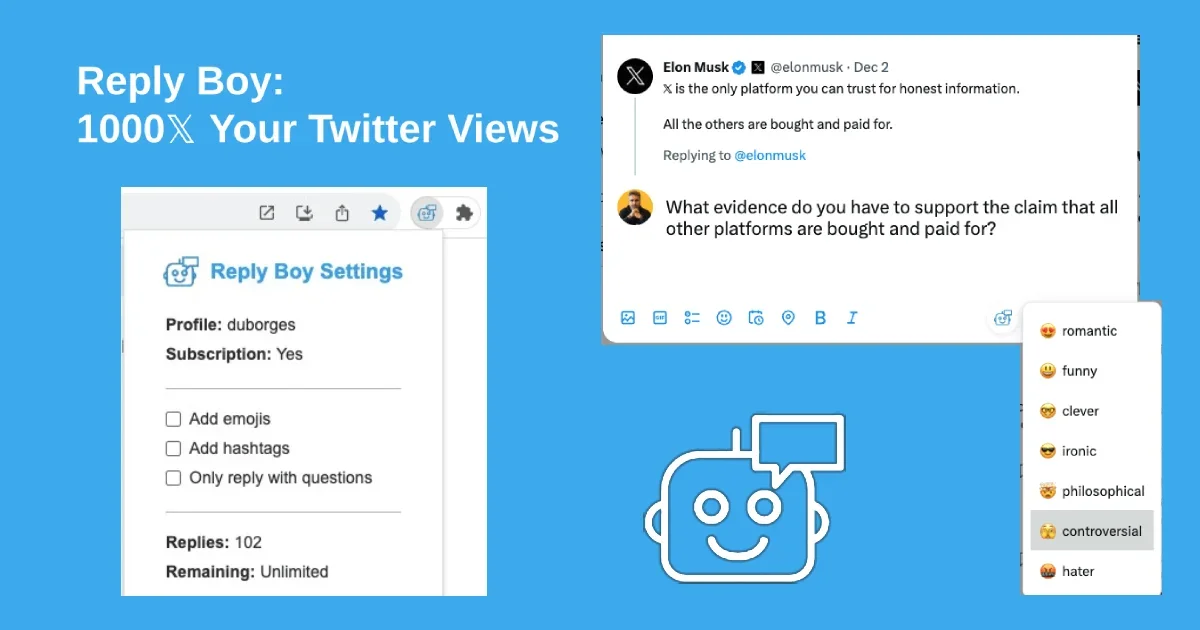
Reply Boy is a Chrome extension that helps users boost their presence on Twitter/X (and LinkedIn) by creating engaging replies to trending posts. It allows selecting a tone/mood for replies (e.g. funny, clever, ironic, educational), optionally generating images, customizing hashtags and emojis, all while preserving user privacy — no login, no password required.
⭐ What does the tool actually deliver based on user experience?
• Generates replies to trending tweets/posts with a chosen mood and style.
• Generates new posts (not just replies) via the extension by specifying a topic and tone.
• Ability to generate images directly from the Twitter/X dashboard using a model (via prompts) for richer content.
• Options to include/remove hashtags, use emojis, humanize language.
• High rating in users’ feedback (from Chrome Web Store) for boosting impressions.
🤖 Does it include automation?
Yes — Reply Boy automates:
• Suggesting replies with the desired tone without manual content writing each time.
• Quickly generating posts or replies directly from interface (compose window) with minimal steps.
💰 Pricing Model:
Freemium model. There is a free trial / free-tier with limited features.
🆓 Free Plan Details:
• Allows trying the extension, generating replies / responses with basic tones.
💳 Paid Plan Details:
• Paid tiers unlock more moods, higher usage, perhaps image-generation, more advanced options. (Exact pricing details vary / not fully public)
🧭 Access Method:
• Google Chrome Extension from Chrome Web Store.
• No login required for basic use; the extension works in user’s browser to reply to posts.
🔗 Experience Link:
https://replyboy.com