Crayo
Crayo is an artificial intelligence (AI) tool that specializes in editing and creating short videos, with a primary focus on turning ordinary or long-form content into videos that can go viral on platforms like TikTok, Instagram Reels, and YouTube Shorts. The tool relies on artificial intelligence to perform cutting, arranging, and adding visual and audio elements, significantly reducing the time and effort required to produce an engaging video without the need for advanced expertise in traditional editing software.
- Video Generation & Editing
- Text and Images to Video
- Video Summaries & Clips
- Social Templates & Auto-Editing
- Automation & Agents
- Video Ideas & Scripting
Last updated
Features
- Turns regular or long-form content into short videos for TikTok, Reels and YouTube Shorts
- Clips videos automatically and selects the right moments
- Creates catchy titles and subtitles automatically
- Adds AI voiceover
- Creates complete videos from an idea or script
- Supports styles like Reddit stories, fake text chats, split-screen and gaming videos
- Optimizes and balances audio quality
- Exports in sizes suited to social media
Pricing Details
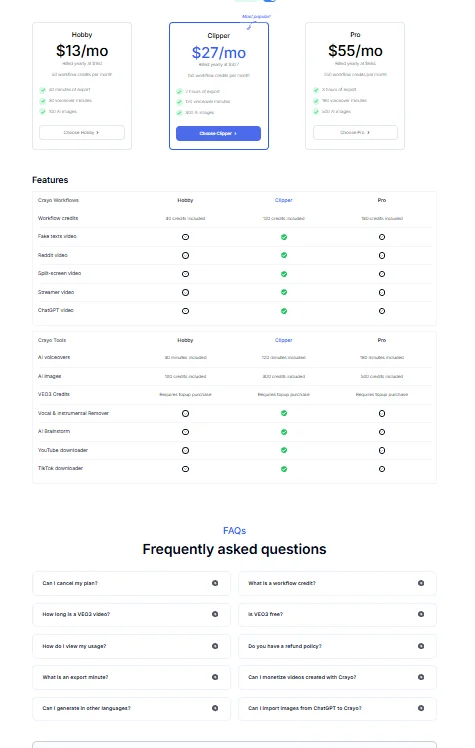
Crayo relies on a fully paid monthly subscription model with no permanent free plan, making it a tool geared more for ongoing use than a quick trial. The platform does not have a fixed free plan, and may sometimes offer a limited trial or a short trial registration to test the tool before subscribing, but this is not always guaranteed. Paid plans start with the Hobby plan at $13 per month, which is suitable for individuals and beginners, and offers limited Workflow credits with basic features for creating short videos. The Clipper plan at $27 per month, geared towards regular content creators, offers more Workflow credits, support for most video types such as Reddit, Split Screen, Streamer, and Gaming, as well as wider use of AI tools such as voiceover and image generation. The Pro plan, at $55 per month, is best suited for professionals and small teams, offering the highest usage limits, full support for all tools and video types, wider export capabilities, and more flexible commercial use.
Related Tips
- A video prompt that gives you the feel of GTA with an Arabic twist · Video Generation & Editing, Text and Images to Video
- 2 million free tokens to create videos! on Seedance · Video Generation & Editing, Text and Images to Video
- How to Create a Series of Educational Videos Using ChatGPT, PixVerse, and Nabat? · Audio & Voice, Text-to-Speech / Speech-to-Text…
- An Explanation of GeminiGen AI for Creating Videos and Images for Children · Video Generation & Editing, Text and Images to Video…
- A brief overview of Vidu and how to create entertaining animated videos · Video Generation & Editing, Text and Images to Video