Aerogram
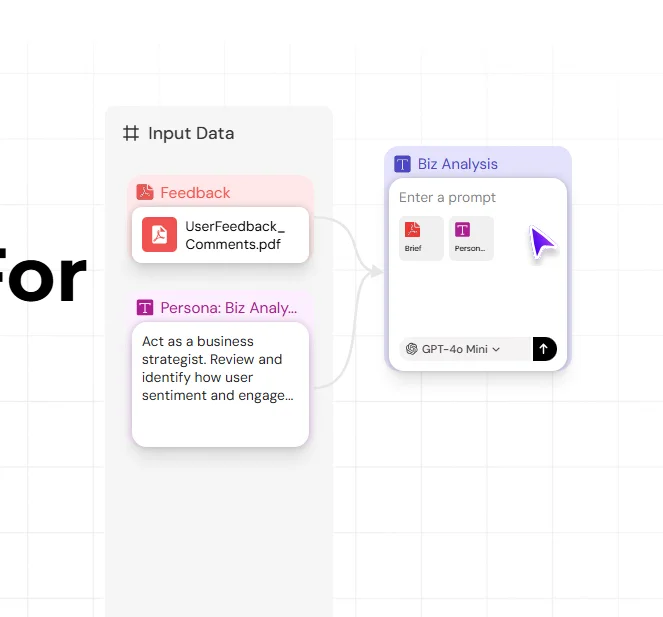
Description
️ 🖼Tool name:
Aerogram
🔖 Tool category:
Automation and smart agents, no-code workflows, study assistants, and smart notes.
️ ✏What does this tool offer?
Aerogram is a revolutionary visual workspace that combines artificial intelligence with interactive canvases. It allows users to build "thought chains" for artificial intelligence by connecting smart cards, where each card can function as a different model, such as Claude for analysis and GPT for summarization. The tool is ideal for turning initial ideas into complete action plans or integrated marketing content at the click of a button, and for organizing complex tasks that require multiple steps.
⭐ What does it actually offer based on user experience?
The user experience is similar to "Figma for AI," allowing you to see the flow of ideas and outputs on a single board.
It allows you to build automated workflows (AI Pipelines) to save time and eliminate the need to copy and paste between tools.
Generate multimedia content that combines text and related images in one place.
It facilitates quick and direct error detection and result development.
🤖 Does it include automation?
Yes, it provides full workflow automation; a series of cards can be set to run automatically once the first request is entered, with the ability to connect outputs to external applications via Webhooks.
💰 Pricing model:
Freemiummodel ,including a free plan with basic features and paid plans that offer expanded capabilities.
🆓 Free Plan Details:
Access to the visual workspace (Unlimited Canvas).
Limited number of active cards per day.
Support for basic models (Standard Models).
Ability to share boards for viewing only.
💳 Paid plan details (2026 update):
Pro Plan (~$20/month): Unlimited card usage, access to Elite models such as GPT-5.1 and Claude 4, and priority processing speed.
Team Plan: Real-time collaboration, shared template library, team role management, and point consumption analytics.
Enterprise: Dedicated technical support, advanced API integration, and data privacy guarantees with no training of models on company data.
🧭 How to access the tool:
A cloud-based web platform that works directly through your browser, with single sign-on support to make it easy to get started and use.
🔗 Trial link or official website:
https://app.aerogram.ai/