AI-Flow
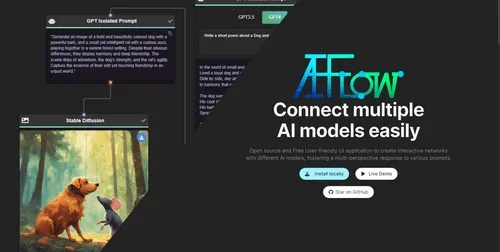
Description
🖼️ Tool Name:
AI-Flow
🔖 Tool Category:
Productivity & Automation — it falls under visual workflow builders that automate tasks using AI models like GPT, DALL·E, and more.
✏️ What does this tool offer?
AI‑Flow is a no-code platform for building and deploying AI-powered workflows using a visual drag-and-drop interface. It allows users to combine different AI models (like GPT-4, Stable Diffusion, Whisper, Claude, and more) with tools and logic blocks to create automated applications, chatbots, content pipelines, image generators, and more — all without writing a single line of code.
⭐ What does the tool actually deliver based on user experience?
• Easily create AI-powered workflows using a drag-and-drop interface
• Combine multiple models from providers like OpenAI, Anthropic, Hugging Face, and Replicate
• Build apps such as AI bots, content generators, or creative tools
• Offers built-in API calls, logic branching, and memory across steps
• Real-time preview and quick deployment to web apps or APIs
• Great for non-developers and technical users alike
🤖 Does it include automation?
Yes — AI-Flow is built entirely around automation:
• Triggers tasks based on inputs or actions (e.g., file upload, message input)
• Connects and sequences multiple AI models automatically
• Enables conditionals, loops, timers, and branching in workflows
• Deploys automated agents or applications in one click
💰 Pricing Model:
Freemium (free tier with usage limits, plus paid upgrades)
🆓 Free Plan Details:
• Includes basic access to visual workflow builder
• Limited runs per month (e.g., ~250 executions)
• Access to core AI integrations (OpenAI, Replicate, etc.)
• No credit card required to start
💳 Paid Plan Details:
• Starting from ~$20/month
• Higher execution limits, priority performance, and more integrations
• Business and enterprise plans available for team collaboration, versioning, and advanced support
🧭 Access Method:
• Web-based — register at https://ai-flow.net
• No installation required
• Option to deploy workflows as public apps or private APIs
• GitHub access available for community and open-source contributions
🔗 Experience Link: