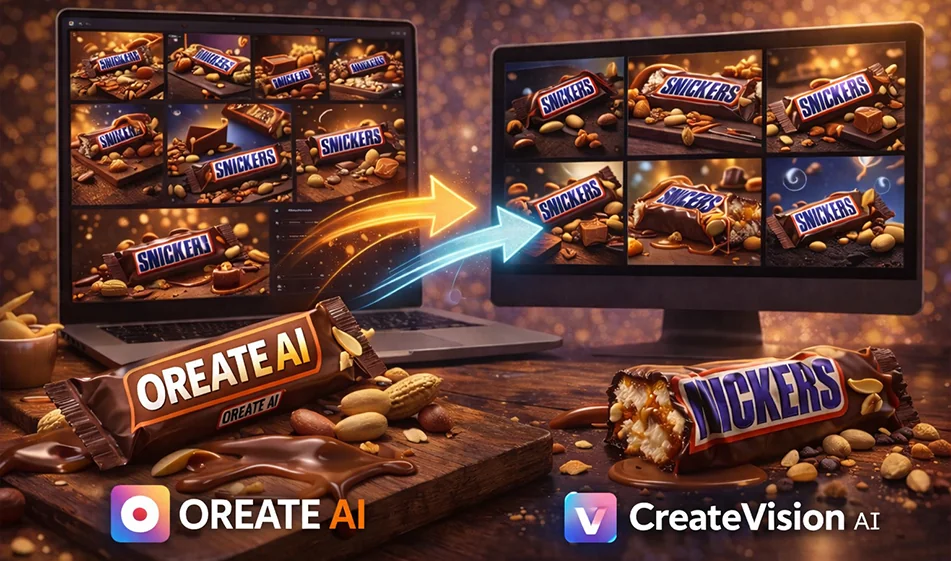
If you want ad images ready for publication from a single product photo, these two websites offer the same basic concept: you write a description or upload an image, then receive designs with different backgrounds, lighting, and angles. But the real difference lies in three areas: the consistency of the product’s appearance, the cleanliness of the design, and the accuracy of the text within the image—especially Arabic text.
Links to the two websites
OreateAI
CreateVision
https://createvision.ai/?auth=success
1) What do we actually want to measure in advertising images?
Before we compare, here are the criteria that matter more to marketing thanjustthe “aestheticsof the image”:
- Consistency of the product’s appearance
Are the packaging, label, and logo intact without distortion? - Realism of lighting and shadows
Does the product look like it was shot in a real studio or“pasted” onto a background - Cleanliness of the background
Does the background complement the product or distract the viewer with too many elements? - Advertising Text Placement
Is there sufficient visual space to include the price and offer? - Accuracy of Arabic text within the image
Are the letters connected and properly aligned, or are there errors? - Speed and number of copies
How many good copies can you extract from each attempt
2) The practical difference between the two tools in an understandable way
Instead of making general judgments, this is a realistic comparison method to help you choose the best tool for you
OreateAI
- Usually suitable if you want quick, social-media-ready vertical designs
- Good when you need a clean ad template with space for text
- May be easier at first for those who want a simple, straightforward interface
CreateVision
- Usually suitable if you want more variety in terms of style and setting
- Good when you want to experiment with different visual styles for the same product
- Useful for creating multiple versions and then choosing the best one for the campaign
Note from
: These differences are more apparent in practical testing than in theoretical descriptions, as results vary depending on the product type, the original image, and how the description is written
3) The Al-Adil Compass Test: Find the Best Option in 10 Minutes
Run the same experiment on both tools, then choose the winner without guessing
Standard Settings
- Use the same product image
- Use the same dimensions:
(9:16 vertical for Reels and Stories)
or 4:5 for posts - Order only three versions
The three required copies
- Clean white studio copy
- Luxury dark version
- Simple usage scene version
Evaluation list
- Sticker and logo stability
- Quality of Shadows and Reflections
- Uncluttered background
- Space for text
- Minimal distortion and minimal visual noise
The tool that gives you two successful versions out of three is the best choice for your ads
4) The best approach for creating a professional ad the first time
These steps will make your result closer to an ad agency design
Step 1
Start with an ad image that has no text in it
to ensure a clean background and a stable product
Step 2
After selecting the best image, add Arabic text later in Canva or any design editor
because Arabic text within image generators can sometimes result in errors in letter spacing
Step 3
Create a campaign package
with only3 images for the same product:
(light),
(dark), and
(use).
Then publish them as a series instead of posting ten different images
5) Ready-made prompts for ad images
Copy the following texts as is, and change only the product name
Clean Studio Ad Prompt
Realistic ad image for Product Name, clean white studio background, soft lighting, realistic shadows, high detail, product centered, empty space for text later, no text inside the image, no watermarks, no distortion of the label or logo
DarkLuxury Ad PromptA luxurious ad image for Product Name, featuring an elegant dark background, soft cinematic lighting, a slight reflection on the product, realistic shadows, the product clearly in the foreground, empty space for text to be added later, no text within the image, no distortion of the label or logo
SimpleUsage Scene Prompt: An advertisement image for Product Name in a simple, realistic usage scene appropriate for the product type, with soft natural lighting, an uncluttered background, the product as the main element, high detail, empty space for text to be added later, no text within the image, and no distortion
6) If you insist on including Arabic text within the image
use this rule to minimize errors
- Keep the text very short, from two to five words
- Request a clear Arabic font and right-to-left alignment
- Request that letters not be separated
- Place the text above or below the image
Example of suitable short text:
Today only
Combo offer
New
7) A quick decision to help you choose
Choose OreateAI if your goal is
Quick ready-made templates and vertical social media sizes with minimal complexity
Choose CreateVision if your goal is
more variety in style and environments to select the best shot for your campaign
’sbottom line: Don’t let tool selection be an emotional decision
Test 3 standardized versions on both tools
Then adopt the tool that gives you the best product consistency and the best text space
For more AI tools: bosala.ai