️ 🖼Tool name:
CTRL Sheet alpha
🔖 Tool category:
• Data and analytics
• Automation and smart agents
• Productivity and scheduling
• DevOps, CI/CD, and monitoring
• Smart interior design
️ ✏What does this tool offer?
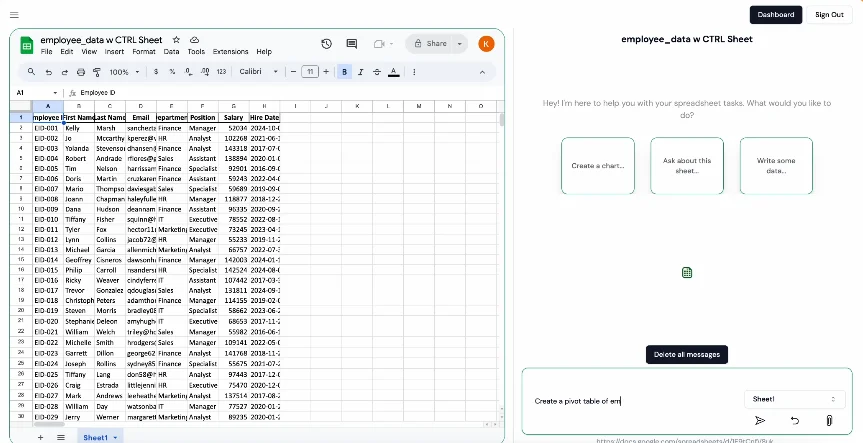
CTRL Sheet alpha is an AI platform that acts as a workmate within spreadsheets such as Google Sheets and Excel, allowing users to give direct text commands to analyze data, create formulas, build models, and easily create Pivot Tables without the need to write code. It focuses on speeding up analysis, reducing manual effort, and improving productivity through a direct conversational interface within spreadsheets.
⭐ What does it actually offer based on user experience?
Execute natural language commands directly within the table
Quickly build pivot tables and sort data
Link multiple sheets and analyze data across them
Simplify processes for non-programmers
A seamless experience to speed up work in Google Sheets and Excel
🤖 Does it include automation?
Yes ✅
Natural language commands for data analysis
Automatically create pivot tables, formulas, and linked tables
Manage and analyze multiple spreadsheets simultaneously
💰 Pricing model:
🆓 Free plan details:
Price: $0 per month
Manual mode for building models
Data Extraction mode for attached files
Up to 1 conversation per day
Try button: Try
💳 Paid plan details:
🔹 Pro Plan
Price: $19.99 per month
All Free features
Privacy Mode
Cross-sheet functionality (linking multiple sheets)
More usage
Up to 25 conversations
Subscribe button: Subscribe
🔹 Enterprise Plan
Price: Custom
All Pro features
Full hands-on support
Custom usage and Custom Excel functions
Contact button: Contact Us
🧭 How to access the tool:
Access via browser
Direct experience through Google Sheets/Excel
Enter text commands within the interface to obtain automated results
🔗 Link to the experience or official website:
https://www.ctrlsheet.ai/