Description
️ Tool Name: 🖼
StockCake
Categories: 🔖
Image Generation from Text
Image Design and Creation
Removing and Replacing Elements and Backgrounds
Edit/Enhance/Upsample
️ What does this tool offer? ✏
StockCake is an AI-powered image generation platform that allows users to write a natural language description or upload an image to instantly create and enhance images without having to start from scratch. It offers over 20 million generated images, available for both personal and commercial use, and creates images in various artistic styles, including realistic photos, illustrations, paintings, and more. It also supports the creation of high-resolution images up to 8192×8192 pixels and generates images in seconds using optimized AI models. The image generation process begins by writing a detailed description of the desired image; the AI then interprets the description and creates a unique, high-quality image, which can then be downloaded and used in projects. The platform enables the creation of concept art, illustrations, character designs, and unique works of art, as well as creating custom images for social media, blog posts, ads, and presentations that align with your brand identity, in addition to creating illustrations for books, video thumbnails, and visual content for various creative projects. It also provides an AI-powered image editor that works directly in the browser, allowing users to open an image from the StockCake library or upload their own, then resize it, apply effects, convert it to video, remove the background, and enhance its quality up to 8K, using more than 10 AI tools. The platform also supports video and music generation, video upscaling, video extension, reframing, and editing, as well as SVG creation, converting images to vector graphics, and creating 3D models. It also offers commercial use of generated images, subscription plans, licensing, an MCP server, an FAQ section, and a “Contact Us” page, in addition to a Privacy Policy and Terms of Use, and features more than 500,000 content creators.
What does it actually offer based on user experience? ⭐
The information provided does not include direct user ratings or reviews that can be relied upon to determine their experience or satisfaction with the platform. Based on the features mentioned, StockCake allows users to create and edit images, enhance their quality, remove backgrounds, apply effects, and convert images to video, as well as generate videos and music, create SVGs and 3D models, with the ability to use the generated images for both personal and commercial purposes.
Does it include automation? 🤖
Yes, StockCake relies on artificial intelligence to automate the creation of images from text descriptions, interpret those descriptions and convert them into images, create visuals in various styles, edit images, remove backgrounds, apply effects, recreate images, resize them, and expand them, It also offers video and music generation, video quality enhancement, and the creation of SVGs and 3D models using AI models.
Pricing Model: 💰
Pay-as-you-go / Monthly subscription / One-time Credit bundles / Free trial, with a 50% discount on the first month for new customers. The paid plan starts at $4.99 per month, with the option to cancel at any time. Paid plans provide monthly credits, access to all AI models, and unlimited downloads within each plan’s resolution limits. Standard and Pro subscribers can also purchase additional credit bundles that never expire.
🆓 Free Plan Details:
| Plan | Price | Details |
|---|---|---|
| Free | $0 per month | No credit card required; you get 125 Credits every 30 days, with the ability to generate up to 25 images and download Small and Medium-sized images for free, while downloading Original-sized images requires a certain number of Credits. Includes 4 free image models: Nano Banana 2 Lite, p-image, Z-Image Turbo, and Grok Imagine Image 2, as well as all AI image editing tools, video generation, video upscaling to 4K, music generation, the ability to run two generation processes simultaneously, reference images, and SVG, 3D, and WAV formats—all within the plan’s limits. Video and music generation are not available on the free plan, while all AI editing tools and commercial licensing are available. |
Paid plan details: 💳
| Plan | Price | Monthly Credits | Key Details |
|---|---|---|---|
| Standard | $4.99 for the first month instead of $9.99 | 500 | Unlimited downloads up to 2K resolution, creation of up to 100 images, 20 videos, and 50 music tracks; all image, video, and music templates; all AI-powered image editing tools; video generation tools; video upscaling to 4K; music generation, running 4 generation processes simultaneously, using up to 3 reference images, SVG, 3D, and WAV formats, purchasing additional Credits packages with no expiration date, plus a commercial license. The price is $9.99 per month after the first month. |
| Pro | $12.49 for the first month instead of $24.99 | 2,500 | Unlimited downloads up to 8K resolution; create up to 500 images, 100 videos, and 250 music tracks; all image, video, and music templates, all AI-powered image editing tools, video generation tools, video upscaling to 4K, music generation, running 10 generation processes simultaneously, using up to 9 reference images, SVG, 3D, and WAV formats, purchasing additional Credits packages with no expiration date, and a commercial license. The price is $24.99 per month after the first month. |
Additional Credit Packages for Standard and Pro Subscribers:
| Package | Price | Credits | Price per Credit |
|---|---|---|---|
| 500 Credits | $4.99 | 500 without Bonus | 1.00¢ |
| 1,500 Credits | $13.99 | 1,400 + 100 Bonus | 0.93¢ |
| 3,000 Credits | $26.99 | 2,700 + 300 Bonus | 0.90¢ |
| 6,000 Credits | $51.99 | 5,200 + 800 Bonus | 0.87¢ |
| 9,000 Credits | $74.99 | 7,500 + 1,500 Bonus | 0.83¢ |
Credits from packages are added immediately, can be used for all tools, never expire, and are consumed on any template as long as the plan is active.
Image Generation Cost:
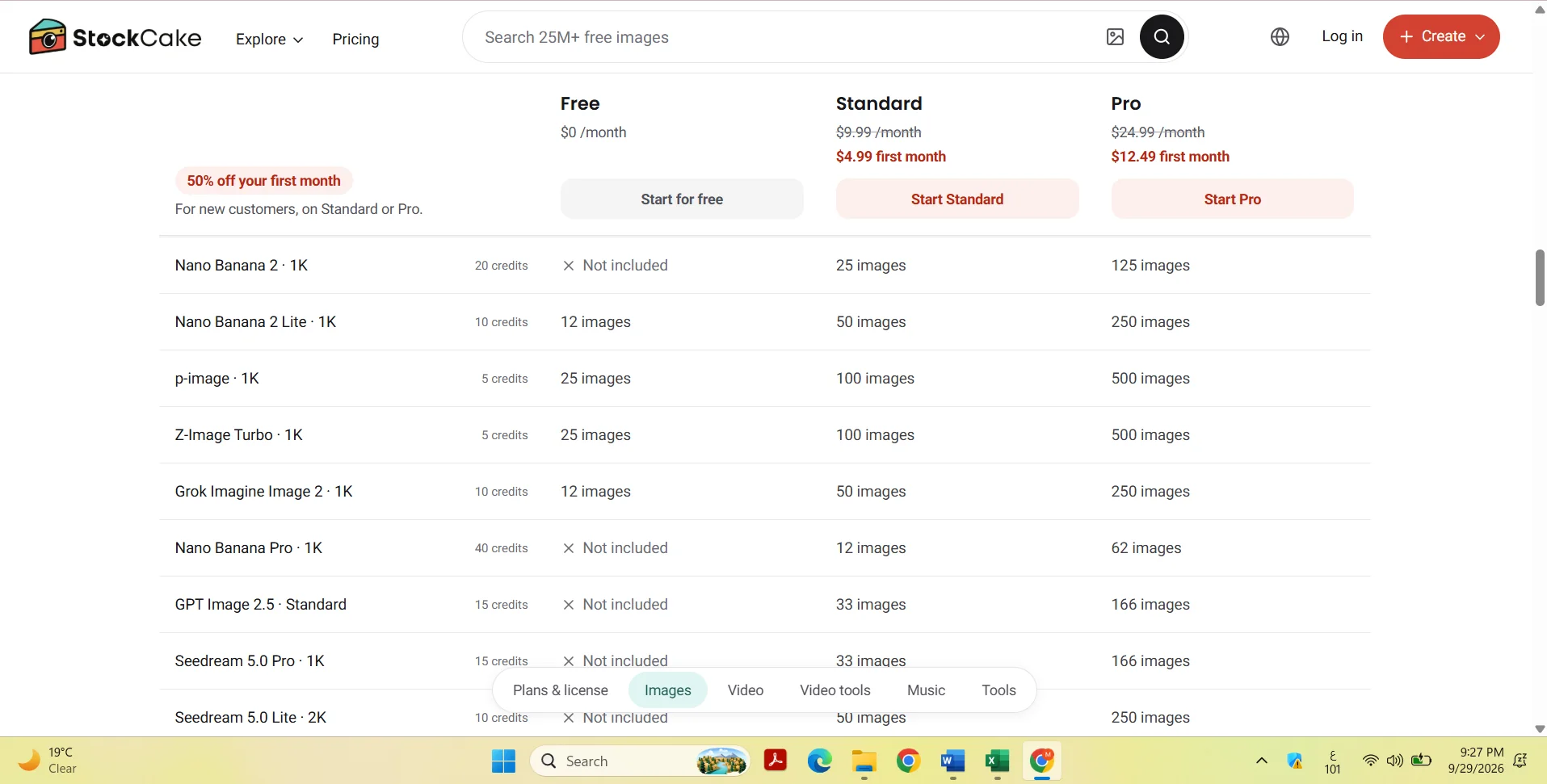
| Template | Resolution | Cost | Limit in Free | Limit in Standard | Limit in Pro |
|---|---|---|---|---|---|
| Nano Banana 2 | 1K | 20 Credits | Not available | 25 photos | 125 images |
| Nano Banana 2 Lite | 1K | 10 Credits | 12 photos | 50 photos | 250 images |
| p-image | 1K | 5 Credits | 25 images | 100 photos | 500 images |
| Z-Image Turbo | 1K | 5 Credits | 25 photos | 100 photos | 500 images |
| Grok Imagine Image 2 | 1K | 10 Credits | 12 images | 50 images | 250 images |
| Nano Banana Pro | 1K | 40 Credits | Not available | 12 photos | 62 images |
| GPT Image 2.5 | Standard | 15 Credits | Not available | 33 images | 166 images |
| Seedream 5.0 Pro | 1K | 15 Credits | Not available | 33 photos | 166 images |
| Seedream 5.0 Lite | 2K | 10 Credits | Not available | 50 images | 250 images |
| FLUX.2 [max] | 1K | 20 Credits | Not available | 25 images | 125 images |
| FLUX.2 [pro] | 1K | 10 Credits | Not available | 50 images | 250 images |
| FLUX.2 [flex] | 1K | 15 Credits | Not available | 33 images | 166 images |
| FLUX 1.1 Pro Ultra | 2K | 15 Credits | Not available | 33 images | 166 images |
| Ideogram 3.0 Quality | Standard | 25 Credits | Not available | 20 images | 100 images |
| Image 4 | Standard | 10 Credits | Not available | 50 images | 250 images |
| Recraft V4.1 | Standard | 10 Credits | Not available | 50 images | 250 images |
| Qwen Image 3 Pro | 1K | 10 Credits | Not available | 50 images | 250 images |
Video Generation Cost:
| Template | Resolution and Duration | Cost | Standard | Pro |
|---|---|---|---|---|
| Veo 3.1 Fast | 720p / 8 seconds | 120 Credits | 4 | 20 |
| Veo 3.1 | 720p / 8 seconds | 240 Credits | 2 | 10 |
| Veo 3.1 Lite | 720p / 8 seconds | 64 Credits | 7 | 39 |
| Kling 3.0 | Standard / 5 seconds | 130 Credits | 3 | 19 |
| Seedance 2.0 | 720p / 5 seconds | 135 Credits | 3 | 18 |
| Seedance 2.0 Mini | 720p / 5 seconds | 70 Credits | 7 | 35 |
| Runway Gen-4.5 | 720p / 5 seconds | 90 Credits | 5 | 27 |
| Hailuo 2.3 | 768p / 6 seconds | 54 Credits | 9 | 46 |
| p-video-2 | 720p / 5 seconds | 25 Credits | 20 | 100 |
| p-video-2 Pro Speed | 5 seconds | 30 Credits | 16 | 83 |
| Wan 3 | 720p / 5 seconds | 40 Credits | 12 | 62 |
| Grok Imagine Video | 720p / 5 seconds | 40 Credits | 12 | 62 |
Video and Editing Tools:
| Tool | Cost | Standard | Pro |
|---|---|---|---|
| Upscale video to 1080p / 5 seconds | 10 Credits | 50 | 250 |
| Upscale video to 2K / 5 seconds | 15 Credits | 33 | 166 |
| Upscale video to 4K / 5 seconds | 25 Credits | Not available | 100 |
| Extend video by 6 s | 84 Credits | 5 | 29 |
| Reframe video / 5 seconds | 85 Credits | 5 | 29 |
| Edit video using p-video-edit / 5 seconds | 35 Credits | 14 | 71 |
| Edit video using Wan 2.7 / 5 seconds | 75 Credits | 6 | 33 |
| Edit video using Seedance 2.0 Mini / 5 seconds | 85 Credits | 5 | 29 |
The Standard and Pro plans allow users to edit, extend, or reframe their MP4 files.
Music Generation:
| Plan | Duration/Cost | Standard | Pro |
|---|---|---|---|
| ElevenLabs Music | 10 seconds / 20 Credits | 25 clips | 125 tracks |
| MiniMax Music 2.6 | 25 credits per track | 20 tracks | 100 tracks |
| Lyria 3 | 10 credits per track | 50 clips | 250 clips |
| Lyria 3 Pro | 15 credits per track | 33 clips | 166 clips |
Advanced photo editing and creation tools:
| Tool | Cost | Free | Standard | Pro |
|---|---|---|---|---|
| Remove Background | 5 Credits | 25 | 100 | 500 |
| Magic Eraser | 10 Credits | 12 | 50 | 250 |
| Recreate Image | 15 Credits | 8 | 33 | 166 |
| Apply Effects | 15 Credits | 8 | 33 | 166 |
| AI Resize | 15 Credits | 8 | 33 | 166 |
| Zoom Out | 15 Credits | 8 | 33 | 166 |
| Move | 15 Credits | 8 | 33 | 166 |
| Create SVG (Speed) | 25 Credits | Not available | Not available | 100 SVG |
| Create SVG (Quality) | 65 Credits | Not available | Not available | 38 SVG |
| Vectorize Image | 25 Credits | Not available | Not available | 100 SVG |
| Create 3D Model | 125 Credits | Not available | Not available | 20 3D Models |
A comparison of the plans shows that the monthly credit allowance is 125 credits every 30 days on the Free plan, 500 on the Standard plan, and 2,500 on the Pro plan. The free plan offers Small and Medium downloads for free, while Original downloads cost a certain number of credits; the Standard plan offers unlimited downloads up to 2K, and the Pro plan offers unlimited downloads up to 8K. Video upscaling is available up to 2K on the Standard plan and up to 4K on the Pro plan, while the free plan includes the Nano Banana 2 Lite, p-image, Z-Image Turbo, and Grok Imagine Image 2 models; the Standard and Pro plans include all models. Video and music generation are not available on the free plan but are included in the Standard and Pro plans. The free plan supports up to 2 simultaneous generation processes, Standard supports up to 4, and Pro supports up to 10. The free plan supports up to 3 reference images, while Standard supports up to 9 and Pro supports up to 10. SVG generation, 3D model generation, and downloading music in uncompressed WAV format are available in the Pro plan, while all AI editing tools and commercial licensing are available across all three plans.
How to Access the Tool: 🧭
StockCake is accessible via a web browser, where users can type a text description to generate an image or upload their own image to edit and enhance it. Users can also use tools for generating images, videos, and music; editing images; enhancing video quality; and creating SVGs and 3D models directly from the platform. Users can also subscribe to the Standard or Pro plans and purchase additional one-time credit packs, with the option to cancel their subscription at any time.
Try it out or visit the official website: 🔗
https://stockcake.com/premium/upgrade